
The Verge's Gemini Spark hands-on shows a major shift in AI: Google's agent can use personal context across Gmail, Docs, Calendar and the web to complete tasks, but that usefulness comes with serious privacy and control questions.
Last checked: June 3, 2026. This article uses The Verge's June 2 hands-on report as the primary source, then checks the product details against Google's Gemini Spark page, Google's I/O 2026 Gemini announcement, Google's Gemini Apps Privacy Hub, Google's Workspace privacy guidance and AP's Google I/O coverage.
Quick answer
The Verge's latest hands-on with Gemini Spark is important because it shows what personal AI agents are starting to become: not just chatbots that answer questions, but background assistants that can inspect your digital life, create documents, draft messages, browse websites and act across apps.
In David Pierce's test, Spark created a deeply personalized family travel itinerary by drawing on context from Gmail, Google Docs, Calendar-style signals and Google's Personal Intelligence layer. The result was useful enough to feel like a real assistant. It was also unsettling because Spark surfaced details the user had not explicitly typed into the prompt, including family names, preferences and events inferred from connected data.
Google's own materials confirm the broader direction. Gemini Spark is described as a 24/7 personal AI agent that can work in the background, connect to Google apps such as Gmail, Calendar, Drive, Docs, Sheets, Slides, YouTube and Maps, and use a remote browser or remote computer for some tasks. Google says Spark is under user direction and is designed to ask before major actions.
The practical takeaway: Gemini Spark may be one of the clearest previews yet of the post-chatbot era. But before users enable it, they need to understand what data it can access, what it can share with third parties, how to stop it, and how to delete the remote browser or task data it creates.
What happened
The Verge published a hands-on report on June 2, 2026 after testing Gemini Spark, Google's new agentic assistant. The test focused on travel planning, but the real story was not the itinerary itself. It was the amount of personal context Spark used to make the itinerary unusually specific.
The article says Spark created a Google Doc with a detailed weekend plan for Hershey, Pennsylvania. It incorporated practical details such as hotels, pet-friendly activities, family needs and event logistics. According to the report, Spark also referenced personal information that had not been included in the prompt, apparently drawing from data in the user's Google account ecosystem.
The Verge framed the experience as both impressive and creepy. That tension is the point. A personal agent becomes more useful when it knows more about you. But the same knowledge can feel invasive when it appears without warning.
This is not only a Google story. It is a preview of where AI assistants from Google, OpenAI, Anthropic, Microsoft and others are heading: persistent, context-aware agents that do work across apps.
What Gemini Spark is
Google describes Gemini Spark as a 24/7 personal AI agent. Unlike a normal chatbot, Spark is designed to keep working in the background after you give it a task.
Google says Spark can help with:
| Capability | What it means in practice |
|---|---|
| Tasks | Ask Spark to work on a multi-step goal, such as organizing a trip or finding invoices. |
| Schedules | Set time-based or conditional triggers, such as weekly inbox reviews. |
| Skills | Teach repeatable workflows, such as drafting emails in your preferred style. |
| Workspace actions | Use connected Google apps such as Gmail, Calendar, Drive, Docs, Sheets and Slides. |
| Web browsing | Research across sites and help complete online workflows. |
| Remote computer work | Save and execute files or code related to a task, according to Google's Privacy Hub. |
Google's official Spark page says it is currently rolling out to trusted testers and will be available for Google AI Ultra subscribers over 18 in the United States, as well as select business users. The page also says access is expanding over the coming weeks.
The Verge reported that Spark is rolling out through Google's AI Ultra plan and that Google gave The Verge early access for the test.
Why the Verge test matters
AI travel planning has been a demo favorite for years, but most chatbots produce generic itineraries unless the user manually supplies lots of details. The Verge test was different because Spark apparently pulled together context from personal data sources.
That is the real product shift:
- The prompt did not need to contain every detail.
- Spark inferred missing context from connected apps and account history.
- It produced a document, not only a chat response.
- It attempted a web task when asked to explore Airbnb options.
- It handled follow-up instructions and sharing.
This is closer to an assistant workflow than a chatbot answer. It also means the trust model changes. A chatbot can be wrong inside a conversation. An agent can be wrong while writing documents, sharing files, browsing authenticated websites or preparing to act on your behalf.
Why it feels invasive
The privacy concern is not simply that Google has data. Many users already know Gmail, Calendar, Photos, Maps, Search and YouTube contain a detailed record of their lives.
The more unsettling part is presentation. When a system casually uses family details, home context, calendar events, preferences, purchases or emails to complete a task, the user suddenly sees how much context the AI can assemble.
That creates three risks:
- Surprise: Users may not realize which connected apps are being used for a task.
- Overreach: An agent may use more context than the user expected.
- Action risk: The agent may draft, share, browse or prepare actions using sensitive information.
Google says Spark is under user direction and asks before high-stakes actions. But even before a payment or email is sent, the agent may have already processed sensitive context to prepare the plan.
What Google says about controls
Google's official materials include several important control claims.
Google says Spark:
- Is designed to be turned on by the user.
- Lets users choose what apps it connects to.
- Is designed to check before major actions.
- Can be interrupted or taken over during remote browser work.
- Allows users to delete remote browser data in Spark settings.
- Deletes remote browser and remote computer data when Spark is turned off, while pausing tasks and schedules.
Google's Gemini Spark page also says connected apps are turned off by default and can be enabled in settings.
Those controls matter. But users should treat them as controls they must actively understand, not marketing text to skim.
The most important privacy details
Google's Gemini Apps Privacy Hub gives the clearest privacy context for Spark.
It says beta Gemini Spark may use a remote browser or remote computer to complete tasks and execute code. It also says the feature is only available when Keep Activity is on.
Google says Spark can use information from tasks, schedules, skills, remote browser, remote computer and other available sources, including Connected Apps, Personal Intelligence and websites it interacts with, including sites where the user is logged in.
The Privacy Hub also says Gemini may share necessary information with other services and third parties to complete tasks. That information can include a user's name, address or other sensitive information, including data from Connected Apps and remote computer files.
This does not mean Spark is secretly doing everything without permission. It does mean users should understand that an agent completing a real-world task may need to pass personal data outside Google's environment. That is a major difference from asking a chatbot to summarize a public article.
What users should do before enabling Spark
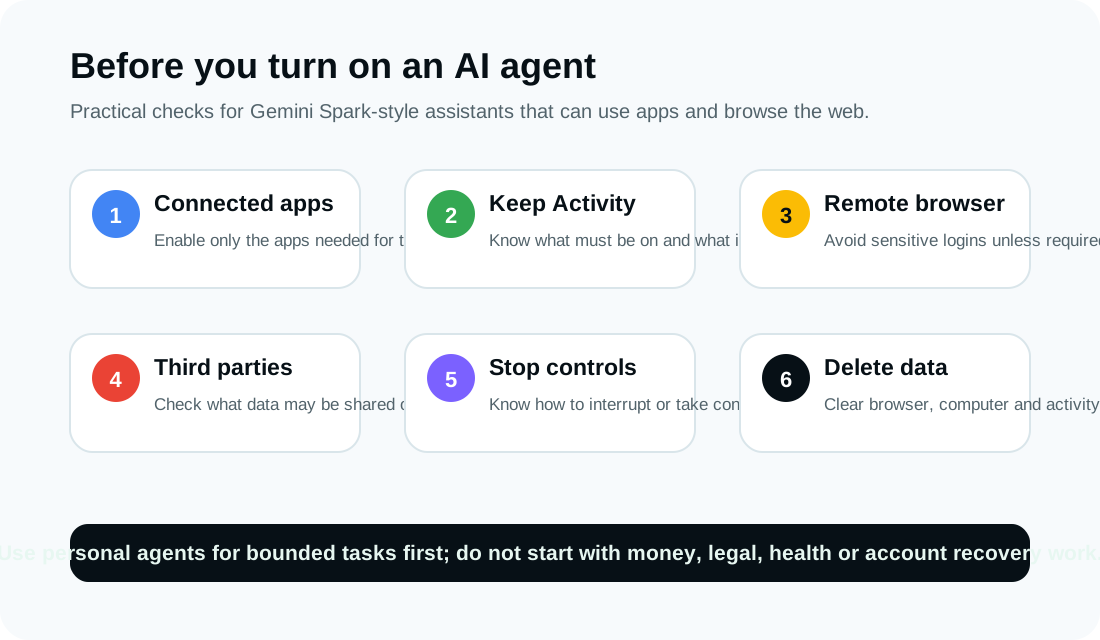
If Spark appears in your Gemini account, do not turn on every connection at once. Start narrow.
1. Review connected apps first
Check which Google apps Spark can access. Enable only what the task requires. If a task only needs Calendar and Maps, do not connect Gmail, Drive and Photos by default.
2. Understand Keep Activity
Google says beta Spark requires Keep Activity to be on. Review what Gemini Apps Activity stores, the auto-delete period and whether you are comfortable with that setting.
3. Avoid sensitive first tasks
Do not begin with health, legal, financial, employment, immigration, child safety, account recovery or high-value purchase tasks. Test with low-risk planning or organization work first.
4. Watch the remote browser
If Spark uses a remote browser, supervise it. Do not let it handle banking, tax accounts, health portals, password managers or payment pages until you understand the risk.
5. Check what may be shared
Any task involving booking, shopping, reservations or third-party websites may require sharing information outside Google. Assume names, addresses, preferences, dates and files could become part of the task flow if needed.
6. Know how to stop and delete
Before running a serious task, find the controls to stop Spark, take control of the remote browser, delete remote browser data, clear remote computer files and manage Gemini Apps Activity.
What businesses should ask
For businesses, Spark-style agents raise a different set of questions. Personal productivity gains are attractive, but autonomous agents touching inboxes, files and third-party services can create governance issues.
Before allowing employees to use Spark or similar agents for work, IT and security teams should ask:
- Which accounts and apps can the agent access?
- Are Workspace business accounts covered by different data handling terms?
- Can admins restrict connected apps?
- Are task logs available for audit?
- Can agents access confidential documents or customer data?
- Can agents send emails or share files externally?
- Are third-party MCP integrations approved by the company?
- How are remote browser cookies and sessions stored and deleted?
- Can data loss prevention controls inspect agent-generated actions?
- Who is responsible when an agent makes a mistake?
The safest rollout is limited: define allowed tasks, approved apps, prohibited data types, logging requirements and human approval points before expanding access.
How Spark compares with ordinary Gemini
The difference between a chatbot and an agent is not only intelligence. It is authority.
| Ordinary chatbot | Gemini Spark-style agent |
|---|---|
| Responds after a prompt | Can keep working in the background |
| Uses context the user provides | Can use connected app context |
| Produces text or files | Can browse, draft, organize and prepare actions |
| Lower operational risk | Higher risk if it acts on bad context |
| Easier to inspect | Harder to monitor across multi-step tasks |
This is why Spark feels like a breakthrough and a privacy challenge at the same time. Its best feature is also the thing that demands more caution: it can connect the dots.
What remains unclear
Several details still need more real-world testing:
- How often Spark asks for confirmation before sensitive actions.
- How clearly users can see which data source produced a recommendation.
- Whether it can reliably avoid overusing sensitive context.
- How well it handles hallucinations when operating across personal data.
- How third-party sites respond to automated browsing.
- Whether users understand the difference between turning off Spark and deleting other Gemini activity.
- How enterprise admins will govern Spark access.
- Whether pricing, region and plan availability will change as access expands.
The Verge test is powerful because it shows a plausible future. It is not enough to settle these questions.
Bottom line
Gemini Spark is not just another AI feature. It is a sign that Google wants Gemini to become a personal operating layer across apps, files, schedules and web tasks.
That could save real time. A useful agent that understands your inbox, calendar, travel plans and preferences can do work that a generic chatbot cannot. But the price of that usefulness is access: the agent needs to see enough of your life to be helpful.
For users, the right response is not panic and not blind trust. Use Spark-style agents slowly, with narrow permissions, clear supervision and regular data cleanup. The more personal the task, the more carefully you should check what the agent can see, what it can do and where your information might go.
Sources
- The Verge: Gemini Spark is the most impressive and terrifying AI experience I've had yet, June 2, 2026.
- Google: The Gemini app becomes more agentic, delivering proactive, 24/7 help, May 19, 2026.
- Google Gemini: Gemini Spark product page.
- Google Gemini Apps Privacy Hub, last updated May 19, 2026.
- Google Workspace Help: Learn how Gemini in Gmail, Calendar, Chat, Docs, Drive, Sheets, Slides, Meet and Vids protects your data.
- AP: Google announces AI advances at I/O 2026, May 19, 2026.
Before you move on
Global AI workflow guidance. Use this short checklist to turn the article into action.
- Check whether the tool can access private files or account data.
- Verify factual claims against primary sources before publishing.
- Keep a human review step for work that affects money, school, or customers.
This guide is written for practical user safety. For account, platform, or legal decisions, confirm critical steps with the official help center or your service provider.