Google has introduced Gemma 4 12B, a unified open-weight multimodal model that handles text, images and native audio input without separate encoders. Here is what developers and businesses need to know.
Last checked: June 4, 2026. This article uses Google's June 3, 2026 launch post as the primary source, with technical details checked against the Google Developers Blog companion guide, the Google AI for Developers Gemma 4 model card, the Gemma license and Google's prohibited-use and intended-use pages. Benchmarks cited below are Google's published benchmark results and should be treated as vendor-reported until independently reproduced.
Quick answer
Google introduced Gemma 4 12B on June 3, 2026 as a mid-sized open-weight model for local multimodal AI. It sits between Google's smaller edge-focused Gemma 4 models and its larger 26B Mixture-of-Experts model.
The headline feature is the architecture: Gemma 4 12B is unified and encoder-free. Google says text, image and audio inputs flow into a single decoder-only transformer backbone instead of passing through separate vision and audio encoders first.
That matters because separate encoders can add latency, memory overhead and extra tuning complexity. Google's pitch is that Gemma 4 12B can bring stronger agentic reasoning and multimodal understanding to everyday developer hardware, including laptops with 16GB of VRAM or unified memory.
The model is available as pre-trained and instruction-tuned open-weight checkpoints through Hugging Face and Kaggle, with ecosystem support across tools such as LM Studio, Ollama, Google AI Edge Gallery, LiteRT-LM, llama.cpp, MLX, SGLang, vLLM, Hugging Face Transformers and Unsloth.
The practical takeaway: Gemma 4 12B is not just another parameter-size variant. It is Google's attempt to make local multimodal agents more practical by reducing the separate-model plumbing usually needed for images and audio.
What Google announced
Google's launch post says Gemma 4 12B is designed to bring "agentic multimodal intelligence" directly to laptops. The model adds native audio input to a medium-sized Gemma model for the first time and is designed to run locally in consumer and developer environments.
The release has five major points:
| Point | What Google says |
|---|---|
| Model size | 11.95B parameters in the 12B Unified model, according to the model card. |
| Architecture | Dense, decoder-only and encoder-free for multimodal input. |
| Modalities | Text, image and audio input, with text output. |
| Context window | Up to 256K tokens for medium Gemma 4 models, including 12B. |
| Local target | Laptops with 16GB of VRAM or unified memory. |
| License/access | Open weights with an Apache 2.0 license, plus Google policy terms. |
Google also says the broader Gemma 4 model family has crossed 150 million downloads, a sign that the company is leaning heavily on developer adoption outside the closed Gemini product line.
Why encoder-free matters
Most multimodal models do not feed raw images or audio directly into the main language model. They often use separate encoders first:
- A vision encoder turns images into representations the language model can use.
- An audio encoder turns sound into representations the language model can use.
- The LLM then receives those encoded representations alongside text tokens.
That approach works, but it adds complexity. Each encoder has its own parameters, memory footprint, latency and tuning behavior.
Google says Gemma 4 12B removes that split. In the developer guide, Google describes Gemma 4 12B as using the same advanced decoder structure as the Gemma 4 31B Dense model, while replacing the usual multimodal encoders with lighter projection mechanisms.
The result is a simpler pipeline:
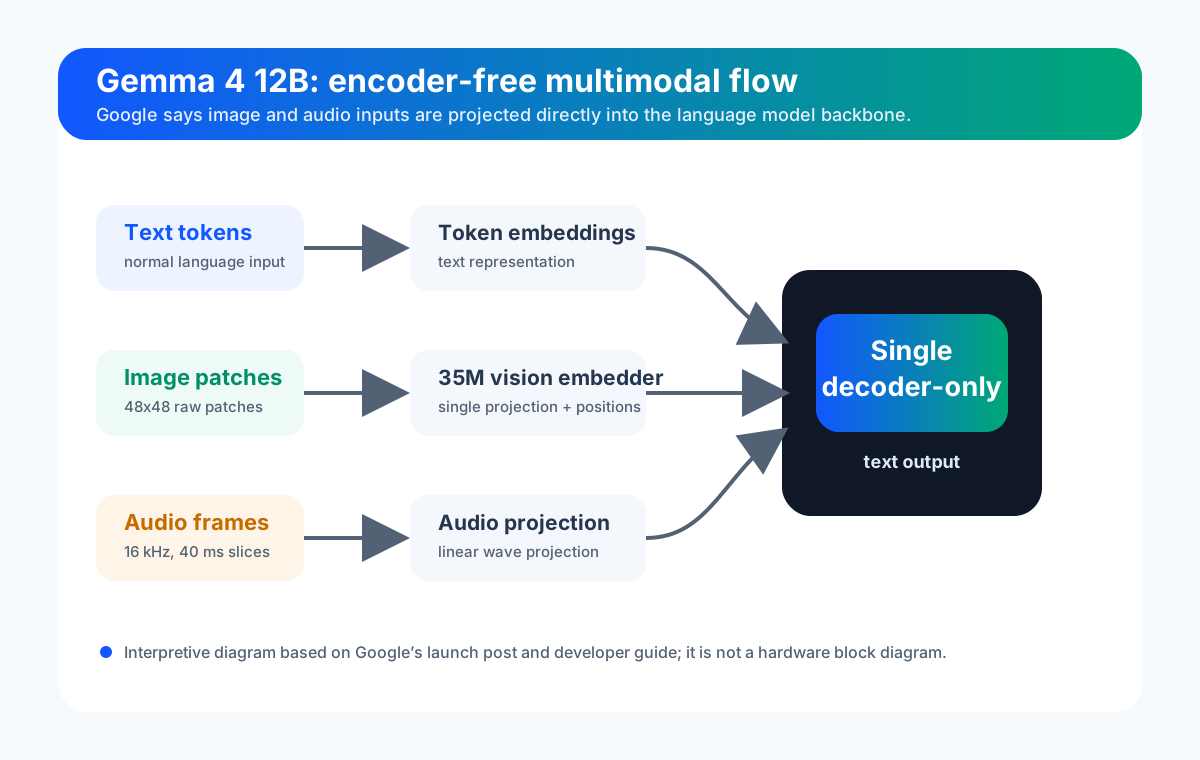
This is not a guarantee that every task will be faster or better. It means Google has changed where the multimodal work happens: more of it is handled inside the shared language-model backbone.
How images and audio are processed
Google's developer guide gives more detail about the two non-text inputs.
For vision, Gemma 4 12B replaces the larger vision encoder used by other medium-sized Gemma models with a lightweight vision embedder. Google says raw 48x48 image patches are projected into the language model's hidden dimension, with positional information added through factorized coordinate lookups.
For audio, Google says the separate audio encoder has been removed. Raw 16 kHz audio is sliced into 40 millisecond frames and projected into the same input space as text.
For developers, the important point is not only speed. Because text, image and audio share one model backbone, downstream tuning can update the multimodal behavior in one pass instead of separately managing frozen encoders and the LLM.
What the model can do
Google positions Gemma 4 12B for:
- Local multimodal agents.
- Automatic speech recognition.
- Speech-to-text translation.
- Image understanding.
- Video understanding through sampled frames.
- Coding assistance.
- Function calling and agent workflows.
- Long-context reasoning.
- Multilingual work.
- Local app and desktop experiments.
The model card says Gemma 4 supports text and image input across the family, with audio supported on E2B, E4B and 12B. It also says the family supports long context, coding, reasoning, function calling and multilingual use.
Google's developer guide includes examples where Gemma 4 12B was used for a local image-processing app and for analyzing a five-minute video segment using sampled frames plus audio. Treat those examples as demonstrations, not independent performance guarantees.
Key specs
| Specification | Gemma 4 12B Unified |
|---|---|
| Parameters | 11.95B total parameters |
| Architecture | Dense, unified, decoder-only transformer |
| Layers | 48 |
| Sliding window | 1024 tokens |
| Context length | 256K tokens |
| Vocabulary | 262K |
| Supported input modalities | Text, image and audio |
| Output modality | Text |
| Vision encoder parameters | None; Google lists the 12B model as encoder-free |
| Audio encoder parameters | None; audio is projected directly |
| Availability | Hugging Face, Kaggle, Google docs and ecosystem tooling |
The "Unified" label is important. Google's model card says the 12B model eliminates the dedicated encoders used by other Gemma 4 models and projects raw image patches and audio waveforms directly into the LLM embedding space.
Benchmark snapshot
Google says Gemma 4 12B delivers performance near its larger 26B MoE model on standard benchmarks while using less than half the memory footprint. The model card gives a fuller table of vendor-reported results.
Selected Google-reported numbers for the instruction-tuned Gemma 4 12B Unified model include:
| Benchmark | Google-reported result |
|---|---|
| MMLU Pro | 77.2% |
| AIME 2026, no tools | 77.5% |
| LiveCodeBench v6 | 72.0% |
| Codeforces ELO | 1659 |
| GPQA Diamond | 78.8% |
| Tau2 average | 69.0% |
| MMMU Pro | 69.1% |
| MATH-Vision | 79.7% |
| FLEURS audio, lower is better | 0.069 |
| MRCR v2 8-needle 128K average | 43.4% |
These scores are useful for orientation, but users should not treat them as deployment proof. Real performance depends on quantization, hardware, prompt design, context length, tool use, fine-tuning, safety filters and the specific workload.
How to try Gemma 4 12B
Google lists several ways to start.
For simple local experimentation:
- LM Studio.
- Ollama.
- Google AI Edge Gallery.
- Google AI Edge Eloquent.
- LiteRT-LM CLI.
For model weights:
- Hugging Face.
- Kaggle.
For developer pipelines:
- Hugging Face Transformers.
- llama.cpp.
- MLX.
- SGLang.
- vLLM.
- Unsloth for efficient fine-tuning.
For production and enterprise deployment:
- Google Cloud Model Garden.
- Cloud Run.
- Google Kubernetes Engine.
The best starting path depends on your goal. A non-specialist developer may start with LM Studio or Ollama. A Mac developer may look at Google AI Edge tools and MLX. A backend team testing server inference may compare vLLM, SGLang, llama.cpp and Google Cloud deployment options.
What this means for developers
Gemma 4 12B is most interesting for developers who want multimodal capability without relying entirely on hosted APIs.
Good early use cases include:
- Local coding agents that can inspect screenshots or UI states.
- Audio transcription and translation experiments.
- Document and chart understanding.
- Local research assistants that can use long context.
- Video analysis through sampled frames plus audio.
- Prototype agents that need function calling and multimodal inputs.
- Internal tools where data locality matters.
The model's local target does not mean every laptop will run it well. A "16GB VRAM or unified memory" target still leaves big practical differences between full precision, quantized formats, context length, batch size, operating system, runtime and thermal limits.
Teams should test latency, memory use and quality on their actual hardware before committing to a product architecture.
What this means for businesses
For businesses, the release is part of a broader trend: capable AI models are moving closer to the device and the private environment.
That can matter for:
- Privacy-sensitive workflows.
- Offline or low-connectivity tools.
- Edge devices and local workstations.
- Cost control when API inference is expensive.
- Custom fine-tuning and adapter experiments.
- Internal agent prototypes before cloud deployment.
But local does not automatically mean safe. Businesses still need controls for:
- Data handling.
- Model licensing and policy compliance.
- Output review.
- Prompt injection.
- Hallucination.
- Audit logging.
- Security testing.
- Employee use policies.
An open-weight model can reduce dependence on a hosted API, but it also shifts more responsibility to the team running it.
Gemma 4 12B vs Gemini
Gemma and Gemini are not the same product.
| Gemma 4 12B | Gemini |
|---|---|
| Open-weight model family from Google DeepMind | Google's flagship commercial AI model family |
| Can be downloaded and run locally or deployed by developers | Typically accessed through Google apps, Gemini API and Google Cloud |
| Designed for experimentation, tuning and local deployment | Designed for Google's broad consumer, developer and enterprise services |
| User controls runtime, hardware and deployment setup | Google manages much of the hosted model infrastructure |
For many users, Gemini will still be easier. For developers who need local control, open weights, custom runtimes or fine-tuning, Gemma is the more relevant model family.
Safety and responsible use
Google's model card says Gemma 4 is built for developers and researchers, and Google provides an intended-use statement and prohibited-use policy.
That matters because multimodal local models can be powerful. A model that processes text, images and audio can be used for helpful accessibility, coding and research workflows, but it can also raise risks around surveillance, impersonation, copyrighted data, misinformation, unsafe automation and sensitive-data exposure.
Practical safeguards:
- Do not feed private audio, documents or images into tools you do not control.
- Review license and prohibited-use terms before commercial deployment.
- Keep a human approval step for code changes, security actions and customer-facing output.
- Log model-assisted actions in agent workflows.
- Test for prompt injection when the model reads documents, screenshots, webpages or tool outputs.
- Use retrieval and tool access narrowly; do not give a local agent broad system permissions by default.
- Disclose AI use where users, customers or policy require it.
The model may run locally, but the legal, security and trust questions still apply.
What remains unclear
Several questions need independent testing:
- How well Gemma 4 12B performs after common quantization choices.
- Whether the 16GB memory target is comfortable for long-context multimodal work or only lighter workloads.
- How reliable audio and video understanding are outside Google's demos.
- How often the model beats smaller hosted models in practical developer tasks.
- How much latency improvement the encoder-free design provides across hardware classes.
- Whether fine-tuning the unified backbone is simpler in real production workflows.
- How ecosystem tools handle 256K context without large memory or latency penalties.
- How businesses will manage local model governance at scale.
Those are not criticisms of the release. They are the normal questions that determine whether a model becomes useful beyond demos and benchmark tables.
Bottom line
Gemma 4 12B is a serious addition to Google's open-weight AI strategy. Its most important idea is architectural: bring text, image and audio into one shared transformer path, remove separate multimodal encoders, and make local multimodal agents more practical.
For developers, it is worth testing if you need local multimodal inference, agent workflows, audio input, long context or fine-tuning flexibility. For businesses, it is a reminder that open-weight AI is becoming more capable, but also more operationally demanding.
The model is not a magic replacement for hosted frontier systems. It is a meaningful step toward capable local AI agents that can see, hear, reason and work across tools under the developer's control.
Sources
- Google: Introducing Gemma 4 12B: a unified, encoder-free multimodal model, June 3, 2026.
- Google Developers Blog: Gemma 4 12B: The Developer Guide, June 3, 2026.
- Google AI for Developers: Gemma 4 model card.
- Google AI for Developers: Gemma 4 model overview.
- Google AI for Developers: Apache License 2.0 for Gemma.
- Google AI for Developers: Gemma Prohibited Use Policy.
- Google AI for Developers: Gemma Intended Use Statement.
- Hugging Face: Google Gemma 4 collection.
- Kaggle: Google Gemma 4 models.
Before you move on
Global AI workflow guidance. Use this short checklist to turn the article into action.
- Check whether the tool can access private files or account data.
- Verify factual claims against primary sources before publishing.
- Keep a human review step for work that affects money, school, or customers.
This guide is written for practical user safety. For account, platform, or legal decisions, confirm critical steps with the official help center or your service provider.