
OpenAI is rolling out a more capable ChatGPT memory system called Dreaming, starting with Plus and Pro users in the US. Here is what changed, who gets it first, what privacy controls matter, and what users should check before relying on it.
Last checked: June 5, 2026. This article is based on OpenAI's June 4 announcement for Dreaming, OpenAI's Memory FAQ, OpenAI's What is Memory help article, and OpenAI's earlier memory controls announcement. Because this is a ChatGPT product update, HacksByte relied on official OpenAI sources for product availability, controls and privacy details.
Quick answer
OpenAI has started rolling out a new ChatGPT memory architecture called Dreaming, a background memory-synthesis system designed to make ChatGPT better at remembering useful context, following user preferences and keeping memories current over time.
OpenAI says the update is available first to ChatGPT Plus and Pro users in the United States and will expand to more countries and to Free and Go users over the coming weeks. The Help Center also says related personalization improvements are rolling out first on web, with mobile support and broader plan support coming later, so availability may vary by account, region and surface.
Dreaming is not a separate chatbot and not a new public model name. It is the memory system behind ChatGPT personalization. Instead of relying only on explicit saved memories, the new system can synthesize context from prior chats and, depending on plan and region, other sources such as files or connected Gmail. OpenAI says users can review a memory summary, correct it, ask ChatGPT what it remembers, use Temporary Chats, turn memory off and delete relevant source material.
The most important user takeaway: this could make ChatGPT feel much more useful for long-running work, travel planning, learning, writing and personal workflows. It also makes memory hygiene more important. If you do not want something influencing future responses, use Temporary Chat before sharing it, or remove it from every place it appears.
What OpenAI announced
OpenAI published "Dreaming: Better memory for a more helpful ChatGPT" on June 4, 2026. The company said it is beginning to roll out a more capable and scalable system for synthesizing memory in ChatGPT.
The problem OpenAI is trying to solve is straightforward: memory becomes harder at ChatGPT scale. A memory system serving hundreds of millions of users across years of conversations has to avoid three failures:
- It should not forget useful facts users expect it to carry forward.
- It should not apply old facts after they become stale.
- It should not treat every past detail as equally important.
OpenAI says Dreaming addresses those issues by synthesizing memory in the background rather than waiting only for explicit "remember this" instructions. The company describes the 2026 system as Dreaming V3, following saved memories in 2024 and an earlier Dreaming-based memory system in 2025.
The feature is starting with Plus and Pro users in the US. OpenAI says it will roll out to additional countries and to Free and Go users in the coming weeks.
What Dreaming actually is
Dreaming is OpenAI's name for a memory-synthesis process. It runs in the background and builds a more current view of what ChatGPT should know about a user, based on relevant context from previous interactions.
In practical terms, Dreaming tries to answer questions like:
| Question | Why it matters |
|---|---|
| What does this user keep working on? | Long-running projects should not restart from zero in every chat. |
| What preferences should be respected? | Dietary choices, writing style, tools, region and work constraints can change the answer. |
| What is no longer true? | Travel plans, deadlines, temporary locations and short-term goals can expire. |
| What should be visible to the user? | A memory system needs review and correction controls, not only hidden personalization. |
OpenAI says Dreaming can include naturally shared context, not only details users explicitly tell ChatGPT to remember. That is the biggest user-facing shift. A user may not say "remember this," but if the information is useful for future help, ChatGPT may still synthesize it into memory when memory is enabled.
Why this is different from saved memories
ChatGPT memory began as saved memories. Users could tell ChatGPT to remember facts such as a name, dietary preference, role, business project or writing style. That approach was useful, but it had obvious limits.
Saved memories often depended on a strong signal. If a user did not explicitly ask ChatGPT to remember something, the system could miss it. Saved memories could also become stale. A trip, injury, job search or event date that made sense in March could become wrong in June.
Dreaming is intended to solve those weaknesses by turning memory into a constantly updated synthesis. OpenAI says the new system is better at freshness, continuity and relevance.
| Older saved-memory behavior | New Dreaming direction |
|---|---|
| Relied heavily on explicit memory cues. | Can learn from useful context that appears naturally in conversation. |
| Could become stale over time. | Tries to update memory as facts change or expire. |
| Focused on individual saved notes. | Synthesizes a broader memory state. |
| Harder to scale across years of use. | Built as a more compute-efficient memory foundation. |
| Users managed a list of memories. | Users can review a higher-level memory summary and sources. |
That does not mean saved memories disappear immediately for every user. OpenAI's Help Center still describes saved memories and chat history controls, and availability varies by plan. The practical point is that OpenAI is moving ChatGPT memory from a simple list of remembered notes toward a synthesized personalization layer.
Why it matters for everyday users
The reason users may care is simple: a useful assistant needs continuity.
Without memory, users have to keep repeating the same context:
- Their business, role and current project.
- Their preferred writing tone.
- Their coding stack.
- Their travel constraints.
- Their dietary restrictions.
- Their local area.
- Their learning goals.
- Their family or work scheduling patterns.
With better memory, ChatGPT can start from the user's actual context. It can recommend camera gear compatible with equipment previously discussed, plan a trip around known constraints, remember that a user prefers concise executive summaries, or avoid suggestions that conflict with prior preferences.
OpenAI's announcement highlights three evaluation goals: carry forward useful context, follow preferences and constraints, and stay current over time. Those are not flashy benchmark claims. They are the everyday reasons memory can make a chatbot feel more like a real assistant.
The rollout details users should know
OpenAI's announcement says the new Dreaming-based update is available to Plus and Pro users in the US first.
Here is the cleanest reading of current availability:
| User group | Status from OpenAI's materials |
|---|---|
| Plus and Pro users in the US | Rollout started June 4, 2026. |
| Additional countries | OpenAI says rollout is coming over the following weeks. |
| Free and Go users | OpenAI says rollout is coming over the following weeks. |
| Mobile users | Some related Memory Sources and personalization features are rolling out on mobile after web. |
| Business and Enterprise | OpenAI Help Center says broader rollout is planned, but administrators may have separate workspace controls. |
| Enterprise and Edu reference chat history | OpenAI's Memory FAQ says Reference Chat History is not yet available to Enterprise and Edu customers. |
That means users should not assume they have the new experience just because they read the announcement. Check your account settings and the memory interface available to you.
The memory summary page
One of the most important changes is reviewability. OpenAI says Dreaming-synthesized memories are visible through a memory summary page.
The memory summary is meant to show the highlights of what ChatGPT knows about you. It can help users:
- See broad themes ChatGPT is using for personalization.
- Add or update details.
- Correct inaccurate information.
- Tell ChatGPT not to bring up certain topics.
- Ask ChatGPT directly what it remembers.
OpenAI's Help Center adds an important caveat: the summary may not show everything ChatGPT remembers or every factor that shaped a response. It is a control surface and transparency aid, not a full raw log of all context.
That distinction matters. Users should treat the summary as a useful review panel, but not the only place to manage memory. If a sensitive detail appears in past chats, files or connected apps, deleting a line from the summary may not fully remove the underlying source.
Memory sources: why the book icon matters
OpenAI's Memory FAQ says users can see sources used to personalize a response by tapping the book icon below a response. Sources may include custom instructions, past chats, files and memories, depending on plan and region.
This is a major usability improvement because memory without attribution can feel unpredictable. If ChatGPT gives a personalized answer, users need some way to understand why.
OpenAI says Memory Sources can let users:
- See what information informed a personalized response.
- Open an explanation for why a memory was used.
- Correct or delete a saved memory.
- Delete referenced chats.
- Mark sources as relevant or not relevant.
- Manage custom instructions.
There are limits. OpenAI says sources may not show every factor that shaped an answer. Shared chats do not include Memory Sources. Some source types also depend on plan and region.
Files, Gmail and connected apps
OpenAI's Help Center says memory can personalize responses using context from chats, files and connected apps when enabled and available. The details vary by plan and region.
The Memory FAQ lists these source differences:
| Plan or source | What OpenAI currently says |
|---|---|
| Free and Go | Memory Sources may include past chats, saved memories and custom instructions. |
| Plus and Pro | Sources may include the above plus files in the user's library and connected Gmail. |
| Files and Gmail availability | OpenAI says these are not available in the European Economic Area, Switzerland or the UK for this memory-source feature. |
| Gmail | Requires users to connect Gmail in Settings > Apps, where available. |
This does not mean ChatGPT reads everything all the time. OpenAI says ChatGPT looks for relevant context when it is likely to improve a response. Still, the privacy implications are larger when connected apps and files can become personalization sources.
If you connect Gmail or upload files, assume that relevant information from those sources may influence future responses when memory is enabled and your plan supports that feature.
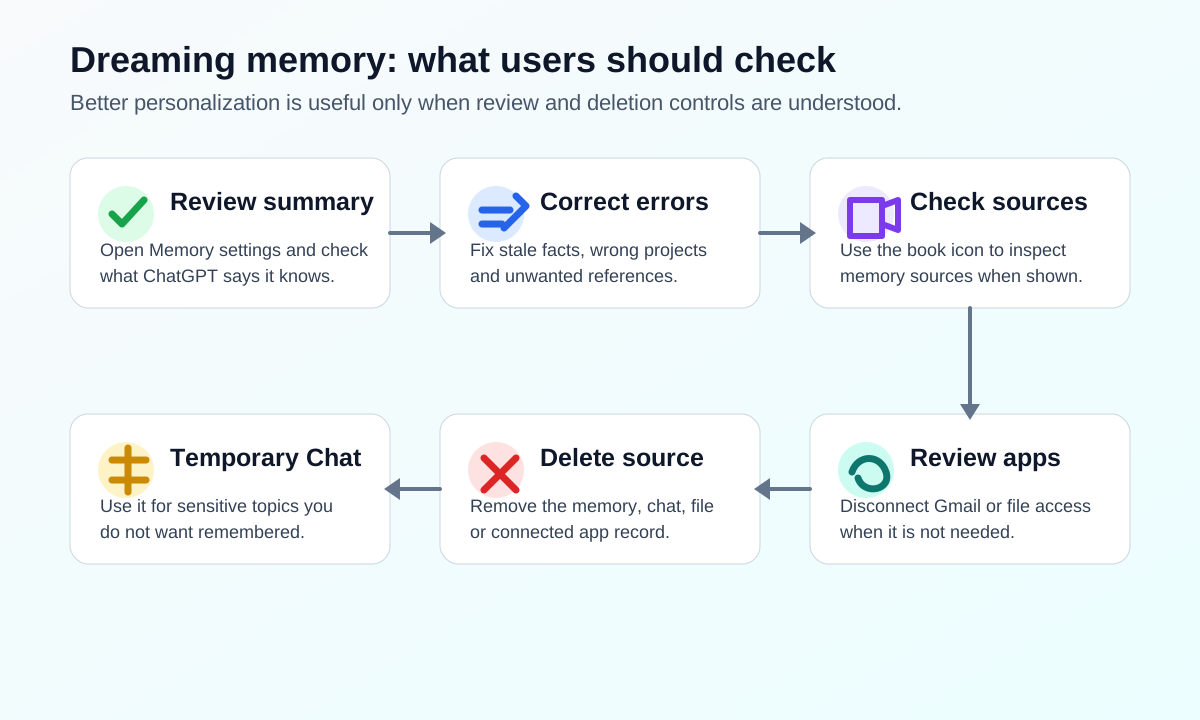
What users should do today
If you see the new memory experience in ChatGPT, do not just turn it on and forget about it. Spend a few minutes checking the controls.
1. Open Memory settings
Go to ChatGPT settings and review Memory or Personalization settings. The exact labels may vary by plan and rollout state.
2. Read the memory summary
Check whether the summary accurately represents your work, preferences, location context, projects and constraints. Correct anything stale or wrong.
3. Ask ChatGPT what it remembers
OpenAI says users can ask ChatGPT what it remembers. This is useful because the memory summary may not show every detail.
4. Use Temporary Chat for sensitive conversations
Temporary Chats do not use existing memories or create new memories. Use them before discussing topics you do not want carried into future personalization.
5. Review connected apps
If Gmail or other apps are connected, decide whether that access is worth the personalization benefit. Disconnect apps you do not need.
6. Delete at the source
If you want to fully remove something ChatGPT may know, OpenAI says you may need to delete it from every source where it appears: memory summary, saved memories, past chats, archived chats, files and connected apps.
7. Check model-improvement settings
OpenAI says content from past chats, saved memories and memory-derived context may be used to improve models if the user's "Improve the model for everyone" setting is on. OpenAI also says ChatGPT Business, Enterprise and Edu content is not used for training by default.
Privacy and safety limits
Memory is useful because it personalizes. That is also why it needs boundaries.
OpenAI's Help Center says sensitive information may appear in memory if a user shares it with ChatGPT. If the user does not want information from a chat used for personalization, OpenAI recommends turning off memory or using Temporary Chat.
There are three practical privacy points users should understand:
| Privacy point | What it means |
|---|---|
| Deleting a memory is not always enough | The same fact may still exist in chats, files, archived chats or connected apps. |
| Sources are partial | Memory Sources help explain personalization, but OpenAI says they may not show every factor. |
| Safety context is separate | Turning off memory does not disable limited safety-relevant context that OpenAI may use in rare high-risk situations. |
For ordinary users, the safest rule is this: do not share highly sensitive details in a normal memory-enabled chat unless you are comfortable with that context potentially shaping future responses.
What businesses should ask before enabling it
Better memory can be valuable for business users. It can help ChatGPT remember a team's writing style, recurring customers, product constraints, codebase patterns, market focus and project goals.
But administrators and managers should treat memory as a data-governance issue, not just a productivity feature.
Before using Dreaming-style memory for work, teams should ask:
- Which plan are employees using: Free, Plus, Pro, Business, Enterprise or Edu?
- Are workspace-level memory controls available to administrators?
- Can users connect Gmail or files, and in which regions?
- Are confidential documents allowed to become personalization context?
- What is the process for deleting stale or sensitive project information?
- Are employees trained to use Temporary Chat for sensitive topics?
- Is model-improvement training turned off where required?
- Do legal, HR, finance and customer-support workflows need stricter rules?
For companies handling customer data, legal matters, health data, credentials or unreleased financial information, memory should be rolled out with policy and training. The productivity benefit is real, but so is the risk of stale or sensitive context influencing later work.
When memory helps most
Dreaming-style memory is most useful when a task improves with continuity.
Good use cases include:
- Long-running writing projects.
- Ongoing coding and product work.
- Personal learning plans.
- Travel planning across several chats.
- Fitness or habit tracking, where appropriate.
- Repeated business analysis.
- Local recommendations based on stable location context.
- Drafting in a preferred style.
- Remembering constraints for recipes, shopping or scheduling.
Memory is less useful, or needs more caution, for:
- One-off sensitive conversations.
- Legal, medical or financial decisions.
- Work involving secrets, credentials or private customer records.
- Situations where old context can be dangerous if reused.
- Shared-account environments.
- Experiments where you want a clean context.
The point is not to avoid memory. It is to match memory to the job.
What could go wrong
Even a better memory system can make mistakes.
Possible failure modes include:
| Risk | Example |
|---|---|
| Stale context | ChatGPT remembers a trip, injury or project after it is no longer current. |
| Over-personalization | ChatGPT makes assumptions from past chats when the current request should be treated fresh. |
| Sensitive recall | A health, family, financial or work detail appears in a later answer unexpectedly. |
| Source confusion | A response is shaped by memory, but the user cannot see every source that influenced it. |
| Cross-context mistakes | Work context bleeds into personal planning, or personal preferences shape professional output. |
OpenAI says Dreaming is designed to reduce stale and irrelevant memories, but users should still check important outputs. Better memory is not the same as guaranteed correctness.
What remains unclear
Several practical questions will need real-world testing as the rollout expands:
- How quickly Dreaming updates stale memories in ordinary use.
- How often users see and understand Memory Sources.
- Whether users can easily distinguish memory, custom instructions and chat history.
- How well the system handles conflicting memories.
- How consistently "do not mention this again" works across related topics.
- How memory behaves across web, mobile and connected apps.
- How business administrators will standardize controls across teams.
- Whether Free and Go users get the same memory depth as Plus and Pro users.
These are not reasons to dismiss the update. They are the reasons users should treat the rollout as a major personalization change and review their settings.
Bottom line
Dreaming is one of the most important ChatGPT updates of 2026 because it changes the assistant from a session-based tool toward a more persistent personal context system.
If it works well, users should spend less time repeating themselves and more time getting answers that fit their actual projects, preferences and constraints. The update should especially help people who use ChatGPT every day across work, learning, planning and creative tasks.
The tradeoff is control. Better memory means more personal context can shape future replies. Users should review their memory summary, understand Memory Sources, use Temporary Chat for sensitive topics, disconnect unnecessary apps and delete information at the source when they want it fully removed.
The right posture is not panic and not blind trust. Turn memory into a managed setting, not a hidden assumption.
Sources
- OpenAI: Dreaming: Better memory for a more helpful ChatGPT, June 4, 2026.
- OpenAI Help Center: Memory FAQ, updated June 2026.
- OpenAI Help Center: What is Memory?, updated June 2026.
- OpenAI: Memory and new controls for ChatGPT, updated April 10, 2025.
Before you move on
Global AI workflow guidance. Use this short checklist to turn the article into action.
- Check whether the tool can access private files or account data.
- Verify factual claims against primary sources before publishing.
- Keep a human review step for work that affects money, school, or customers.
This guide is written for practical user safety. For account, platform, or legal decisions, confirm critical steps with the official help center or your service provider.