Filtr, a new paid add-on for Wipr 2, uses Apple's URL filters in iOS, iPadOS and macOS 26 to block many ads and trackers beyond Safari. Here is how it works, what it costs, what it cannot block, and what privacy-minded Apple users should know.
Last checked: June 5, 2026. This article uses TechCrunch's June 4 report as the primary source, and checks the technical details against Apple's URL filters documentation, Apple's deployment guide for URL filters, the Wipr 2 App Store listing, Wipr Help, Kaylee Serena Calderolla's privacy policy and the FBI's public warning about malicious search ads.
Quick answer
Filtr is a new privacy-focused add-on for Wipr 2, the Apple-only ad blocker built by independent developer Kaylee Serena Calderolla. Unlike traditional iPhone ad blockers that mostly work inside Safari, Filtr uses Apple's newer URL filters feature to block many ad and tracking requests across iPhone, iPad and Mac apps.
TechCrunch tested Filtr and reported that it removed ads from many apps, leaving blank or grey ad placeholders in some cases. The Wipr 2 App Store listing says Filtr extends Wipr's blocking to all apps on the device and works at the network level without acting as a VPN.
There are limits. Filtr cannot block everything. It does not block ads served from the same domain as the app or website itself, because blocking that domain would likely break the app. TechCrunch specifically notes that users should still expect ads in apps from companies such as Facebook, Google and Reddit when those apps serve ads from their own networks.
Pricing is also separate from Wipr. Wipr 2 costs $4.99 on the App Store. TechCrunch reports that Filtr costs an additional $5 per year or $25 as a lifetime in-app purchase.
What happened
TechCrunch reported on June 4, 2026 that Filtr is one of the first consumer tools to use Apple's new URL filtering system to block ads beyond the browser on Apple devices.
The tool is bundled as an add-on inside Wipr 2. Wipr itself is a Safari content blocker for iPhone, iPad, Mac and Vision Pro. Filtr expands the idea from Safari pages to app network requests, which is why the launch matters.
Traditional iPhone content blockers have been narrow. They can clean up Safari pages, but ads inside news apps, shopping apps, games, social apps and other native apps usually remain untouched unless users rely on DNS filtering, VPN-style filtering or network-level tools such as a home Pi-hole.
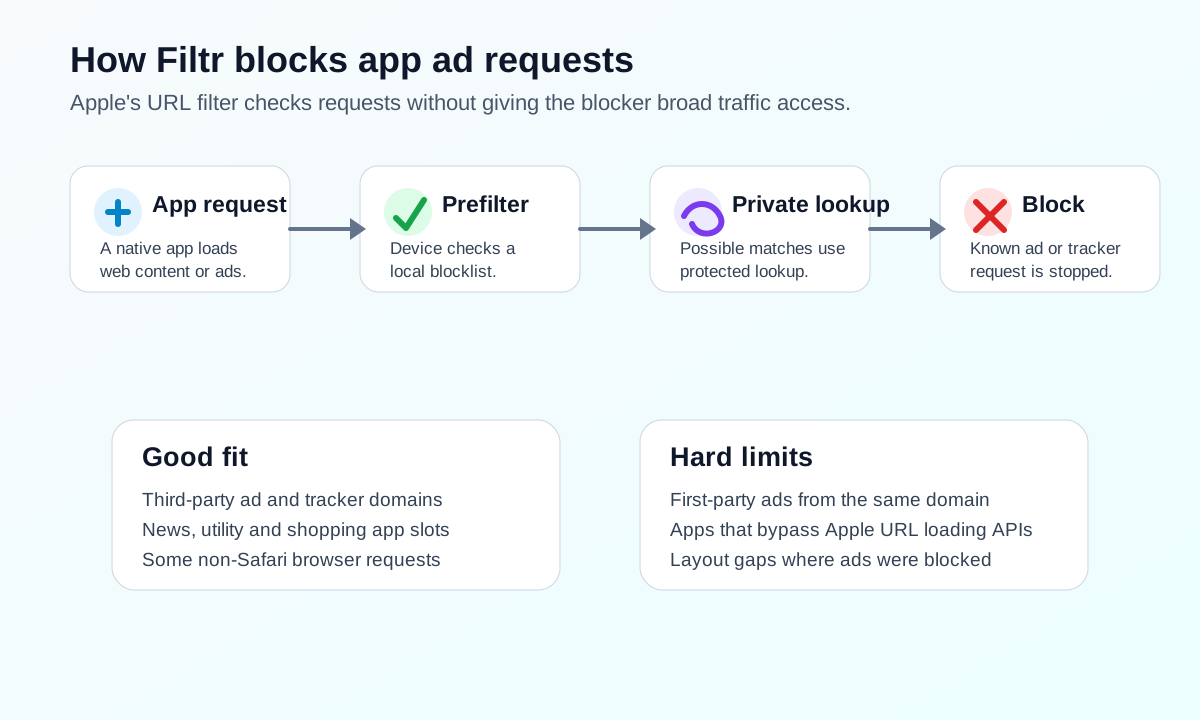
Filtr takes advantage of a newer Apple platform feature instead. Apple's URL filters allow a developer to provide a URL data set and let Apple's Network Extension framework decide whether to allow or block requests while preserving privacy through local prefiltering and private lookup infrastructure.
What Filtr is
Filtr is not a standalone ad blocker in the usual sense. It is an add-on for Wipr 2.
According to the Wipr 2 App Store listing, Wipr blocks ads, trackers, popups, cookie warnings and related web annoyances in Safari. The same listing says the Filtr add-on extends Wipr's blocking to all apps on the device, works at the network level, does not act as a VPN and can be used with VPNs, iCloud Private Relay and custom DNS.
That positioning is important. Many system-wide ad blockers on mobile route traffic through local VPN-style tunnels or custom DNS settings. Filtr's appeal is that it uses Apple's system URL filtering APIs rather than asking to see all device traffic.
In plain English: Wipr still handles Safari ad blocking. Filtr is the extra layer meant to stop app requests to known ad and tracking domains before the ad loads.
How Apple's URL filters make it possible
Apple's URL filters are part of the Network Extension framework. Apple's developer documentation describes them as a way to filter URL requests by analyzing the full URL against a developer's URL data set while preserving privacy.
Apple's deployment guide says URL filters are available in iOS 26, iPadOS 26 and macOS 26. It describes a system that uses:
- A local Bloom filter on the device for fast prefiltering.
- A private lookup system when remote confirmation is needed.
- Apple's privacy-preserving relay infrastructure for off-device lookups.
- Support for filtering HTTP and HTTPS requests.
- Decisions based on the full URL, not only the domain.
TechCrunch reported that Filtr keeps a pre-filter blocklist on the user's device and updates it through Wipr. If a request may match the blocklist, the app confirms against Calderolla's server-side list through Apple's proxy mechanism so the app developer does not learn who is querying the blocklist.
That design is why Filtr is different from a normal browser extension. It can operate below the browser layer, while relying on Apple's system to avoid exposing the user's full traffic to the blocker app.
Why this is a privacy story, not just an ad story
Ads are not only visual clutter. Many advertising systems also load tracking code, measurement pixels, device identifiers, fingerprinting scripts and third-party SDK calls. Blocking the request can stop both the visible ad and the tracking path behind it.
The FBI has also warned users about malicious ads in search results. In a 2022 public service announcement, the FBI said criminals were buying search ads that impersonated legitimate brands and directed victims to malware or credential-theft sites. One of the FBI's recommendations was to use an ad blocking extension when performing internet searches.
Filtr is not a malware scanner and should not be described as one. Wipr's own help page says Wipr is not a security tool for blocking malicious, malware, scam or phishing sites. But reducing exposure to third-party advertising networks can still reduce tracking and some malvertising risk.
The practical benefit is narrower and still valuable: fewer ad and tracker requests leaving your device.
What Filtr blocks
Filtr blocks network requests that match its advertising and tracking blocklist.
Based on TechCrunch's reporting and Wipr's App Store description, users should expect Filtr to help with:
| Area | What Filtr can help with |
|---|---|
| In-app ad networks | Blocking many third-party ad requests inside apps. |
| Tracker domains | Stopping known tracking and analytics domains when they are on the list. |
| Non-Safari browsers | Reducing some ads in browsers that are not Safari, depending on how requests are made. |
| News and utility apps | Blocking external ad slots in apps that load ads from third-party domains. |
| Data and battery overhead | Reducing requests that would otherwise load ads, tracking scripts and media. |
Users may still see empty rectangles or placeholders where an ad would have loaded. That is normal. Filtr can block the network request, but it may not be able to redesign the app layout.
What Filtr cannot block
No ad blocker blocks everything, and Filtr has a clear technical limit.
If an app serves ads from the same domain it needs to function, blocking that domain would break the app. TechCrunch notes that this means users should still expect ads in apps such as Facebook, Google and Reddit, along with other apps that deliver ads from their own domains.
Filtr may also miss:
- Ads embedded as first-party content.
- Sponsored posts loaded from the app's own API.
- Native recommendation units that are not separate ad-network requests.
- Apps that do not use Apple's normal URL loading paths and do not voluntarily participate in URL filtering.
- Video ads integrated directly into a platform's own media stream.
- Anti-ad-blocking layouts that leave blank spaces or warnings.
This is why "almost every app" should not be read as "every ad in every app." It means Filtr can reach far beyond Safari, not that it defeats every ad system.
The pricing
The current pricing reported by TechCrunch is:
| Product | Price | Notes |
|---|---|---|
| Wipr 2 | $4.99 | Universal Apple app for iPhone, iPad, Mac and Vision Pro, according to the App Store listing. |
| Filtr annual add-on | $5 per year | In-app purchase inside Wipr 2, according to TechCrunch. |
| Filtr lifetime add-on | $25 one-time | In-app purchase inside Wipr 2, according to TechCrunch. |
The App Store listing says Wipr 2 supports Family Sharing and has in-app purchases. Users should check the App Store before buying, because App Store pricing can vary by country, taxes and currency.
What users should check before buying
Before paying for Filtr, users should answer a few practical questions.
1. Are your devices on the right OS version?
Apple's URL filters are tied to iOS 26, iPadOS 26 and macOS 26. If your device is not on a supported system version, Filtr may not be available or useful.
2. Are most of your annoying ads in apps or Safari?
If your biggest problem is Safari websites, Wipr alone may be enough. Filtr is more useful if you see ads inside native apps or non-Safari browsers.
3. Are the ads first-party?
If most of your irritation comes from YouTube, Instagram, Facebook, Google, Reddit or similar first-party ad ecosystems, Filtr may not remove those ads inside the native apps.
4. Do you already use DNS filtering or a VPN blocker?
Filtr may overlap with tools such as custom DNS, NextDNS, AdGuard DNS or Pi-hole. Its advantage is Apple platform integration and privacy-preserving URL filtering. Its value depends on your current setup.
5. Do you need control or simplicity?
Wipr is intentionally simple. It is a set-and-forget blocker, not a power-user rule editor. If you want custom rule writing, per-domain dashboards and deep logs, another tool may fit better.
How Filtr compares with DNS and VPN-style blockers
Filtr's main difference is where it sits in the stack.
| Tool type | Strength | Tradeoff |
|---|---|---|
| Safari content blocker | Strong web cleanup in Safari with low privacy risk. | Mostly limited to Safari and Safari-based views. |
| DNS blocker | Can block known domains across apps and networks. | Domain-level blocking can be blunt and may miss full-URL patterns. |
| VPN-style blocker | Can see more traffic and block broadly. | Requires routing traffic through a local or remote VPN-style path. |
| Filtr URL filter | Uses Apple's URL filtering framework for system-level request blocking with privacy-preserving lookups. | Depends on Apple APIs, Wipr's blocklist and technical limits around first-party ads. |
For many Apple users, Filtr's selling point is convenience: install Wipr 2, enable Filtr, keep the blocklist updated, and avoid maintaining a separate network appliance or custom DNS profile.
Privacy questions users should ask
Filtr is being marketed as privacy-friendly, but users should still read the privacy details.
Calderolla's privacy policy says her apps do not collect personal data. TechCrunch also reported that Filtr does not need access to personal information and that Apple's URL filter feature does not require the blocker app to access the user's personal data.
That is a strong claim compared with many privacy tools. Still, users should understand the operating model:
- Wipr maintains and updates the blocklist.
- A prefilter list is stored on the device.
- Some potential matches may require server-side confirmation.
- Apple infrastructure helps proxy those requests.
- The blocker app should not need to inspect all traffic like a VPN.
For users who are highly sensitive about metadata, the question is not only "does the app collect personal data?" It is also "what requests are made to update and consult the blocklist, and how are they protected?" Apple's URL filter design appears built specifically to reduce that exposure.
Why app-wide blocking has been hard on iPhone
iOS has historically been restrictive about what apps can do to other apps. That is good for security, but it limits app-wide ad blocking.
Safari content blockers work because Safari exposes a dedicated content-blocking extension system. Native apps are different. An ad blocker generally cannot reach into another app's interface and remove visual elements.
That left users with imperfect options:
- Use Safari instead of native apps.
- Use DNS blocking.
- Use a VPN-style blocker.
- Set up a Pi-hole or similar home network filter.
- Accept ads inside apps.
Apple's URL filters create a new path. Instead of modifying another app's UI, the filter can block network requests before ad or tracker resources load. It still cannot control the layout inside the app, but it can stop many external requests.
What this means for publishers and app developers
Filtr will not be welcomed by every publisher. Many apps rely on advertising revenue, and broader blocking can reduce impressions.
Developers may respond in several ways:
- Move more ads into first-party delivery paths.
- Add anti-ad-blocking checks.
- Shift users toward subscriptions.
- Reduce third-party trackers to make ads less objectionable.
- Improve privacy-respecting advertising formats.
- Warn users when ad slots fail to load.
Users should understand the tradeoff. Blocking invasive ads and trackers improves privacy, security and performance. But independent publishers and app developers still need business models. The healthiest long-term outcome would be fewer abusive trackers and clearer choices between ads, subscriptions and paid apps.
What remains unclear
Several practical questions will need more real-world testing:
- How well Filtr performs across different countries and blocklists.
- How much battery and data usage changes in day-to-day use.
- Whether Apple will change URL filter behavior or App Store review expectations over time.
- How quickly Wipr updates the Filtr blocklist after ad networks change domains.
- Whether major apps redesign ad delivery to bypass URL filtering.
- How often users see broken app behavior.
- Whether other ad blockers adopt Apple's URL filters.
Filtr looks significant because it is early. The broader story may be whether Apple's URL filters become a new privacy layer for consumer apps, enterprise filters and parental controls.
Bottom line
Filtr is a notable privacy tool because it brings Apple users closer to app-wide ad blocking without requiring a VPN-style traffic tunnel. By using Apple's URL filters, Wipr can block many ad and tracking requests outside Safari while keeping the implementation closer to Apple's privacy model.
It is not magic. It will not remove every ad, and it will struggle with first-party ads from major platforms. It also costs extra on top of Wipr 2.
For iPhone, iPad and Mac users who already like Wipr and want broader ad blocking, Filtr is worth watching. For users who mainly want to block YouTube, Instagram, Facebook, Google or Reddit app ads, expectations should be lower. The best privacy result may still come from a mix of Safari content blocking, app tracking controls, careful app choices and selective subscriptions.
Sources
- TechCrunch: Filtr is a new privacy tool that blocks ads in almost every iPhone and Mac app, June 4, 2026.
- Apple Developer Documentation: URL filters.
- Apple Support Deployment Guide: Filter content for Apple devices.
- Apple App Store: Wipr 2.
- Wipr Help.
- Kaylee Serena Calderolla: Privacy Policy.
- FBI IC3: Cyber Criminals Impersonating Brands Using Search Engine Advertisement Services to Defraud Users, December 21, 2022.
Before you move on
Personal privacy controls. Use this short checklist to turn the article into action.
- Review location, camera, microphone, contacts, and photo access.
- Remove apps and connected services you no longer use.
- Protect your main email because it controls account recovery.
This guide is written for practical user safety. For account, platform, or legal decisions, confirm critical steps with the official help center or your service provider.