

A complete business guide to using ChatGPT for operations, marketing, sales, support, research and automation without creating data, quality or compliance problems.
Last checked: May 31, 2026. This guide is based on current ChatGPT business features, OpenAI's business and privacy documentation, and practical AI governance patterns. Product plans and admin controls change, so businesses should confirm settings in their workspace before rollout.
Quick answer
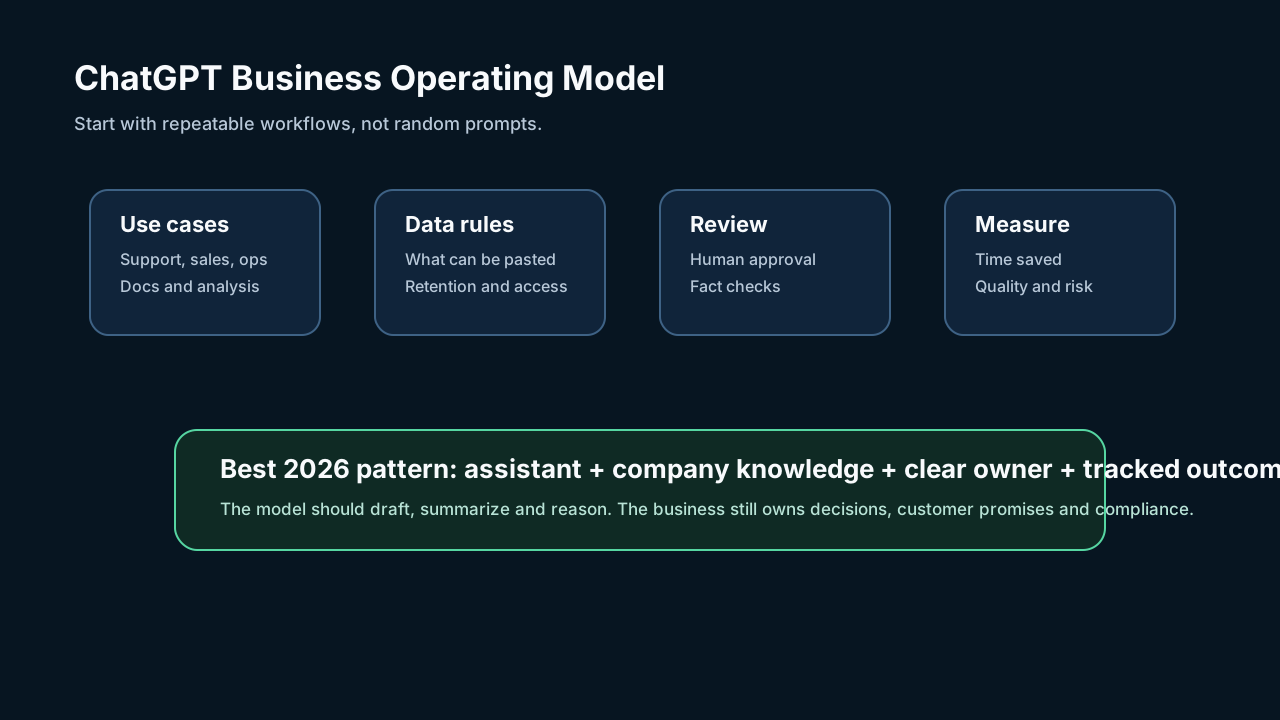
Use ChatGPT effectively by turning it into a managed business workflow, not a random prompt box. The winning pattern in 2026 is: choose a repeatable task, connect approved knowledge, write a reusable prompt, require human review, measure the result and document what data can be used.
ChatGPT can help with customer support drafts, sales emails, meeting summaries, proposals, market research, internal knowledge search, spreadsheets, coding, training materials, hiring workflows and content planning. It should not silently replace human judgment for legal, medical, financial, HR or customer-impacting decisions.

Start with business workflows
Most companies fail with AI because they begin with "write better prompts." Start with workflows instead.
Good first use cases have three traits:
- The task repeats often.
- The output can be reviewed quickly.
- Mistakes are low to medium risk.
Strong starter workflows include:
| Team | ChatGPT use case | Human review needed |
|---|---|---|
| Sales | Draft follow-up emails from call notes | Yes |
| Support | Summarize tickets and suggest replies | Yes |
| Marketing | Create campaign briefs and content outlines | Yes |
| Operations | Turn messy notes into SOPs | Yes |
| Finance | Explain variances in exported reports | Yes, especially before decisions |
| Leadership | Summarize meetings and identify decisions | Yes |
| Product | Analyze feedback themes | Yes |
The business prompt formula
Use this structure for repeatable prompts:
``text Role: You are helping our business with [task]. Context: Here is the relevant background, data and customer situation. Goal: Produce [specific output] for [audience]. Constraints: Follow our tone, policy, region and compliance rules. Evidence: Use only the provided source material. Flag uncertainty. Format: Return the answer as [table/checklist/email/brief]. Review: List assumptions and what a human should verify. ``
This reduces hallucinations because it tells the model what to use, what to avoid and how the output will be reviewed.
Data rules matter
Before employees paste information into any AI tool, create a data-use policy.
Define:
- Public information that is safe to use.
- Internal information that can be used only in an approved workspace.
- Confidential information that requires permission.
- Restricted information that should not be pasted at all.
- Customer data that needs redaction or consent.
- Regulated data such as health, financial, legal or children's data.
If your business uses ChatGPT Team, Business or Enterprise, review the workspace data controls, retention, admin, connector and security settings. Do not rely on employee personal accounts for sensitive business work.
Best ways to use ChatGPT by department
Marketing
Use ChatGPT to create audience research, content briefs, campaign angles, landing-page variants, ad copy drafts, social calendars and competitor comparison checklists. Keep human review for factual claims and brand voice.
Sales
Use it to summarize call transcripts, draft follow-ups, prepare objection-handling notes and personalize outreach based on approved CRM context. Do not let it invent customer facts.
Customer support
Use it to summarize long tickets, classify sentiment, draft replies and suggest knowledge-base updates. A human should approve sensitive refunds, escalations and policy exceptions.
Operations
Use it to turn undocumented processes into SOPs, checklists, training scripts and internal FAQs. Ask it to identify missing steps and risks.
Leadership
Use it for meeting summaries, decision logs, board memo drafts and scenario planning. Leaders should verify numbers and assumptions before acting.
15-minute setup
If you are starting today:
- Pick one repeated task.
- Choose one owner.
- Write one reusable prompt.
- Define allowed data.
- Add a human review step.
- Measure time saved and error rate for one week.
Do not launch AI across the whole company before you know what quality looks like.
Risks to avoid
- Pasting sensitive customer data into personal accounts.
- Publishing AI-written claims without checking sources.
- Letting AI answer customers without escalation rules.
- Automating bad processes instead of fixing them.
- Measuring only speed, not accuracy.
- Giving every employee access to every connector.
- Ignoring copyright, privacy, HR and compliance requirements.
Bottom line
ChatGPT is most valuable when it becomes a controlled business assistant: connected to the right knowledge, limited by clear policy and reviewed by accountable people.
The best companies in 2026 will not be the ones with the most prompts. They will be the ones that turn AI into reliable workflows.
Sources
- OpenAI for Business: openai.com/business
- ChatGPT Enterprise: openai.com
- OpenAI enterprise privacy: openai.com
- OpenAI Help Center for ChatGPT: help.openai.com
Before you move on
Global AI workflow guidance. Use this short checklist to turn the article into action.
- Check whether the tool can access private files or account data.
- Verify factual claims against primary sources before publishing.
- Keep a human review step for work that affects money, school, or customers.
This guide is written for practical user safety. For account, platform, or legal decisions, confirm critical steps with the official help center or your service provider.