A detailed SEO guide to AI coding tools merging into unified developer workflows, covering GitHub Copilot, OpenAI Codex, Claude Code, Gemini Code Assist, Windsurf, OpenCode, MCP, IDE agents, CLI agents, cloud coding, code review, security, media, videos, and buyer guidance.
Last checked: May 21, 2026. This article uses official sources from GitHub, Visual Studio Code, OpenAI, Anthropic, Google, Windsurf, and OpenCode. Feature image credit: official GitHub Copilot agent mode and MCP support image from the GitHub Blog. Credit: GitHub / Microsoft.
AI coding tools are merging. Not always through acquisitions, and not only through one company buying another. The bigger merger is happening at the workflow level: autocomplete, chat, multi-file editing, terminal agents, issue assignment, pull request review, cloud execution, model routing, MCP tool connections, and IDE integrations are collapsing into one continuous developer experience.
For years, developers thought of AI coding tools as separate categories. GitHub Copilot was autocomplete. ChatGPT was a coding chat window. Cursor was an AI editor. Claude Code was a terminal tool. Codex was a cloud agent. Gemini Code Assist was an IDE assistant. OpenCode was an open-source terminal agent. Windsurf had Cascade. Those labels still matter, but the boundaries are getting weaker every month.
The new direction is clear: AI coding tools are becoming agentic development platforms. They are no longer satisfied with suggesting the next line. They want to understand your repository, write code across files, run tests, inspect errors, review pull requests, open browser previews, connect to external systems, and move work between local and cloud environments without losing context.
This article explains what "AI coding tools merging" really means, why it is happening, which tools show the trend most clearly, what it means for developers and engineering leaders, and how to choose tools without being trapped by hype.
Quick Answer: What Does AI Coding Tools Merging Mean?
AI coding tools merging means the market is moving from separate assistants toward unified agent workflows. Instead of using one tool for autocomplete, another for chat, another for terminal commands, another for code review, and another for issue automation, developers increasingly expect one AI system to move across the whole software development lifecycle.
In practical terms, merging looks like this:
- IDE assistants are becoming agents that can edit files, run commands, and ask for approval.
- Terminal agents are adding IDE extensions, desktop apps, web apps, and cloud sessions.
- Cloud agents are becoming pull request workers that can be assigned issues.
- Code review tools are becoming AI reviewers that understand the intent of a change.
- Model choice is moving inside the tool instead of forcing developers to pick a single vendor.
- MCP and similar protocols are turning tool integrations into reusable infrastructure.
- AI coding workflows are becoming auditable through logs, diffs, branch protections, and review gates.
The result is not one universal tool yet. It is a convergence pattern. GitHub, OpenAI, Anthropic, Google, Windsurf, Cursor-style editors, OpenCode, and other developer platforms are all building toward the same shape: a coding agent that can work where developers already work.
Why This Shift Matters
The shift matters because software development is not one activity. A real developer workflow includes reading code, asking questions, writing changes, running tests, checking logs, reviewing pull requests, coordinating issues, updating documentation, deploying safely, and monitoring what happened afterward. A coding assistant that only completes code handles a small piece of that work.
AI coding agents are valuable because they can connect those pieces. The strongest new tools are not just better at writing snippets. They are better at moving through the loop: understand, plan, edit, run, observe, fix, review, and hand back control.
That is the main reason the industry is merging around agent workflows. The product category is shifting from "AI writes code" to "AI participates in development operations." Once a tool can use the terminal, inspect files, read an issue, create a branch, run tests, and open a pull request, it is no longer just a code generator. It becomes part of the engineering system.
For individual developers, this can reduce tedious work and speed up unfamiliar tasks. For teams, it changes process design. Engineering leaders now have to think about permissions, model routing, cost controls, audit logs, data handling, review policy, and how to prevent agents from producing fast but unsafe changes.
Official Media and Videos
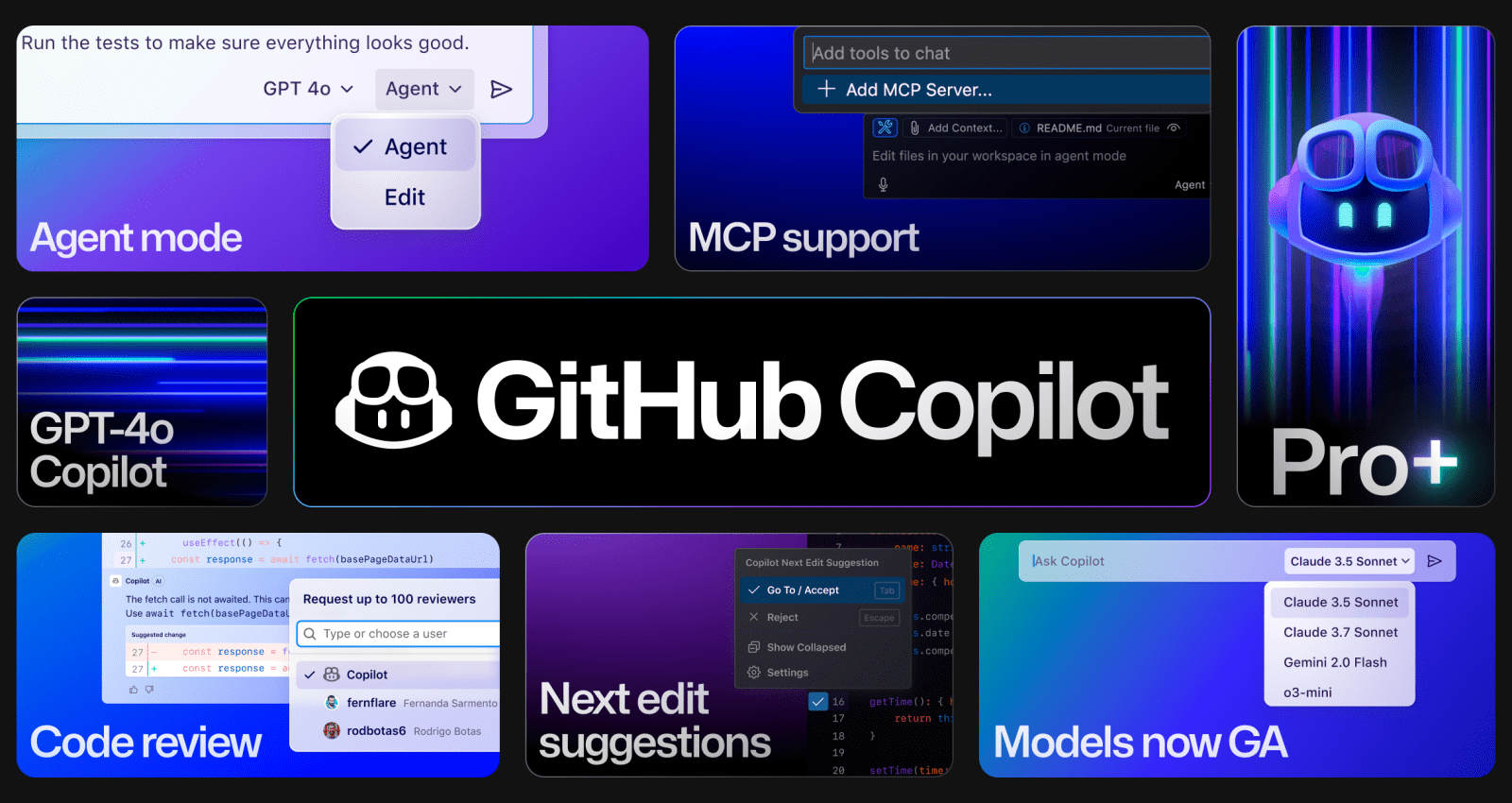
The feature image below is from the official GitHub Blog article about Copilot agent mode and MCP support. It shows several pieces of the merging trend in one place: agent mode, MCP support, model choice, code review, and next-edit suggestions.
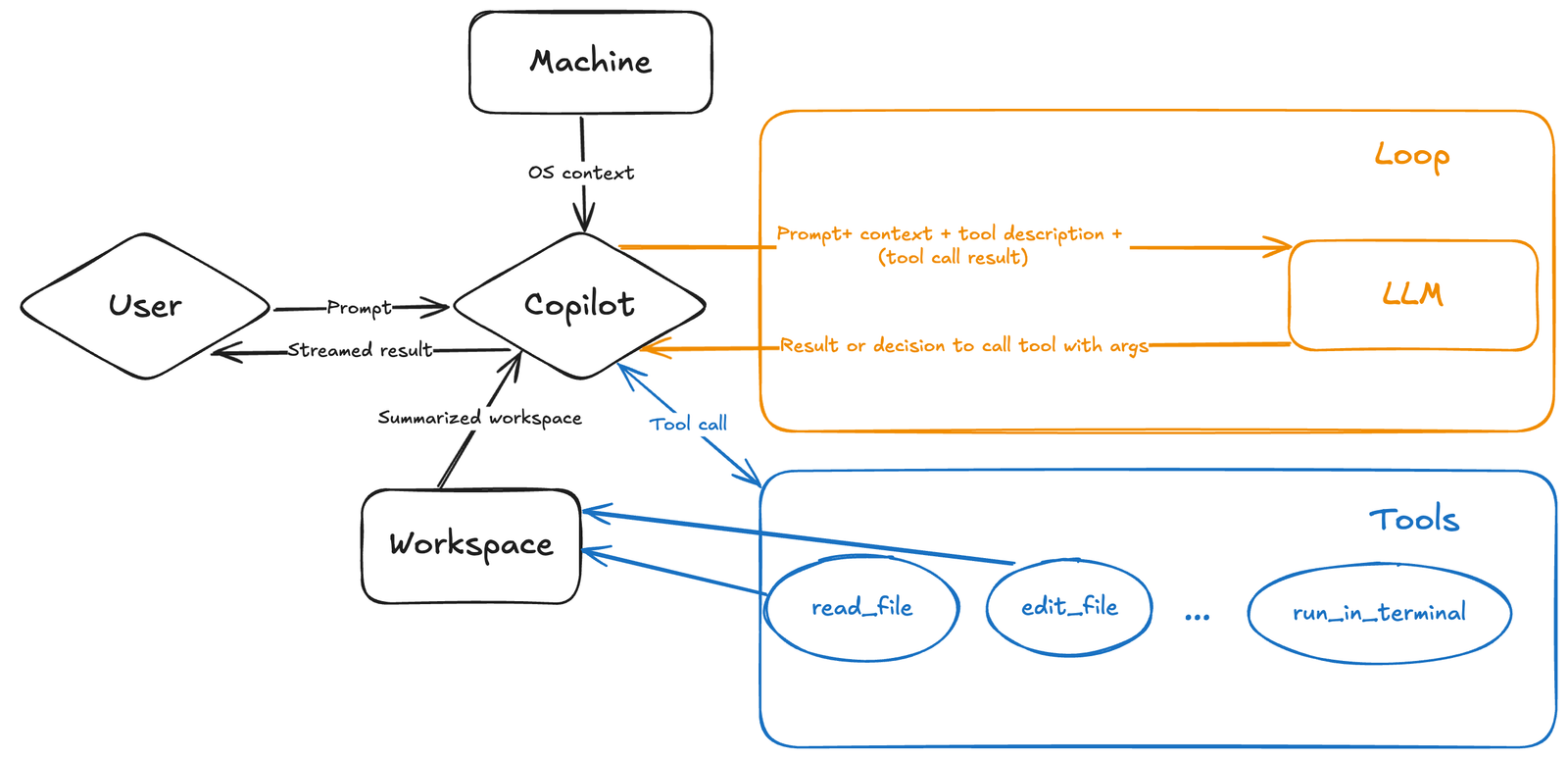
The diagram below comes from the official Visual Studio Code blog post introducing Copilot agent mode. It illustrates the agent loop: user prompt, workspace context, tools, model calls, and iterative results.
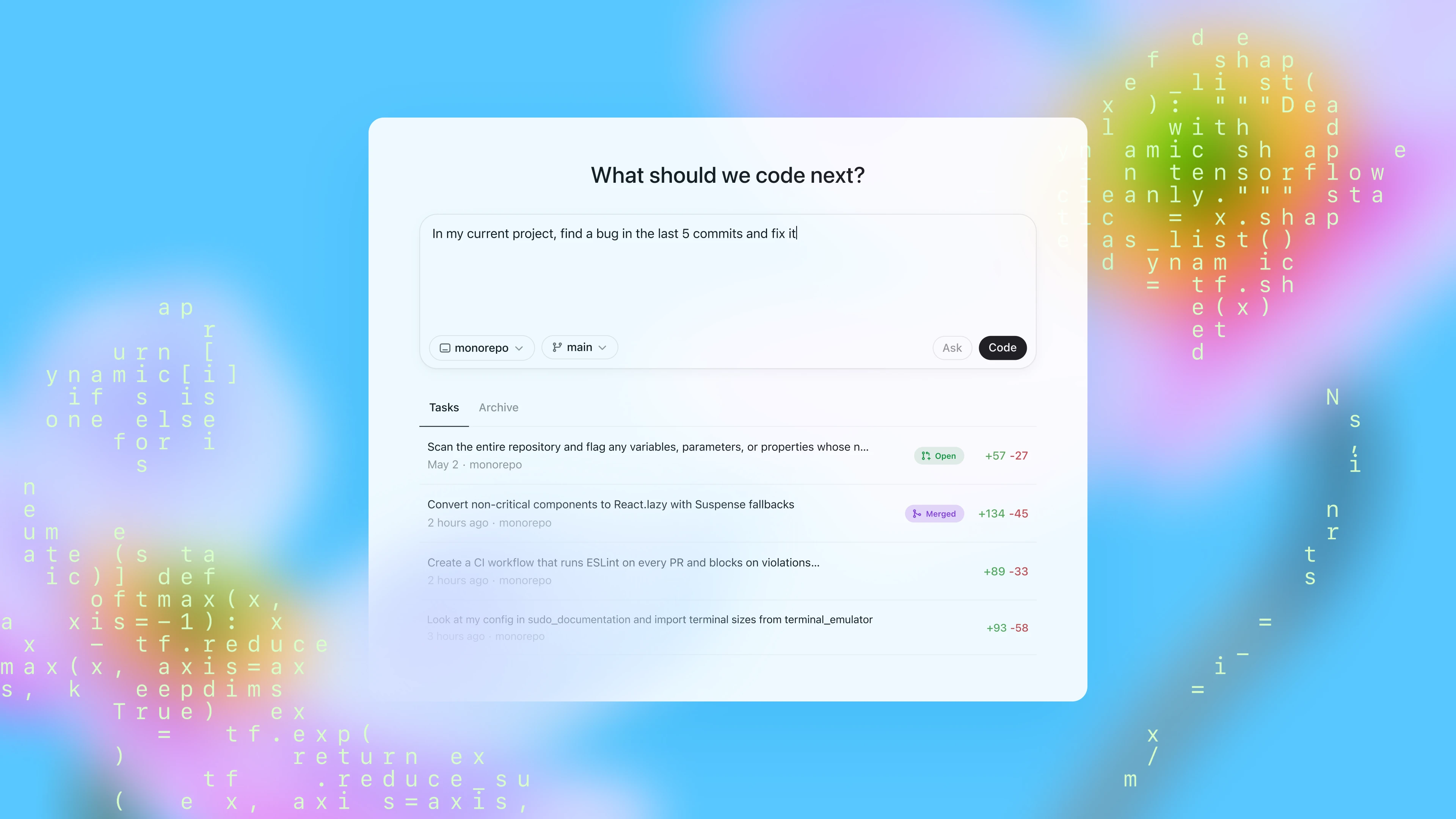
The image below is the official OpenAI Codex blog header. It represents another side of the same convergence: cloud coding agents that can track tasks, handle repository work, and move between coding surfaces.
The official video below comes from the GitHub Blog article about Copilot agent mode and MCP support.
This second official video shows OpenCode, an open-source AI coding agent, in action.
The Old Stack: Autocomplete, Chat, and Separate Tools
The first popular wave of AI coding was mostly autocomplete. A developer wrote a comment or function signature, and the tool suggested the next line or block. This was useful, but limited. The assistant was inside the editor, but it was not really part of the software workflow.
The next wave was AI chat. Developers pasted errors, asked questions, requested explanations, and generated snippets. Chat was more flexible than autocomplete, but it was often detached from the local project. The developer had to copy context into the chat and copy results back into the editor. That workflow helped with learning and debugging, but it was inefficient for real codebase work.
Then came multi-file edit tools. These could inspect a workspace and propose changes across several files. That was a major step, because modern software tasks rarely fit in one file. Still, many of these tools needed the developer to manually run tests, report errors, and decide the next action.
The current wave is different. AI coding agents can use tools. They can read files, search repositories, write changes, run terminal commands, inspect test output, ask for approval, and iterate. This is why the category is merging. Once an AI assistant has tools, it naturally expands beyond its original product box.
The New Stack: Agentic Software Development
The merged AI coding stack has several layers.
The first layer is context. The agent needs to understand the repository, open files, symbols, instructions, issues, design documents, screenshots, and terminal output. Without context, it guesses.
The second layer is planning. A useful coding agent should be able to break a task into steps, explain risks, list files to inspect, and ask for permission before changing important code.
The third layer is action. The agent needs tools for reading files, writing files, searching, running commands, using a browser, querying APIs, calling MCP servers, and interacting with Git.
The fourth layer is verification. The agent should run tests, compile, lint, inspect errors, and try again when the result fails.
The fifth layer is collaboration. The work should appear as a diff, branch, issue comment, session log, or pull request that a human can review.
The sixth layer is governance. Teams need permissions, audit trails, data controls, cost controls, model policies, and security boundaries.
When people say AI coding tools are merging, this is the structure they are merging into. Every serious product is trying to own more of this stack.
GitHub Copilot: From Assistant to Agentic DevOps Loop
GitHub is one of the clearest examples of the merging trend. The official GitHub newsroom announced in May 2025 that Copilot included an asynchronous coding agent embedded in GitHub and accessible from VS Code. The same announcement described an "Agentic DevOps loop" across GitHub and coding environments.
That phrase is important because it shows the direction. Copilot is not only an editor assistant anymore. In the newer workflow, a developer can assign a GitHub issue to Copilot or start work from Copilot Chat in VS Code. The agent can work in a GitHub Actions-powered environment, push commits to a draft pull request, and allow developers to track progress through logs and review feedback.
This is a major merging point. Issues, code, CI, pull requests, code review, model choice, and security controls are no longer separate from the AI assistant. They become part of the same workflow.
The GitHub Blog also announced agent mode with MCP support rolling out to VS Code users. That post emphasized model choice, naming Anthropic, Google, and OpenAI models in Copilot. This matters because the market is not only merging tools; it is also merging models into tool surfaces. Developers increasingly choose a task inside the tool and let the tool route to a model, rather than treating every model as a separate app.
Visual Studio Code: Chat, Edits, Tools, and Agent Mode Converge
The official Visual Studio Code blog introduced Copilot agent mode as a step beyond traditional AI-assisted coding. The blog describes an agent that can analyze a codebase, read relevant files, propose edits, run terminal commands and tests, respond to compile and lint errors, and iterate until the task is complete.
The practical takeaway is that the editor is becoming an agent host. VS Code is not just where code is displayed. It is where the model can access workspace context, call tools, ask for approvals, show diffs, run commands, and let the developer intervene.
The VS Code blog also mentioned a roadmap item around unifying chat and edits. That is one of the clearest signs of merging. Developers do not want a confusing split between "chat with the AI" and "ask the AI to edit." They want a single conversation where the assistant can explain, propose, edit, test, and revise.
This is why the IDE remains central. Even if cloud agents become powerful, developers still need a place to inspect changes, review context, and make final decisions. The winning agent workflows will likely keep the IDE as a control room rather than replacing it entirely.
OpenAI Codex: Local, Cloud, IDE, GitHub, Slack, and SDK
OpenAI's Codex shows another version of the same convergence. OpenAI introduced Codex in May 2025 as a cloud-based software engineering agent that could work on many tasks in parallel. Later Codex updates expanded the tool across terminal, IDE, web, GitHub, and mobile surfaces.
OpenAI's September 2025 Codex upgrade article said Codex had been unified into a single product experience connected by a ChatGPT account, allowing work to move between local and cloud environments without losing context. The same article described Codex working in the terminal, IDE, web, GitHub, and the ChatGPT iOS app.
OpenAI's October 2025 general availability announcement added Slack integration, a Codex SDK, admin controls, monitoring, analytics dashboards, and stronger team-scale management. That is another clear merging pattern: the coding agent becomes available not only as an app, but as infrastructure that can be embedded into engineering workflows.
The Codex direction is especially important for teams. A single developer may experience Codex as a CLI or IDE extension. An engineering organization may experience it as a cloud agent, PR reviewer, Slack participant, GitHub integration, SDK, and admin-managed platform.
Claude Code: Terminal Agent Expanding Across Surfaces
Anthropic's Claude Code is another strong signal. The official Claude Code documentation describes it as an agentic coding tool that reads a codebase, edits files, runs commands, and integrates with development tools. It is available in the terminal, IDE, desktop app, and browser.
This is exactly what merging looks like from the opposite direction. Claude Code started with a strong terminal identity, but the official docs now describe multiple surfaces: terminal, VS Code, desktop app, web, and JetBrains. The tool also connects to broader development systems and supports workflows such as code review and CI/CD.
The reason is obvious: serious coding work does not live in one surface. Developers want to start a task in the terminal, inspect diffs in an editor, check a long-running task in a browser, and collaborate through GitHub or GitLab. Claude Code's expansion reflects the same market pressure seen in Codex and Copilot.
Claude Code also highlights the importance of permissions. Terminal agents can be powerful because they sit close to real commands and local files. That makes them useful, but it also makes review and approval controls essential.
Gemini Code Assist: Agent Mode Inside IDEs
Google's Gemini Code Assist also follows the convergence pattern. The official Gemini Code Assist agent mode documentation says agent mode is available in VS Code and IntelliJ. It can answer code questions, use context and built-in tools, configure MCP servers, generate code from design documents or issues, and support multi-step tasks.
The documentation describes tools such as file read, file write, grep, terminal-style actions, Git commands, MCP servers, and RESTful API calls. It also says the agent can show a high-level plan for approval on complex tasks.
This is another sign that the IDE assistant is becoming a tool-using agent. It is not enough for an assistant to respond with text. It must know when a task needs a file edit, when a user should approve a plan, when a tool requires permission, and when context from the IDE or project should guide the response.
Google's direction also shows that the agent trend is not limited to one ecosystem. The same architecture is appearing across Microsoft/GitHub, OpenAI, Anthropic, Google, open-source tools, and AI-first editors.
Windsurf Cascade: The Editor Becomes an Agent Workspace
Windsurf's Cascade is a useful example because it was designed around an AI-first editor workflow. The official Windsurf docs describe Cascade as an agentic AI assistant with Code and Chat modes, tool calling, voice input, checkpoints, real-time awareness, and linter integration.
Cascade also includes planning and todo-list concepts for longer tasks. It can use tools such as search, analyze, web search, MCP, and terminal. Its Code mode can modify the codebase, while Chat mode is optimized for questions and general coding discussion.
This reflects a broader market truth: AI coding tools are not merging only by adding more features. They are merging by adopting similar mental models. Whether the tool is Copilot, Codex, Claude Code, Gemini Code Assist, Windsurf, or OpenCode, the same primitives keep appearing: context, plans, tools, diffs, terminal access, tests, checkpoints, and human approval.
OpenCode: Open Source Joins the Same Pattern
OpenCode is an open-source AI coding agent that also fits the merging trend. Its official homepage describes it as an open-source AI coding agent that helps developers write code in a terminal, IDE, or desktop. The site highlights LSP support, multi-session workflows, share links, GitHub Copilot login support, ChatGPT Plus or Pro login support, model-provider flexibility, and support for many providers through Models.dev.
OpenCode matters because it shows that the convergence is not only happening inside large commercial platforms. Open-source tools are also adopting the same pattern: terminal plus IDE plus desktop, multi-model support, session sharing, planning, and repository-aware assistance.
For developers, open-source AI coding agents offer transparency and flexibility. For teams, they can be useful for experimentation, internal customization, or evaluating whether an agent workflow makes sense before committing to a larger platform.
MCP: The Integration Layer Behind the Merger
The Model Context Protocol, or MCP, is one of the most important pieces of the AI coding tools merging story. Anthropic introduced MCP in November 2024 as an open standard for connecting AI assistants to systems where data lives, including content repositories, business tools, and development environments.
The key problem MCP addresses is fragmentation. Before a common integration pattern, every AI tool needed its own custom connection to every data source or developer system. That does not scale. If every coding agent needs separate integrations for GitHub, Slack, databases, issue trackers, cloud logs, docs, and internal tools, the ecosystem becomes messy.
MCP gives tool builders a standard way to expose capabilities to agents. A coding assistant can use MCP servers to access context and actions beyond the editor. GitHub's agent mode post compared MCP to a kind of port for intelligence. Google's Gemini Code Assist docs mention MCP servers as tools. Windsurf docs mention MCP support. OpenAI Codex updates also mention MCP connections.
This is a major reason tools are merging. Once agents can connect to the same external capabilities, the borders between IDE assistant, terminal tool, cloud worker, and workflow automation platform become less rigid.

The Seven Mergers Happening at Once
The AI coding market is not experiencing one merger. It is experiencing several overlapping mergers.
First, autocomplete is merging with chat. Developers expect completions and explanations to share context.
Second, chat is merging with edits. A conversation should be able to become a diff without forcing the developer to switch tools.
Third, edits are merging with terminal execution. The agent should be able to run tests and read failures instead of waiting for the developer to paste logs.
Fourth, terminal agents are merging with IDEs. Developers want command-line power but visual diff review.
Fifth, local agents are merging with cloud agents. Some tasks need local context and fast iteration; others can run asynchronously in cloud environments.
Sixth, coding agents are merging with pull request workflows. Agents are becoming issue assignees, branch creators, draft PR authors, and code reviewers.
Seventh, model selection is merging into product interfaces. Developers increasingly choose the workflow first and the model second.
This explains why the market feels crowded and confusing. Many products are approaching the same destination from different starting points.
What Developers Gain
Developers gain speed on repetitive and context-heavy tasks. A coding agent can inspect unfamiliar files, summarize a flow, draft tests, update docs, and handle a first implementation pass. This is especially useful when the task is well-scoped and the repository has good tests.
Developers also gain continuity. A merged workflow can keep context across local sessions, cloud tasks, IDE review, and pull requests. Instead of starting over in a separate chat window, the developer can keep the task connected to the code.
The biggest gain is not typing less. The biggest gain is reducing the cost of understanding. Much of software work is navigation: finding the right files, understanding old decisions, reading errors, and remembering how a system fits together. AI coding agents can help compress that discovery work.
But the gain is real only when the developer stays in control. The best users of AI coding tools are not passive. They ask for plans, constrain scope, inspect diffs, run tests, and reject changes that do not fit the codebase.
What Teams Gain
Teams gain a chance to standardize AI-assisted development. Instead of every developer using a different chatbot with unknown prompts and unknown data handling, teams can move toward approved tools with logs, controls, and repeatable workflows.
For example, a team might decide:
- Use Copilot or Gemini agent mode for IDE-based tasks.
- Use Codex or Claude Code for longer agentic implementation.
- Use AI code review as an additional reviewer, not a replacement.
- Use MCP only for approved internal tools.
- Require human approval before CI/CD or deployment actions.
- Track agent-created pull requests with labels.
- Keep security-sensitive changes under stricter review.
This kind of policy becomes necessary when AI tools merge into the development lifecycle. A casual autocomplete tool may not need heavy governance. A coding agent that can run commands, edit files, and open PRs does.
The Risks: Cost, Security, and False Confidence
The more AI coding tools merge into development workflows, the more risk they carry.
Cost is the first risk. Agentic workflows can use many model calls per task. A simple chat answer may cost little, but a multi-step agent session that reads files, plans changes, edits code, runs tests, responds to errors, and tries again can consume far more resources. GitHub's premium request system and OpenAI's plan-based Codex usage show that agent economics are becoming a product design issue.
Security is the second risk. Agents with terminal access, file write access, network access, and MCP integrations can do real work. That means they can also do real damage if misconfigured or tricked by prompt injection. Teams should treat agent permissions like they treat developer permissions: scoped, logged, reviewed, and minimized.
False confidence is the third risk. AI-generated code can look polished while missing business rules. It can produce tests that pass without verifying the important behavior. It can refactor code in ways that are technically valid but architecturally wrong. The merge of tools does not remove the need for engineering judgment.
How to Evaluate AI Coding Tools in 2026
When evaluating AI coding tools, do not start with benchmark claims alone. Start with workflow fit.
Ask these questions:
- Can the tool understand your repository without exposing data in unacceptable ways?
- Can it work in your preferred environment: IDE, terminal, browser, GitHub, Slack, or all of them?
- Does it support the models your team trusts?
- Does it provide approval gates before file writes, terminal commands, network calls, or CI execution?
- Can it run tests and show logs?
- Can it create reviewable diffs and pull requests?
- Does it support team instructions or repository rules?
- Can admins manage usage, permissions, and analytics?
- Does it integrate with your issue tracker, docs, CI, and code review process?
- Can developers recover from bad changes through undo, checkpoints, or clean diffs?
The best AI coding tool is not always the one with the most dramatic demo. It is the one that fits your repository, permissions, team habits, and review process.
Best Practices for Using Merged AI Coding Workflows
Start with narrow tasks. Ask the agent to inspect a specific feature, add a focused test, update documentation, or fix a small bug. Avoid handing over broad architecture changes until the team has experience with the tool.
Use planning before implementation. Ask the agent to explain what it will change before it edits files. This keeps the developer in control and makes the final diff easier to review.
Keep the working tree clean. If the agent changes files while unrelated work is present, review becomes harder. Branches and worktrees are useful for agent tasks.
Prefer small pull requests. AI can generate large diffs quickly, but large AI diffs are hard to trust. Smaller changes are easier to test and review.
Run the same checks humans must run. Type checks, unit tests, integration tests, linting, security scans, and manual QA still matter.
Separate exploration from editing. It is often useful to ask the agent to investigate without making changes. Once the explanation makes sense, approve a focused implementation.
Define sensitive zones. Authentication, authorization, billing, encryption, migrations, data deletion, and infrastructure should have stricter rules.
Document team prompts and rules. Repository instructions, AGENTS.md-style files, style guides, and task templates can improve consistency.
SEO-Focused Buyer Guide: Which Type of AI Coding Tool Should You Choose?
Choose an IDE-first tool if your main need is daily pair programming, inline edits, autocomplete, local context, and fast review of changes. GitHub Copilot agent mode, Gemini Code Assist, Cursor-style workflows, and Windsurf fit this category.
Choose a terminal-first tool if your developers are comfortable in the command line and want an agent that can inspect files, run scripts, and work close to the repository. Claude Code, OpenCode, and Codex CLI fit this category.
Choose a cloud coding agent if your team wants asynchronous task delegation, issue-to-PR workflows, or long-running work that does not require a developer's laptop to stay active. GitHub Copilot coding agent and Codex cloud are strong examples.
Choose an open-source agent if transparency, model flexibility, or customization is important. OpenCode is a useful example.
Choose tools with strong admin controls if you are adopting AI coding at company scale. Usage dashboards, permission controls, environment policies, and review gates matter more as adoption grows.
Most teams will not choose just one category. The realistic future is a layered toolset: IDE assistant for everyday work, terminal agent for local tasks, cloud agent for asynchronous implementation, and AI code review for an additional safety net.
What Happens Next
The next phase of AI coding tools will likely focus on memory, task state, safety, and multi-agent coordination.
Memory will matter because long-running projects need continuity. Agents need to remember decisions without blindly carrying stale context.
Task state will matter because teams need to know what agents are doing, what they changed, what failed, and what still needs human attention.
Safety will matter because agents will keep gaining access to more tools. The industry will need better defaults for permissions, network access, secret handling, tool trust, and prompt injection defenses.
Multi-agent coordination will matter because developers are already experimenting with parallel agents. One agent can investigate, another can write tests, another can implement, and another can review. This can be powerful, but only if work is scoped clearly and conflicts are managed.
The long-term winner may not be a single app. It may be the platform that best coordinates models, tools, code, context, review, and governance.
FAQ: AI Coding Tools Merging
Are AI coding tools really merging?
Yes, but mostly at the workflow level. Products remain separate, but their capabilities are converging around the same agentic pattern: context, planning, editing, terminal tools, tests, pull requests, code review, model choice, and governance.
What is the difference between an AI coding assistant and an AI coding agent?
An assistant usually answers questions, completes code, or suggests edits. An agent can take multi-step action: inspect files, plan, edit, run commands, read errors, iterate, and produce a reviewable result.
Is MCP the reason AI coding tools are merging?
MCP is not the only reason, but it is an important integration layer. It helps agents connect to external tools and data sources through a more standard pattern, reducing the need for one-off integrations.
Will one AI coding tool replace all the others?
Not soon. Developers have different preferences, companies have different security needs, and models keep changing. The more likely outcome is a set of interoperable workflows where IDE, terminal, cloud, and code review agents overlap.
Are AI coding agents safe for production code?
They can be useful for production code when used with human review, tests, permissions, and security controls. They should not be allowed to make sensitive changes without oversight.
Which AI coding tool is best?
The best tool depends on your workflow. Copilot fits GitHub and VS Code-heavy teams well. Codex fits teams that want OpenAI's local/cloud agent path. Claude Code is strong for terminal-oriented workflows. Gemini Code Assist fits Google and IDE-based teams. Windsurf fits AI-first editor users. OpenCode is useful for developers who want an open-source agent.
Should developers learn to code if AI agents can write code?
Yes. AI agents make coding knowledge more valuable, not less. Developers still need to evaluate architecture, security, tests, product requirements, and whether generated code actually solves the problem.
What is the biggest mistake teams make with AI coding tools?
The biggest mistake is treating AI output as automatically correct. A better approach is to treat agents like fast junior collaborators: useful, tireless, and sometimes wrong.
Final Takeaway
AI coding tools are merging because software work is connected. Developers do not want separate islands for autocomplete, chat, edits, terminal commands, CI, pull requests, and code review. They want one workflow where AI can help across the full development loop while humans keep control.
GitHub Copilot, VS Code agent mode, OpenAI Codex, Claude Code, Gemini Code Assist, Windsurf Cascade, OpenCode, and MCP all point toward the same future. The next generation of AI coding will be less about isolated prompts and more about managed collaboration between developers, agents, tools, models, and review systems.
The teams that benefit most will not be the ones that blindly automate the most. They will be the ones that design clear workflows: scoped tasks, approved tools, strong review, reliable tests, secure permissions, and practical expectations.
AI coding is no longer just about writing code faster. It is about merging the entire developer workflow into an agent-aware system that can move faster without losing engineering discipline.
Sources
- GitHub Blog: Vibe coding with GitHub Copilot, agent mode, and MCP support
- GitHub Newsroom: GitHub introduces coding agent for GitHub Copilot
- Visual Studio Code Blog: Introducing GitHub Copilot agent mode
- OpenAI: Introducing Codex
- OpenAI: Introducing upgrades to Codex
- OpenAI: Codex is now generally available
- Claude Code official documentation
- Google Gemini Code Assist agent mode overview
- Windsurf Cascade official documentation
- Anthropic: Introducing the Model Context Protocol
- OpenCode official homepage
Before you move on
Global AI workflow guidance. Use this short checklist to turn the article into action.
- Check whether the tool can access private files or account data.
- Verify factual claims against primary sources before publishing.
- Keep a human review step for work that affects money, school, or customers.
This guide is written for practical user safety. For account, platform, or legal decisions, confirm critical steps with the official help center or your service provider.