A detailed Kimi Coding Plan guide explaining Kimi Code membership benefits, kimi-for-coding, setup, quotas, CLI, VS Code, third-party tools, official media, videos, and safe developer workflows.
Last checked: May 21, 2026. This article uses official Kimi Code documentation, the Kimi Code product page, Kimi Help Center, Moonshot AI's official website, the Kimi API Platform, the MoonshotAI/kimi-cli GitHub repository, and the official moonshotai/Kimi-K2.6 Hugging Face model page as primary sources. Feature image credit: official Kimi Code product image from Kimi.com / Moonshot AI.
Quick answer
Kimi Coding Plan is the search-friendly phrase many developers use for Kimi Code, the coding-focused membership benefit from Kimi and Moonshot AI. The official product name is Kimi Code. It includes a terminal-first coding agent, a VS Code extension, browser UI support, Agent Client Protocol integration for IDEs, third-party coding-agent compatibility, and a dedicated Kimi Code API surface for tools that need a key and endpoint.
The most important model ID is kimi-for-coding. Kimi's official docs say this is a stable model ID for third-party coding tools. The backend maps it to the latest supported Kimi coding model, so developers do not need to change client configuration whenever Kimi updates the underlying model. On the public Kimi Code page, the displayed model line says kimi-for-coding is powered by kimi-k2.6.
Kimi Code is built for terminal and IDE agent programming, not generic product API integration. That distinction is critical. Kimi Code uses Kimi membership subscription benefits, quotas, and rate limits. The separate Kimi Platform is for pay-as-you-go API use, product integration, enterprise-level calls, and broader multimodal application development. The account systems and keys are different. The official quick start warns that api.kimi.com and api.moonshot.cn are independent systems and that keys are not interchangeable.
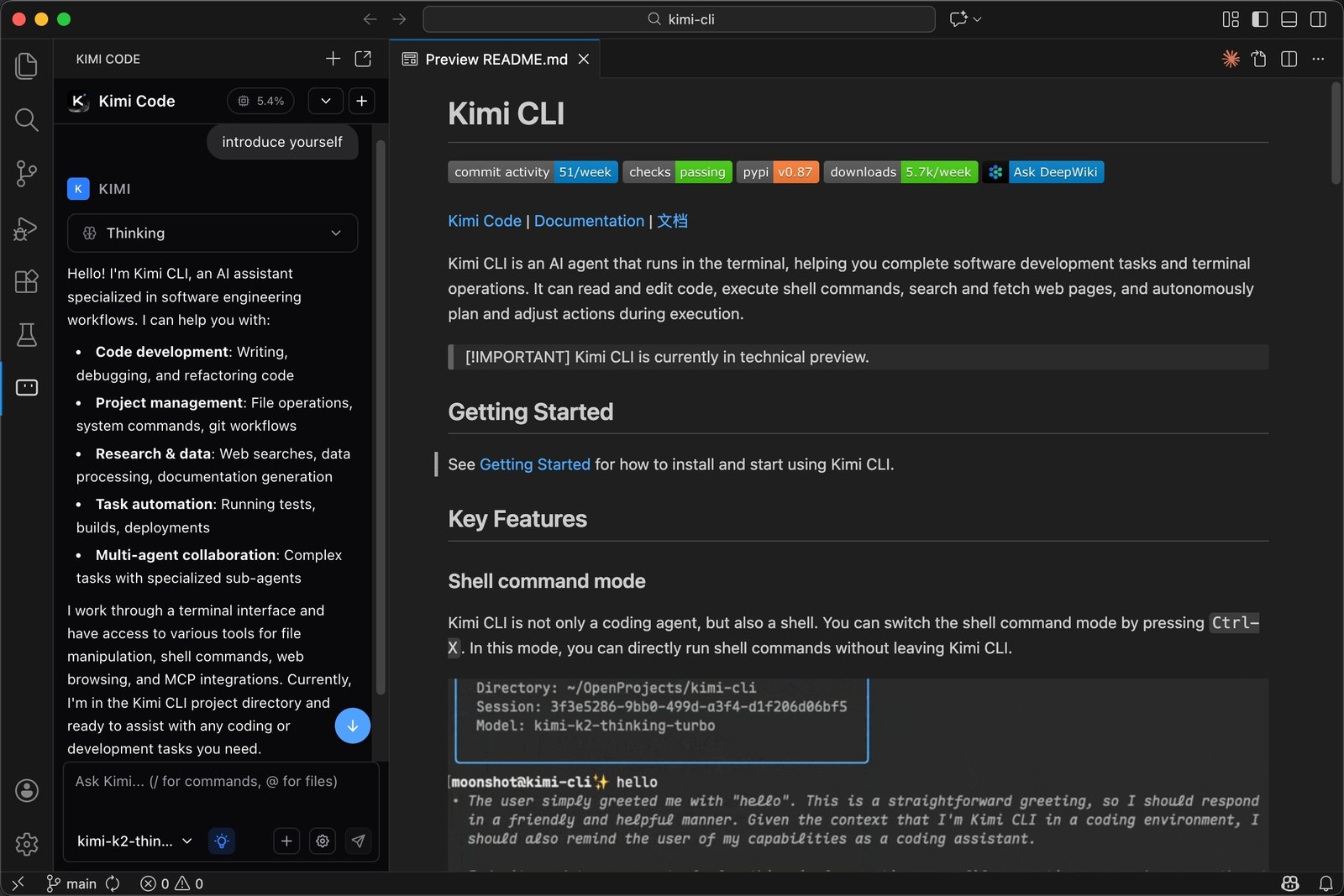
For developers, Kimi Code is useful when the task goes beyond autocomplete: multi-file refactoring, debugging, test generation, repository analysis, project setup, shell automation, MCP-powered tool access, and long-running agent sessions. It can read and edit code, execute shell commands, fetch web content, work inside the terminal, launch a browser UI with kimi web, and integrate with IDEs through ACP.
The plan is not a magic unlimited coding API. Kimi Code quota refreshes every 7 days from the subscription date, unused quota does not carry over, and there is also a rolling 5-hour frequency window. All logged-in devices and API keys share the same quota. If you want production API usage for your own SaaS or enterprise product, the official docs point you to Kimi Platform instead.
What is Kimi Coding Plan?
Kimi Coding Plan is best understood as a user phrase, not the exact official product label. The official site calls the developer product Kimi Code. Kimi Code is described as a coding-focused perk of Kimi membership, built to fit into developer workflows and complete programming tasks faster and more reliably.
Kimi Code has two sides. The first side is the official client experience: Kimi CLI, Kimi Code for VS Code, and Kimi's local browser UI. The second side is third-party tool integration: developers can create API keys in the Kimi Code Console and configure supported coding agents with Kimi Code endpoints and the kimi-for-coding model ID.
This is why the phrase "Kimi coding plan" appears in developer discussions. People are usually asking one of five questions:
- What subscription do I need to use Kimi Code?
- How do I use Kimi in Claude Code, Roo Code, OpenClaw, Kilo Code, Zed, JetBrains, or another coding agent?
- Which endpoint and model name should I configure?
- How does quota work?
- Is Kimi Code different from the normal Kimi Platform API?
The short answer is that Kimi Code is a membership-based coding assistant suite. It is designed for terminal and IDE agent programming. It is not the same billing product as the pay-as-you-go Kimi Platform.
Why Kimi Code matters in 2026
The AI coding market has shifted from simple autocomplete to agentic development. Autocomplete helps finish the next line. Coding agents can inspect a repository, edit multiple files, run commands, debug failures, search documentation, maintain context over a long session, and work through a task loop.
Kimi Code is built for that second world. The official Kimi Code introduction describes an agent-based workflow where the system can proactively plan, execute, and iterate. It targets complex work such as multi-file refactoring, debugging, automation, testing, and external tool integration.
That positioning matters because coding assistants are no longer only editor plugins. Developers now compare full agent loops:
| Capability | Why it matters |
|---|---|
| Long context | Lets the model understand more of the project, not just the current file |
| Tool use | Lets the agent run tests, inspect logs, use MCP servers, and act on feedback |
| Session management | Helps long tasks continue without starting from scratch |
| IDE integration | Keeps coding assistance close to the actual development surface |
| CLI support | Fits terminal-heavy workflows and remote development environments |
| Quota visibility | Helps developers understand when subscription limits affect work |
Kimi's broader product line also matters. The Kimi Help Center says Kimi is an AI assistant from Moonshot AI with built-in web search, deep thinking, multimodal reasoning, and ultra-long context conversations. It also lists Kimi Code as a developer-focused coding assistant suite, including the CLI tool and VS Code extension.
Kimi Code therefore sits inside a larger Kimi ecosystem: chat, agent mode, agent swarm, document processing, slides, sheets, websites, deep research, Kimi Claw, and Kimi API. For developers, the key point is not that Kimi can chat. It is that Kimi Code provides a coding-specific way to put Kimi's model capabilities into a development workflow.
Kimi Code vs Kimi Platform
The most important distinction in the official docs is Kimi Code Platform vs Kimi Platform.
Kimi Code Platform is for membership-based programming scenarios. It uses Kimi Code endpoints, Kimi Code API keys, and the kimi-for-coding model ID. The official docs describe it as best for terminal or IDE agent programming and multi-file engineering tasks.
Kimi Platform is the pay-as-you-go developer platform. It uses a different base URL and a different key system. The docs describe it as best for product integration, enterprise-level calls, and multimodal application development.
| Comparison item | Kimi Code | Kimi Platform |
|---|---|---|
| Main purpose | Coding agents, terminal work, IDE assistance | Product APIs and enterprise integration |
| Billing style | Membership subscription with quotas and rate limits | Pay-as-you-go, top up and use |
| OpenAI-compatible base URL | https://api.kimi.com/coding/v1 | https://api.moonshot.cn/v1 |
| Anthropic-compatible base URL | https://api.kimi.com/coding/ | Depends on platform API docs and selected model |
| Model ID for coding plan tools | kimi-for-coding | Platform model IDs such as Kimi K2.6 variants |
| Best fit | Claude Code-style tools, Kimi CLI, VS Code, Roo Code, IDE agents | SaaS apps, internal tools, production API workloads |
This distinction prevents a lot of setup frustration. If a user enters a Kimi Code key into a Kimi Platform endpoint, authentication can fail. If a user enters a Kimi Platform key into a Kimi Code endpoint, the same problem can happen. The official quick start says the two systems are independent and keys are not interchangeable.
The kimi-for-coding model ID
If you remember one configuration detail, remember this: for Kimi Code third-party tools, use kimi-for-coding.
The official docs say that when calling the Kimi Code API from third-party tools, users should always set the model field to kimi-for-coding, whether they use the OpenAI-compatible or Anthropic-compatible protocol. The docs also say kimi-for-coding is a stable model ID. The backend automatically updates the display name it maps to whenever a newer model is released.
That design is practical. Coding tools are annoying to reconfigure when model versions change. A stable model ID lets Kimi update the underlying coding model while developers keep the same client configuration.
On the Kimi Code product page, the terminal demo shows:
Model: kimi-for-coding (powered by kimi-k2.6)
This gives developers a useful mental model:
kimi-for-codingis the model ID to put into coding-agent configs.- Kimi may update the underlying served model.
- The public product page currently connects that experience to K2.6.
- Kimi Platform API usage may expose other model names and settings.

Kimi K2.6 and coding capability
Kimi K2.6 is the model family currently emphasized across Kimi's coding and agent materials. The Kimi API Platform describes K2.6 as Kimi's latest and most intelligent model, with stronger long-term code writing, improved instruction compliance, better self-correction, stronger autonomous execution, and native multimodal support for text, image, and video input.
The Kimi API docs highlight three areas:
- Long-horizon coding capability.
- Ultra-long 256K context support across several Kimi K2-family models.
- Long-thinking capabilities for multi-step tool invocation and complex reasoning.
The official Hugging Face Kimi K2.6 page describes it as an open-source, native multimodal agentic model that advances long-horizon coding, coding-driven design, proactive autonomous execution, and swarm-based task orchestration. It also says Kimi K2.6 works best with Kimi Code CLI as its agent framework.
For Kimi Code users, this means the plan is not only about a CLI wrapper. The underlying model direction is toward long-running agentic software engineering tasks. That includes reading large codebases, following project conventions, handling multi-step fixes, and using tools.
Developers should still evaluate it realistically. Benchmarks and product pages do not guarantee that a model will solve your repository's exact problems. The quality of a coding-agent session depends on the model, the harness, the prompt, the test suite, permissions, repository structure, and how carefully the human reviews the diff.
Kimi Code CLI
Kimi Code CLI is the terminal agent. The official GitHub README describes it as an AI agent that runs in the terminal and helps complete software development tasks and terminal operations. It can read and edit code, execute shell commands, search and fetch web pages, and autonomously plan and adjust actions during execution.
The official quick start lists three main ways to use Kimi Code CLI:
| Mode | Command | Purpose |
|---|---|---|
| Interactive CLI | kimi | Chat with AI in the terminal and describe coding tasks |
| Browser UI | kimi web | Open a graphical local browser interface |
| Agent integration | kimi acp | Run as an ACP service for IDEs and local agent clients |
Installation on Linux and macOS uses:
``bash curl -LsSf https://code.kimi.com/install.sh | bash ``
Windows PowerShell uses:
``powershell Invoke-RestMethod https://code.kimi.com/install.ps1 | Invoke-Expression ``
The docs say the install script installs uv first, then installs Kimi Code CLI through uv. They also note that Python 3.12 to 3.14 is required, with 3.13 recommended in the resource guide.
After installation, verify the command:
``bash kimi --version ``
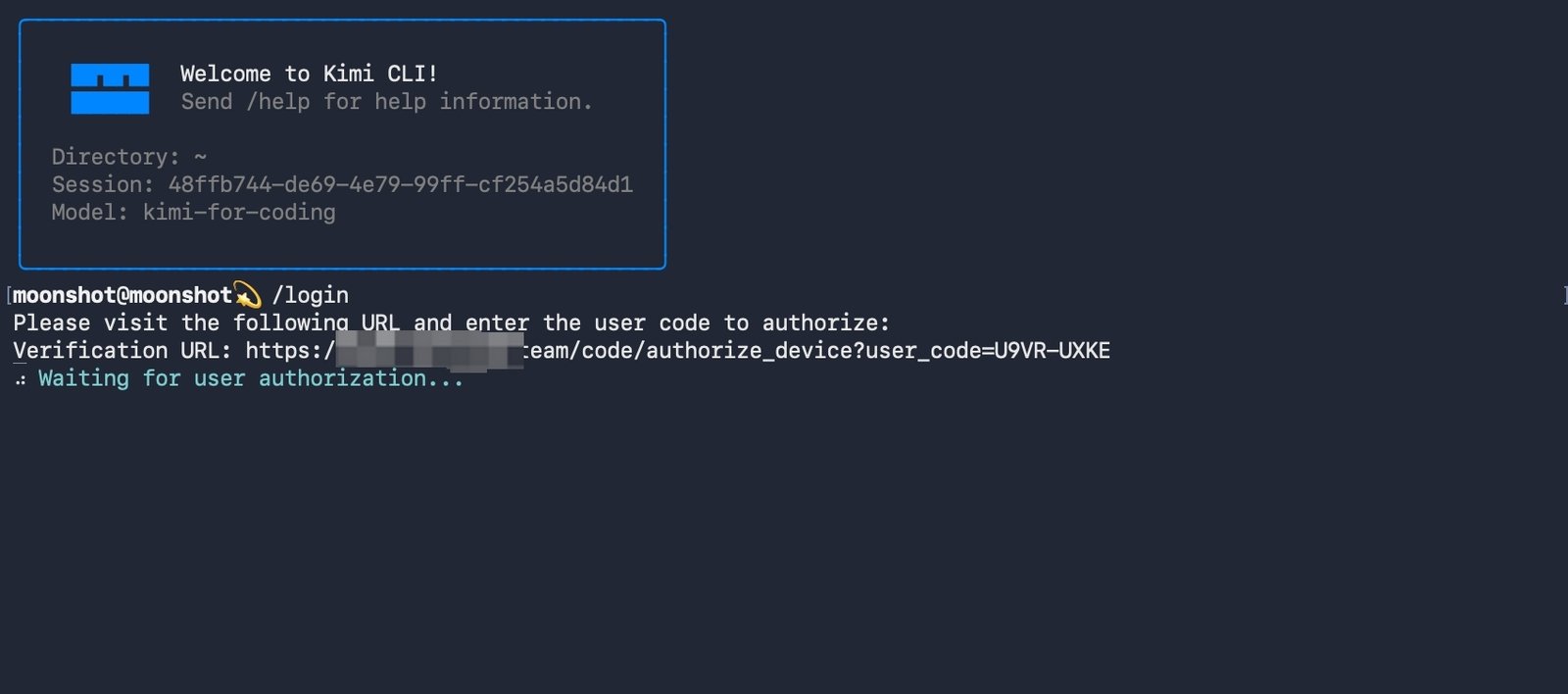
Then start the CLI:
``bash kimi ``
The common command list includes /login, /usage, /help, Ctrl-J for newline, and Ctrl-C or Ctrl-D for interrupt or exit. The docs also mention /init, which can analyze a project and generate an AGENTS.md file when the project does not already have one.
Kimi Code for VS Code and IDEs
Kimi Code is not limited to the terminal. The Kimi Code introduction and GitHub README both emphasize IDE integration.
For VS Code, Kimi provides a native extension. The resource guide says users can install it from the VS Code Marketplace, authenticate, and use Kimi Code directly in the editor. This matters for developers who prefer visual code navigation, side panels, file references, and editor-integrated chat.
For Zed and JetBrains, Kimi Code CLI supports Agent Client Protocol. ACP allows an editor or local agent client to talk to Kimi Code as an agent server. The GitHub README gives an example where the IDE launches:
``json { "agent_servers": { "Kimi Code CLI": { "type": "custom", "command": "kimi", "args": ["acp"], "env": {} } } } ``
The practical benefit is that Kimi can sit behind multiple development surfaces. You can use the CLI for terminal-heavy work, the browser UI for a graphical local experience, VS Code for editor workflows, and ACP-compatible IDEs for agent panel integration.
Third-party coding agents
Kimi Code docs explain that users can configure Kimi Code in third-party frameworks such as Claude Code, Roo Code, OpenClaw, Hermes, and other coding agents. The key requirements are:
- Create an API key in the Kimi Code Console.
- Use the right Kimi Code endpoint.
- Use the
kimi-for-codingmodel ID. - Keep the tool's real identity identifier.
The endpoint table is simple:
| Protocol | Base URL | Common endpoint example |
|---|---|---|
| OpenAI Compatible | https://api.kimi.com/coding/v1 | https://api.kimi.com/coding/v1/chat/completions |
| Anthropic Compatible | https://api.kimi.com/coding/ | https://api.kimi.com/coding/v1/messages |
The docs warn that tampering with the client identifier, often the User-Agent, can violate the rules and may result in suspension of membership benefits. That warning is worth including in any SEO guide because some users try to spoof clients to bypass tool restrictions. Do not do that. Use supported tools and real identifiers.
Quotas, limits, and plan behavior
Kimi Code quota has two layers. First, quota refreshes automatically every 7 days from the subscription date, and unused quota does not carry over. Second, there is a rolling 5-hour frequency window. Even when total quota is available, too many requests in a short period can trigger rate limiting, which recovers as the rolling window moves forward.
The official docs also say all logged-in devices and API keys share the same quota. Requests from CLI, VS Code, and third-party tools all consume the same account quota. Devices inactive for more than 30 days are automatically unbound, and users can run /login again to restore access.
That quota model has practical consequences:
- Running Kimi CLI and a VS Code extension at the same time uses one shared account quota.
- Generating many small agent calls can hit the 5-hour frequency window before weekly quota is exhausted.
- A third-party coding agent may consume multiple requests for one visible task.
- If a membership monthly quota reaches its limit, Kimi Code quota can be frozen until the monthly quota resets or the subscription is upgraded.
- The Kimi Code Console is the place to check remaining quota, rate limit status, API keys, and devices.
For heavy users, the right workflow is to monitor /usage inside the CLI and the Kimi Code Console. Do not assume one prompt equals one model request. Agent tools often break tasks into planning, file reading, editing, command execution, error analysis, and follow-up calls.
Kimi Code membership benefits
Kimi's resource guide describes Kimi Code as a premium membership benefit within the Kimi membership plan. It lists core benefits such as high-speed output, high concurrency, large quota, mainstream coding-agent compatibility, and native IDE integration.
The same guide states:
- Up to 100 tokens per second output speed.
- Support for up to 30 concurrent requests.
- A 5-hour token quota supporting roughly 300 to 1,200 API calls.
- Compatibility with Kimi Code CLI, Claude Code, Roo Code, and other mainstream agents.
- Plug-and-play support for VS Code, Zed, JetBrains, and other major IDEs.
These numbers are useful, but they should be treated as product guidance rather than a universal guarantee. Real output speed and call count can vary by prompt length, tool behavior, context size, model mode, traffic conditions, and whether the task requires long thinking.
Core developer workflows
Kimi Code is strongest when the task needs a loop, not just a snippet. The official resource page gives examples such as large-scale refactoring, complex debugging, automated test generation, project setup, and external tool integration with MCP.
A good first task is bounded:
``text Review the authentication module, identify why password reset tokens expire too early, edit only the relevant files, and run the existing tests. ``
A weak first task is vague:
``text Improve this entire app. ``
Kimi Code can plan, but it still benefits from clear scope. Good prompts tell the agent:
- What problem to solve.
- Which directories are relevant.
- Which files should not be touched.
- Which tests to run.
- Whether it should ask before installing dependencies.
- Whether the output should be a patch, explanation, or both.
For refactoring, ask it to preserve behavior and run tests. For debugging, give logs and reproduction steps. For test generation, specify framework, coverage target, and style. For project setup, state the stack and tooling preferences. For MCP usage, confirm which external tools are safe to query.
MCP and external tools
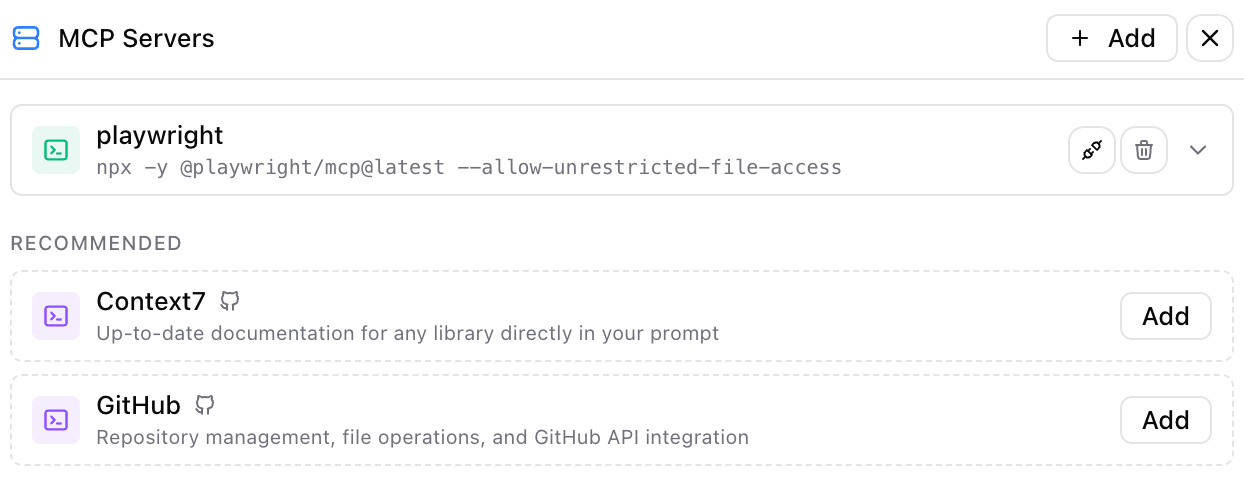
Kimi Code CLI supports MCP, the Model Context Protocol. MCP lets coding agents connect to external tools and data sources, such as documentation services, databases, browser devtools, issue trackers, or internal APIs.
The GitHub README shows commands such as:
``bash kimi mcp add --transport http context7 https://mcp.context7.com/mcp --header "CONTEXT7_API_KEY: ctx7sk-your-key" kimi mcp list kimi mcp remove chrome-devtools kimi mcp auth linear ``
The resource guide says MCP tools follow the same approval mechanism as other Kimi Code operations. That is important for safety. A database MCP server can be useful for slow-query analysis, but it can also expose sensitive data if misconfigured. A browser devtools MCP server can help debug frontend behavior, but it should not be casually pointed at private user sessions.
Use MCP deliberately. Add one server at a time. Prefer read-only credentials where possible. Keep secrets outside the repository. Review tool calls. Avoid connecting production databases unless your team has explicitly approved the workflow.
Browser UI and session management
Kimi Code also offers a browser UI:
``bash kimi web ``
The official quick start says this opens a graphical interface in the local browser, supporting session management, file references, code highlighting, and more. This can be useful when you want a more visual coding-agent session or when you are pair programming and need to share the screen.
Session management matters for long development tasks. The resource guide mentions /sessions, --continue, --session, /clear, and /compact. The status bar shows context usage, and /compact summarizes older conversation history while preserving important information.
Long-context agents can fail when the session becomes bloated. Good session hygiene helps:
- Start a new session for unrelated work.
- Use
/compactwhen a task gets long. - Keep one branch or worktree per task.
- Export or summarize important decisions.
- Restart when the context is confusing the model.
The 256K context window is useful, but it is not a substitute for clear instructions and clean task boundaries.
Security and review workflow
Kimi Code can read and write files, execute shell commands, use MCP tools, and interact with a development environment. That makes it powerful. It also means you need a real review workflow.
The official FAQ says Kimi Code asks for confirmation before modifying files or running potentially destructive commands. It also mentions kimi --yolo, which auto-approves actions. Use YOLO mode only in safe environments such as disposable branches, containers, throwaway repos, or personal experiments where damage is easy to reverse.
A safer workflow looks like this:
- Start from a clean Git branch or worktree.
- Run
kimiinside the intended project. - Ask for a plan before edits.
- Limit the files or directories in scope.
- Approve commands intentionally.
- Run tests independently when the agent is done.
- Review the full diff before committing.
- Never let the agent access production secrets unless the environment is explicitly designed for that.
Protect .env files, private keys, customer data, deployment tokens, SSH credentials, and production databases. If you connect MCP servers, use scoped credentials and read-only access where possible. Do not paste API keys into prompts. Do not commit Kimi Code keys or Kimi Platform keys to your repository.
Official Kimi video
The official MoonshotAI Kimi K2.6 Hugging Face page includes a demo video used in its visual-content API example. It is relevant to Kimi coding workflows because K2.6 supports multimodal input and the official page ties the model to coding-agent scenarios and Kimi Code CLI.
Kimi's official docs also describe video understanding through the Kimi K2.6 API. For coding workflows, this matters because a multimodal agent can inspect UI screenshots or short videos and help reproduce interface behavior, identify visual bugs, or generate frontend code from a visual reference.
Kimi Coding Plan vs other coding plans
Kimi Code competes with a growing category of coding-agent subscriptions and coding-focused model plans. The important comparison is not only price. It is workflow fit.
Kimi Code is attractive if:
- You want a terminal-first coding agent.
- You want a native VS Code extension.
- You want Kimi's
kimi-for-codingmodel ID in third-party tools. - You work on multi-file tasks and long sessions.
- You value a 256K context window.
- You want ACP-based IDE integration.
- You want MCP support inside the coding agent.
Kimi Platform is better if:
- You are building a product around Kimi API calls.
- You need pay-as-you-go billing.
- You need team or enterprise API management.
- You need production app integration rather than personal coding assistance.
Other coding agents may be better if:
- Your team already standardizes on another IDE assistant.
- You need a specific model vendor.
- You need strict enterprise governance not covered by membership plans.
- You want fully local inference rather than hosted model access.
The right choice depends on how you code. If you live in the terminal and want a Kimi-powered agent that can plan, edit, run commands, and integrate with IDEs, Kimi Code is a strong candidate. If you are building a customer-facing API product, use Kimi Platform instead.
Practical setup checklist
Before using Kimi Code seriously, run this checklist:
| Step | Action |
|---|---|
| 1 | Confirm you want Kimi Code membership benefits, not Kimi Platform pay-as-you-go |
| 2 | Install Kimi CLI with the official install command |
| 3 | Run kimi --version |
| 4 | Start kimi and complete /login |
| 5 | Run /usage to understand your quota |
| 6 | Test with a small repository task |
| 7 | Add VS Code, ACP, or third-party tool integration only after CLI works |
| 8 | Use the Kimi Code Console to create API keys for supported third-party tools |
| 9 | Use kimi-for-coding as the model ID |
| 10 | Keep Git clean and review every diff |
Do not start by wiring Kimi Code into every tool at once. First prove that the CLI works. Then add VS Code. Then add third-party tools. That sequence makes configuration errors easier to diagnose.
SEO-focused FAQ
Is Kimi Coding Plan the same as Kimi Code?
Kimi Coding Plan is a common search phrase, but the official product name is Kimi Code. Kimi Code is a coding-focused membership benefit from Kimi and Moonshot AI.
What model should I use for Kimi coding tools?
For Kimi Code third-party tool configuration, use kimi-for-coding. The official docs say this stable model ID maps to the latest supported coding model on the backend.
What is the Kimi Code endpoint?
For OpenAI-compatible tools, use https://api.kimi.com/coding/v1. For Anthropic-compatible tools, use https://api.kimi.com/coding/. Do not confuse these with the Kimi Platform endpoint https://api.moonshot.cn/v1.
Does Kimi Code work in VS Code?
Yes. Kimi Code has a VS Code extension, and the official docs also describe integration with Zed and JetBrains through Agent Client Protocol.
Does Kimi Code support Claude Code or Roo Code workflows?
The official Kimi Code docs mention third-party coding agents and compatibility with tools such as Claude Code and Roo Code. Configuration depends on the tool, endpoint style, API key, and model ID.
How does Kimi Code quota work?
Kimi Code quota refreshes every 7 days from the subscription date. Unused quota does not carry over. There is also a rolling 5-hour frequency window, and all devices and API keys share the same account quota.
Is Kimi Code suitable for production APIs?
Kimi Code is designed for programming scenarios such as terminal and IDE agent work. For product integration, enterprise-level calls, and pay-as-you-go API usage, the official docs point users to Kimi Platform.
Can Kimi Code run shell commands?
Yes. The official GitHub README says Kimi Code CLI can execute shell commands and act as a shell mode through Ctrl-X. It can also read and edit code, search and fetch web pages, and plan actions.
Sources
- Kimi Code product page
- Kimi Code overview docs
- Kimi Code CLI quick start
- Kimi Code introduction
- Kimi Help Center overview
- Kimi K2.6 API Platform guide
- MoonshotAI/kimi-cli GitHub repository
- moonshotai/Kimi-K2.6 on Hugging Face
- Moonshot AI about page
Before you move on
Global AI workflow guidance. Use this short checklist to turn the article into action.
- Check whether the tool can access private files or account data.
- Verify factual claims against primary sources before publishing.
- Keep a human review step for work that affects money, school, or customers.
This guide is written for practical user safety. For account, platform, or legal decisions, confirm critical steps with the official help center or your service provider.