A detailed MiniMax Coding Plan guide explaining the current MiniMax Token Plan, M2.7 for AI coding tools, setup, quotas, credits, safety, official media, videos, and developer use cases.
Last checked: May 21, 2026. MiniMax's official documentation now uses the name "Token Plan" for the subscription that extends the older Coding Plan. This article uses the search-friendly term "MiniMax Coding Plan" while explaining the current official Token Plan, MiniMax-M2.7, AI coding tool integrations, quotas, credits, and safety considerations. Feature image credit: official MiniMax Token Plan hero image from MiniMax API Docs / MiniMax.
Quick answer
MiniMax Coding Plan is the name many developers still use when they talk about MiniMax's subscription-based access for AI coding workflows. In the current official MiniMax documentation, the product is presented as the MiniMax Token Plan. The Token Plan extends the former Coding Plan by covering more than language-model coding usage. A single Token Plan Key can be used for MiniMax text, speech, image, video, and music model coverage, subject to the plan's quota rules.
For coding, the main model is MiniMax-M2.7. MiniMax describes M2.7 as a model with strong code understanding, multi-turn dialogue, and reasoning capabilities. The official docs show how to use M2.7 in AI coding tools such as Claude Code, OpenClaw, Cursor, TRAE, Cline, OpenCode, Kilo Code, Roo Code, Droid, Zed, and other tools that can point to compatible Anthropic or OpenAI-style endpoints.
The practical value is simple: instead of relying only on pay-as-you-go token billing, developers can use a subscription-style Token Plan Key with request quotas. Standard M2.7 quotas reset on a rolling 5-hour window. Non-text models such as speech, image, video, and music use daily quotas. Credits can cover usage in the same resource coverage when available. MiniMax is careful to state that Token Plan Keys are separate from standard pay-as-you-go API keys, so users must choose the right key for the right billing method.
That makes MiniMax Token Plan useful for developers who run interactive AI coding sessions, test agent workflows, connect M2.7 to terminal coding agents, or build multimodal prototypes that need more than code generation. It is not the same thing as a production-grade unlimited API contract. MiniMax's FAQ says Token Plan is designed for individual, interactive developer use and recommends pay-as-you-go for production use.
What is MiniMax Coding Plan?
MiniMax Coding Plan is best understood as the earlier developer-facing name for MiniMax's subscription access aimed at coding and agent workflows. The official docs now redirect the old Coding Plan overview to Token Plan. That rename matters because people still search for "MiniMax Coding Plan", "MiniMax coding subscription", and "MiniMax M2.7 coding plan", but the up-to-date official product page is Token Plan.
The Token Plan is a subscription and credits system attached to a Token Plan Key. That key is not interchangeable with MiniMax's standard pay-as-you-go API key. A Token Plan Key can exist before a user has paid resources. It becomes usable when the user has a Token Plan seat assigned or Credits access. This separation prevents confusion between quota-based subscription use and balance-based API billing.
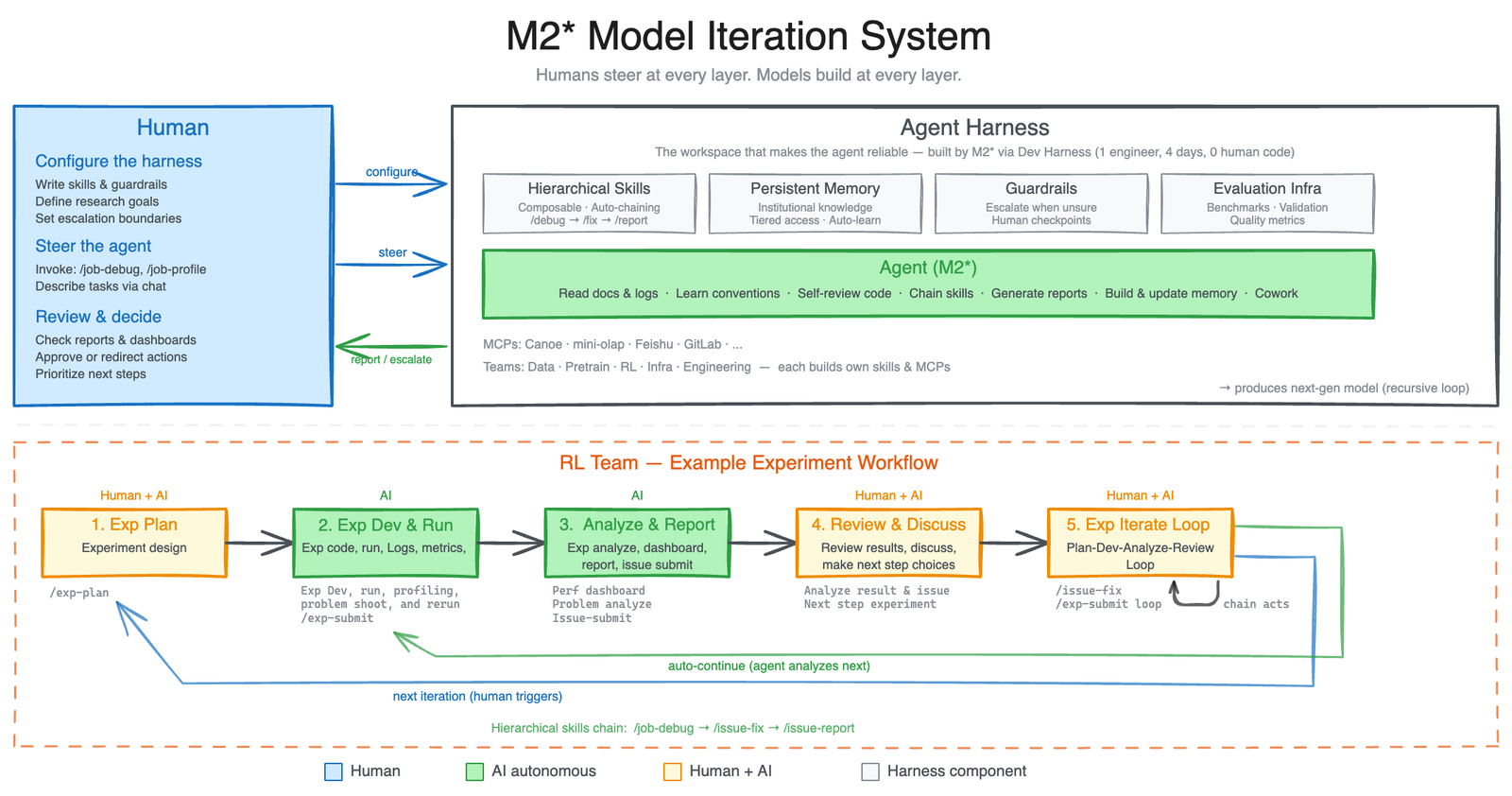
For software developers, the important part is M2.7. MiniMax-M2.7 is the current coding and agent-focused text model highlighted in MiniMax's docs and announcement material. MiniMax says M2.7 can build complex agent harnesses, complete elaborate productivity tasks, use Agent Teams, follow complex Skills, and perform dynamic tool search. In software engineering tasks, MiniMax highlights use cases such as log analysis, bug troubleshooting, refactoring, code security, machine learning, Android development, production debugging, and full project delivery.
The "Coding Plan" search term therefore points to a broader product than the old name suggests. It is not only a coding model subscription. It is a plan for using MiniMax's model family under a quota model, with M2.7 as the central text and coding model, and with optional access to non-text modalities depending on plan tier.
Why MiniMax renamed the Coding Plan to Token Plan
The old name was narrow. "Coding Plan" suggested a package only for programming assistants. The current Token Plan covers a wider surface: text, speech, image, video, music, and image understanding or web-search capabilities through related tooling. MiniMax's own overview says the Token Plan extends the former Coding Plan by providing usage beyond language models.
That change reflects how developer workflows are changing. A modern coding agent may start by reading code, but it often needs to handle more than source files. It may inspect screenshots, generate UI assets, produce a demo video, summarize a meeting transcript, create voice output, search the web, or produce documentation. A plan limited to text-only code generation would not match that workflow.
For SEO and user clarity, the right wording is:
| Search term | Current official wording | Meaning |
|---|---|---|
| MiniMax Coding Plan | MiniMax Token Plan | The subscription-style quota plan that extended the older coding plan |
| MiniMax coding model | MiniMax-M2.7 | The current M-series model emphasized for coding and agent tools |
| Coding Plan key | Token Plan Key | The key used for Token Plan quotas and Credits |
| API key | Pay-as-you-go API key | A separate key that bills by actual API usage |
This article uses both terms because users may still search for the older phrase. But if you are configuring a tool today, follow the current Token Plan documentation.
MiniMax-M2.7 and AI coding tools
MiniMax-M2.7 is the model that makes the Token Plan interesting for coding. The official "M2.7 for AI Coding Tools" guide states that the model has strong code understanding, multi-turn dialogue, and reasoning capabilities. More importantly, the guide shows how M2.7 can be wired into actual developer tools rather than used only from a web chat interface.
The official integration guide covers several tool families:
| Tool category | Examples listed by MiniMax | Why developers care |
|---|---|---|
| Terminal coding agents | Claude Code, OpenClaw, OpenCode, Droid | Useful for repository-level coding, shell commands, and agent loops |
| IDE or editor tools | Cursor, Zed, TRAE | Useful when developers want M2.7 inside an editor workflow |
| Extension-based assistants | Cline, Roo Code, Kilo Code | Useful for VS Code-style tool calling and project edits |
| Custom API integrations | Anthropic-compatible and OpenAI-compatible routes | Useful when teams already have internal tooling |
The recommended Claude Code setup in the MiniMax docs uses a compatible Anthropic API endpoint. International users are instructed to use https://api.minimax.io/anthropic, while users in China are instructed to use https://api.minimaxi.com/anthropic. The docs also warn users to clear conflicting Anthropic environment variables before configuration.
This compatibility strategy is important. Developers do not need every tool to build a MiniMax-specific integration from scratch. If a tool can use a compatible endpoint and a model name, it can often be pointed at M2.7 with the right base URL, authentication token, and model settings.
How the Token Plan works
The Token Plan has three concepts that users need to understand before they connect it to a coding agent.
First, the Token Plan Key is the key used for both Token Plan quota and Credits. It is not the same as a standard Open Platform pay-as-you-go API key. If a tool is configured with the wrong key type, users may see unexpected billing behavior or access errors.
Second, usage is measured differently by model type. M2.7 and M2.7-highspeed are measured by request count in a 5-hour rolling reset window. Non-text models such as speech, image, video, and music are measured by daily quotas. That means a long coding session and a batch of image generations are governed by different quota logic.
Third, Credits can extend usage within Token Plan resource coverage. MiniMax's FAQ says that if a user has both Token Plan quota and Credits, the Token Plan quota is used first, then Credits can automatically cover overflow within Token Plan coverage. For usage outside Token Plan coverage, users need a pay-as-you-go API key.
The official plan table lists these M2.7 text quotas:
| Plan group | Model | Quota style |
|---|---|---|
| Starter | M2.7 | 1,500 requests per 5 hours |
| Plus | M2.7 | 4,500 requests per 5 hours |
| Max | M2.7 | 15,000 requests per 5 hours |
| Plus-Highspeed | M2.7-highspeed | 4,500 requests per 5 hours |
| Max-Highspeed | M2.7-highspeed | 15,000 requests per 5 hours |
| Ultra-Highspeed | M2.7-highspeed | 30,000 requests per 5 hours |
MiniMax also lists daily access levels for non-text models. Availability varies by plan. The key point for developers is not only the headline quota. It is the reset model. Interactive coding usage recovers as the 5-hour window rolls forward. Non-text usage recovers daily.
Standard vs High-Speed plans
MiniMax's FAQ describes the High-Speed subscription as a plan that supports the MiniMax-M2.7-highspeed model. The stated difference is speed, not output quality. MiniMax says MiniMax-M2.7-highspeed delivers the same model capability and output quality as M2.7 while offering considerably higher inference output speed.
For coding agents, speed can matter more than people expect. A coding tool may make many model calls during a single visible user request. It may inspect files, summarize context, propose edits, reflect on failures, run tests, and correct mistakes. Slow inference compounds across those steps.
Standard plans make sense when:
- You are testing MiniMax for the first time.
- Your coding sessions are occasional.
- You can tolerate slower agent responses.
- You want subscription predictability more than maximum throughput.
High-Speed plans make sense when:
- You use AI coding tools every day.
- You run long interactive sessions.
- You care about terminal latency.
- You connect M2.7 to agents that call tools repeatedly.
- You need more quota headroom.
The safest advice is to start with the smallest plan that fits your real workflow, measure how often you hit limits, then upgrade only when speed or quota is clearly the bottleneck.
How to get started
The official Token Plan quick start is short. First, visit Billing > Token Plan in the MiniMax platform and get your Token Plan Key. Second, buy an individual Token Plan subscription, buy Credits, or use resources assigned by a Team Owner or Admin. Third, test M2.7 through the compatible Anthropic API if you want to confirm the key works before connecting it to a coding tool.
For a developer, a practical first setup looks like this:
- Create or log in to your MiniMax account.
- Go to the Token Plan section and obtain the Token Plan Key.
- Decide whether you are using Token Plan quota, Credits, or pay-as-you-go.
- Choose one coding tool to configure first.
- Set the correct base URL for your region.
- Set the model name to
MiniMax-M2.7or the high-speed variant if your plan supports it. - Test a small repository task.
- Check usage after the session.
For the Anthropic-compatible route, the docs show this basic environment pattern:
``bash export ANTHROPIC_BASE_URL=https://api.minimax.io/anthropic export ANTHROPIC_API_KEY=${YOUR_API_KEY} ``
MiniMax's Claude Code guide also uses ANTHROPIC_AUTH_TOKEN in some tool-specific settings. The exact variable depends on the tool. Read the MiniMax integration page and the tool's own documentation before assuming every client uses the same variable name.
Setting up MiniMax in coding tools
MiniMax's coding-tool docs are useful because they avoid a common problem: many AI providers publish model pages but leave developers to guess how to wire the model into real tools. MiniMax gives tool-by-tool instructions.
For Claude Code, the official guide recommends configuring the Anthropic-compatible endpoint, setting the model to MiniMax-M2.7, and checking /status and /model inside the TUI. That verification step matters because environment variables can silently override settings files.
For OpenClaw, the guide describes installing OpenClaw and selecting MiniMax Token Plan during configuration. This is relevant because OpenClaw is an agent system rather than a simple chat client. In that kind of workflow, a predictable quota plan can make agent experimentation easier.
For Cursor, TRAE, Cline, Roo Code, OpenCode, Kilo Code, Droid, and Zed, the setup usually follows the same idea: install the tool, configure an API host, add a key, set the model name, and verify that the tool is actually calling MiniMax. Some tools use an OpenAI-compatible configuration style. Others use Anthropic-compatible settings.
The most common setup mistakes are:
- Using a standard pay-as-you-go key when you meant to use the Token Plan Key.
- Using the China endpoint from outside China or the international endpoint from China.
- Forgetting to clear older Anthropic or OpenAI environment variables.
- Setting the wrong model name.
- Assuming all tools support the same provider configuration fields.
- Running a high-concurrency workflow on a plan meant for individual interactive use.
The fix is boring but reliable: configure one tool at a time, test with a small prompt, inspect the tool status page or model command, then check usage in MiniMax Billing > Token Plan.
What developers can build with MiniMax Coding Plan
MiniMax Token Plan is best suited to interactive and experimental developer workflows. It is especially useful when the developer already uses AI coding agents and wants a more predictable path than pure token billing.
Strong use cases include:
- Repository exploration and codebase summaries.
- Bug triage with logs and stack traces.
- Small feature implementation.
- Unit test generation.
- Refactoring suggestions.
- Code review assistance.
- Documentation generation.
- Prototyping browser or mobile apps.
- Agent harness experimentation.
- Multimodal app prototypes that combine text, image, video, speech, or music models.
MiniMax's M2.7 announcement emphasizes deeper software engineering work, including production debugging, code security, ML workflows, Android development, repo-level generation, and multi-agent collaboration. Those are ambitious claims, and developers should test them against their own repositories rather than treating benchmark numbers as a guarantee.
The best way to evaluate M2.7 is to give it a realistic but bounded task:
- Ask it to inspect a bug report and identify likely files.
- Ask it to propose a plan before editing.
- Let it modify a small set of files.
- Run the project's real tests.
- Review the diff manually.
- Compare its result with your current coding assistant.
This workflow tests the model's actual value: not whether it can write a function in isolation, but whether it can navigate messy code, preserve project style, and recover when checks fail.
Official MiniMax videos
MiniMax's M2.7 announcement includes official MP4 demos showing software engineering and generated application examples. These are useful for understanding the kind of agentic workflow MiniMax is positioning M2.7 around.
Treat videos as product demonstrations, not independent benchmarks. They show what the model and agent harness can do in selected scenarios. Your own result will depend on the tool, prompt, repository quality, test suite, permissions, context, and model settings.
M2.7 benchmarks and what they mean
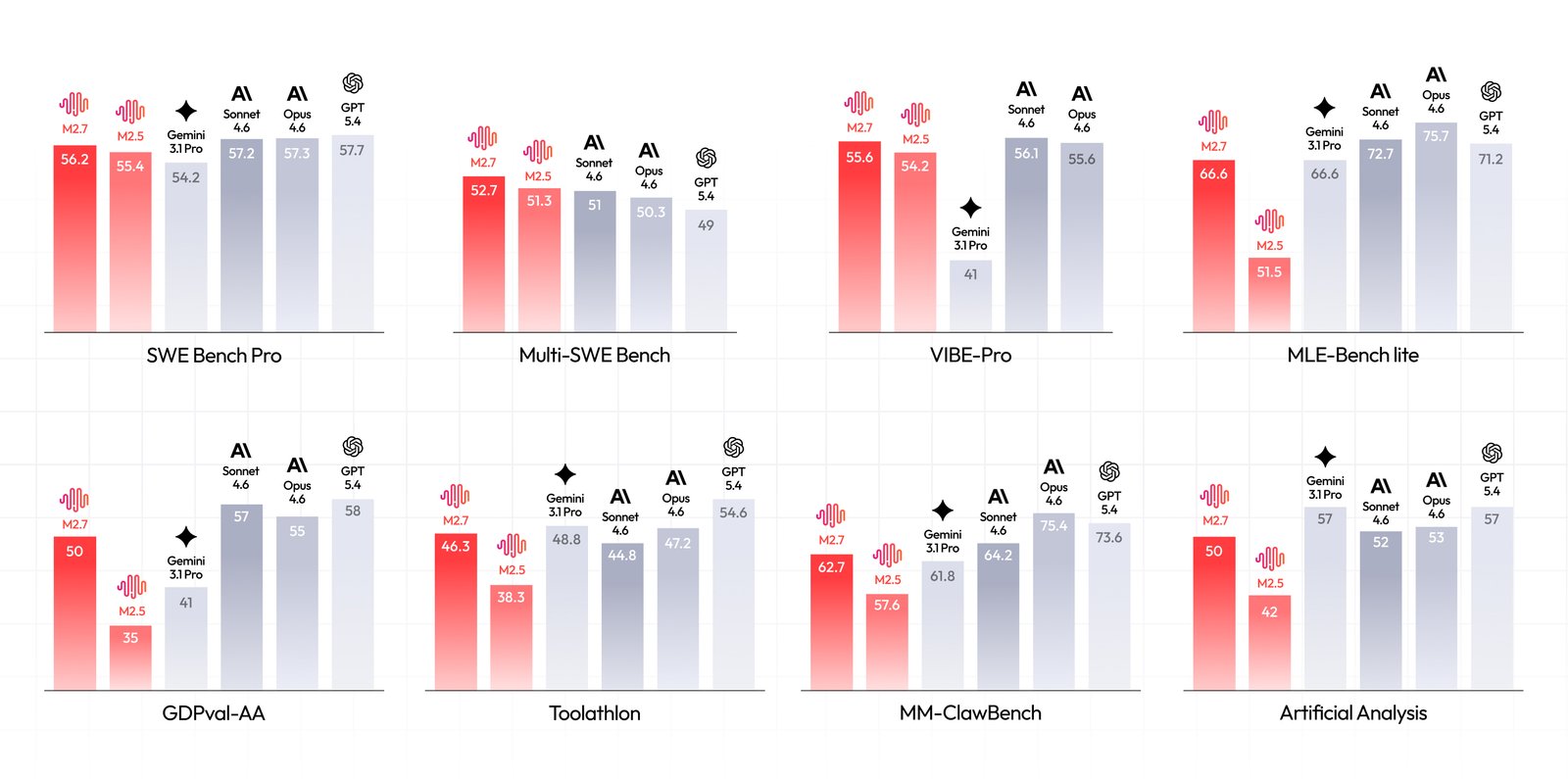
MiniMax reports strong M2.7 results across software engineering and agent benchmarks. In the official M2.7 announcement and GitHub repository, MiniMax says M2.7 scored 56.22% on SWE-Pro, 55.6% on VIBE-Pro, 57.0% on Terminal Bench 2, and 62.7% on MM ClawBench. It also highlights SWE Multilingual, Multi SWE Bench, GDPval-AA, Toolathon, MLE Bench Lite, and other results.
Benchmarks help compare models, but they do not replace hands-on testing. A model can rank well and still fail your repository if:
- The codebase has weak tests.
- The task depends on private context.
- The agent tool cannot access the right files.
- The prompt leaves too much scope open.
- The model gets trapped in an edit-test loop.
- The harness allows risky shell behavior.
M2.7's benchmark story is strongest when viewed through the lens of agentic work. MiniMax is not only saying the model writes code. It is saying the model is designed for complex workflows, skills, tool use, and multi-step execution. That makes the surrounding coding tool very important. The same model can feel different in Claude Code, OpenClaw, Cursor, Cline, OpenCode, or a custom internal harness.
Credits, teams, and usage management
Token Plan gets more flexible when you understand Credits and Teams. MiniMax says every user has a Default Team. The Default Team is personal: it has one member, the user is the sole owner, and it can hold individual Token Plan subscriptions and Credits. Regular Teams can assign Token Plan seats to members and share Credits from a Team Credits pool.
Credits can be used without a Token Plan subscription seat. If there is no Token Plan seat but Credits access exists, usage within Token Plan coverage is charged to Credits. If both quota and Credits exist, quota is consumed first and Credits can cover overflow.
This is useful for teams experimenting with AI coding tools. A team owner can assign seats or provide shared Credits without requiring every developer to manage billing independently. But it also creates governance questions:
- Who owns the Token Plan Key?
- Which repositories may use it?
- Which tools may store it?
- Can contractors or temporary users access it?
- What happens when a developer leaves the team?
- Is production use routed through pay-as-you-go instead?
For professional environments, treat MiniMax keys like any other API credential. Store them in approved secret managers or local environment files with proper permissions. Do not commit them to source control. Do not paste them into prompts. Rotate them if they are exposed.
Rate limits and production suitability
MiniMax's FAQ is clear that Token Plan is designed for individual, interactive developer use. It recommends pay-as-you-go for production use. That distinction matters.
Interactive coding use has a human in the loop. A developer asks for a change, reviews output, runs checks, and decides whether to continue. Production use may involve automated traffic, customer-facing workloads, batch jobs, scheduled agents, or multi-user concurrency. Those are different risk profiles.
Token Plan limits include:
- Request caps for text models on a 5-hour rolling window.
- Daily quotas for non-text models.
- Dynamic rate limits during peak hours.
- RPM and TPM throttling.
- Weekly usage quota rules for some accounts.
- Different concurrency expectations by plan tier.
MiniMax's FAQ says peak-hour dynamic rate limiting may occur, and it gives approximate continuous agent support by tier in the traffic rules. This is a signal that users should avoid treating Token Plan as an unlimited compute pool for automated high-concurrency jobs.
If you are building a commercial product, use the production billing path and confirm the appropriate limits, terms, logging, data handling, and support expectations. If you are using an AI coding agent interactively, Token Plan may be a good fit.
Security and safe coding workflow
An AI coding model is not dangerous by itself. The risk comes from the harness around it: file access, shell commands, secrets, network calls, deployment tools, and unreviewed edits. MiniMax M2.7 is commonly used through coding tools that can read files, edit repositories, run tests, and call external commands. That means your workflow needs guardrails.
Use a Git branch or disposable worktree for every agent session. Start from a clean status. Ask the model to explain its plan before editing. Keep tasks scoped. Let it run tests, but inspect the commands first if your tool supports confirmation. Review the diff manually. Do not merge code solely because an agent says tests passed.
Protect secrets. Coding agents often read nearby files to gather context. Keep .env, API keys, SSH keys, production configs, and customer data outside the agent's accessible path when possible. If the tool supports path deny lists or permission prompts, use them.
Watch for supply-chain changes. Agents may install packages, update lockfiles, or recommend dependencies. That can be useful, but it also expands risk. Review new dependencies, scripts, postinstall behavior, and license terms.
Separate experimentation from production. The Token Plan is good for interactive development, but production systems need stricter controls, predictable billing, observability, retries, rate-limit handling, and incident response.
MiniMax Coding Plan vs pay-as-you-go
The choice between Token Plan and pay-as-you-go depends on usage style.
Token Plan is attractive when:
- You run interactive coding sessions.
- You want subscription-style predictability.
- You use a coding agent for repeated small tasks.
- You want M2.7 access in popular developer tools.
- You want to experiment with multimodal MiniMax models under one key.
Pay-as-you-go is better when:
- You are building production services.
- Usage is customer-facing or automated.
- You need fewer quota-window surprises.
- You need billing directly tied to actual API consumption.
- You run workloads outside Token Plan coverage.
Many developers may use both. Token Plan for personal or team coding assistance, pay-as-you-go for production applications.
SEO-focused FAQ
Is MiniMax Coding Plan the same as MiniMax Token Plan?
The current official product is MiniMax Token Plan. MiniMax's documentation says Token Plan extends the former Coding Plan. Many users still search for "MiniMax Coding Plan", but the up-to-date docs and subscription pages use Token Plan.
Which model does MiniMax Coding Plan use for AI coding?
The main model for coding workflows is MiniMax-M2.7. High-Speed plans support MiniMax-M2.7-highspeed, which MiniMax says provides the same model capability and output quality with faster inference.
Does MiniMax Token Plan work with Claude Code?
Yes. MiniMax provides official instructions for using MiniMax-M2.7 in Claude Code through a compatible Anthropic API configuration. The docs recommend checking /status and /model after setup.
Does MiniMax Token Plan work with Cursor and Cline?
MiniMax's official AI coding tools guide includes Cursor and Cline, along with OpenClaw, TRAE, OpenCode, Kilo Code, Roo Code, Droid, Zed, and other tools. Setup details vary by tool.
Is MiniMax Token Plan suitable for production?
MiniMax's FAQ says Token Plan is designed for individual, interactive developer use and recommends pay-as-you-go for production use.
What happens when I hit the MiniMax M2.7 limit?
For M2.7, the request limit uses a 5-hour rolling window. When a user reaches the limit, MiniMax lists options such as using Credits, upgrading, switching to pay-as-you-go, or waiting for the window to reset.
Sources
- MiniMax Token Plan overview
- MiniMax Token Plan quick start
- MiniMax Token Plan FAQ
- MiniMax M2.7 for AI Coding Tools
- MiniMax M2.7 official announcement
- MiniMax-AI/MiniMax-M2.7 on GitHub
Before you move on
Global AI workflow guidance. Use this short checklist to turn the article into action.
- Check whether the tool can access private files or account data.
- Verify factual claims against primary sources before publishing.
- Keep a human review step for work that affects money, school, or customers.
This guide is written for practical user safety. For account, platform, or legal decisions, confirm critical steps with the official help center or your service provider.