A detailed SEO guide to vibe coding, covering its meaning, Andrej Karpathy origin, AI coding agents, GitHub Copilot, Codex, Claude Code, Gemini Code Assist, OpenCode, MCP, practical workflow, security risks, examples, media, videos, and best practices.
Last checked: May 21, 2026. This article uses official and primary sources including Merriam-Webster, GitHub, Visual Studio Code, OpenAI, Anthropic Claude Code, Google Gemini Code Assist, OpenCode, and the Model Context Protocol announcement. Feature image credit: official GitHub Copilot agent mode and MCP support image from the GitHub Blog. Credit: GitHub / Microsoft.
Vibe coding is the AI-assisted software development style where a person describes what they want in natural language and lets an AI coding tool generate, modify, debug, and often run the code. The phrase became popular after Andrej Karpathy described a new kind of coding where the developer gives in to the flow of AI assistance and focuses more on intent than manually writing every line. Merriam-Webster records the term's first known use in 2025 and notes its association with Karpathy's February 2025 post.
The idea sounds playful, but it describes a serious shift in software development. Developers, founders, designers, students, and non-technical operators are now using AI tools to turn ideas into working prototypes faster than before. A person can ask an AI coding agent to build a landing page, connect an API, fix a bug, write tests, refactor a component, or explain a codebase. The human supplies direction, taste, constraints, and review. The AI supplies speed, boilerplate, suggestions, and sometimes full implementation.
This detailed vibe coding guide explains what vibe coding means, where the term came from, how it works, which tools enable it, what media and official videos show the trend, how to use it responsibly, and where it can go wrong. It is written for readers searching for a practical, balanced, SEO-friendly explanation rather than a hype post.
Quick Answer: What Is Vibe Coding?
Vibe coding is a way of building software by describing goals to AI coding tools instead of manually writing every line yourself. The developer works through conversation, prompts, screenshots, error messages, and iterative feedback. The AI generates or edits the code, while the human reviews the result, tests the behavior, and guides the next step.
In simple terms, vibe coding means saying what you want and steering the AI toward it.
That does not mean code no longer matters. It means the human role changes. Instead of spending most of the time typing syntax, the developer spends more time defining intent, checking output, deciding architecture, testing behavior, and correcting the AI when it misunderstands the goal.
Good vibe coding still requires judgment. It is not the same as blindly accepting whatever the model writes. The best version is a fast feedback loop: prompt, inspect, test, refine, and ship only after the work is understood well enough to trust.
Why Vibe Coding Became Popular
Vibe coding became popular because AI coding tools crossed a usability threshold. Early AI code completion helped developers move faster, but it still required the developer to understand the surrounding code and fit suggestions into a larger system. Newer tools can work across multiple files, use terminal commands, inspect errors, understand screenshots, and produce larger chunks of working software.
That change makes software creation feel less like writing syntax and more like directing a capable but imperfect assistant.
Several trends came together:
- Large language models became better at code generation and debugging.
- AI coding assistants moved from autocomplete into chat, edit, and agent modes.
- Tools such as GitHub Copilot, OpenAI Codex, Claude Code, Gemini Code Assist, OpenCode, Cursor-style editors, and Windsurf made agentic workflows easier to access.
- Developers became comfortable asking AI to explain unfamiliar code.
- Non-developers started using AI to build small apps, internal tools, dashboards, automations, and prototypes.
- The market began talking about AI agents as collaborators rather than only text generators.
The phrase "vibe coding" captured that cultural shift. It made the practice sound casual, creative, and accessible. It also created controversy, because casual software creation can become dangerous when people run or deploy code they do not understand.
Origin of the Term Vibe Coding
Merriam-Webster notes that the term was apparently introduced by AI researcher Andrej Karpathy in a February 2025 post on X. The quoted phrase describes a style where someone fully gives in to the vibes and forgets that the code exists. That line became the core cultural reference for vibe coding.
The wording matters because it points to both the promise and the problem.
The promise is creative flow. A person can move from idea to implementation without getting stuck on syntax, boilerplate, or framework details. The problem is that forgetting code exists can be risky when the software affects real users, money, private data, security, or infrastructure.
So the useful definition is not "ignore the code forever." A more professional definition is: vibe coding is AI-assisted development where natural-language intent drives the creation of software, while human review and testing decide whether the result is acceptable.
That distinction separates hobby vibe coding from responsible engineering.
Official Media and Videos
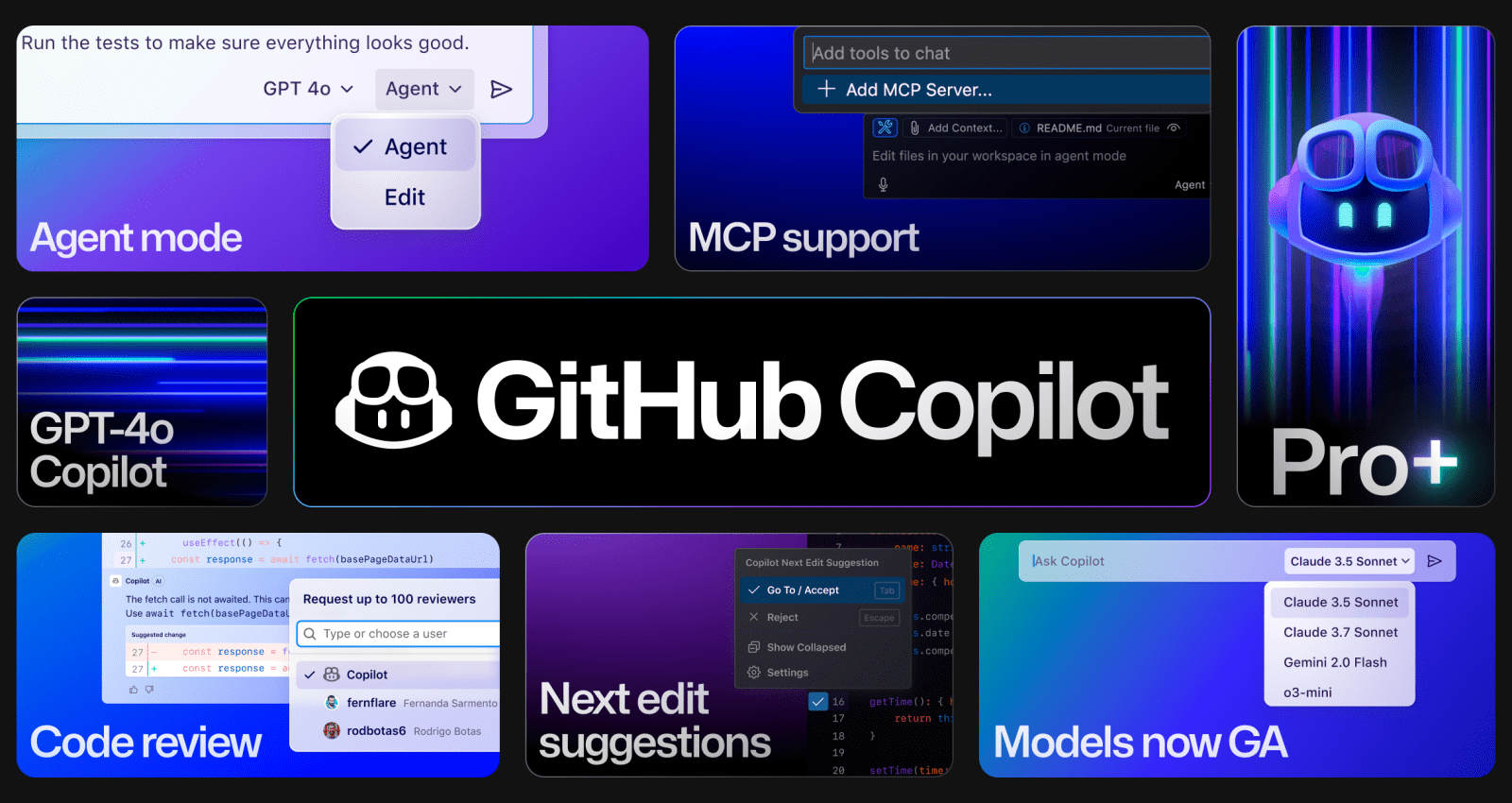
The feature image below comes from GitHub's official article "Vibe coding with GitHub Copilot: Agent mode and MCP support rolling out to all VS Code users." It is a strong fit because it shows the modern vibe coding stack: agent mode, MCP support, model choice, code review, and next-edit suggestions.
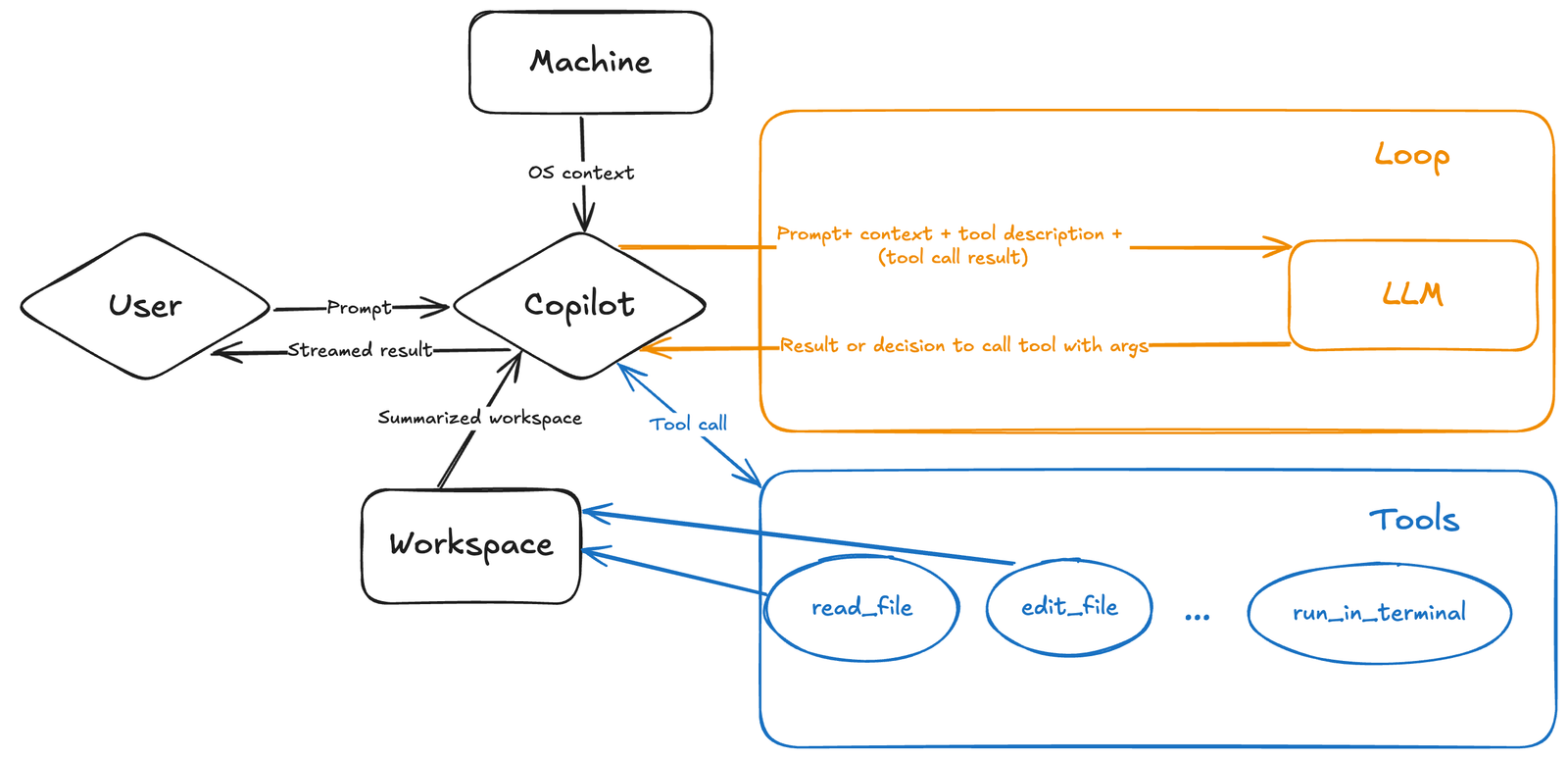
The following official diagram from the Visual Studio Code blog shows how Copilot agent mode connects a user prompt, workspace context, tools, and an LLM loop. This is the technical shape behind much of modern vibe coding.
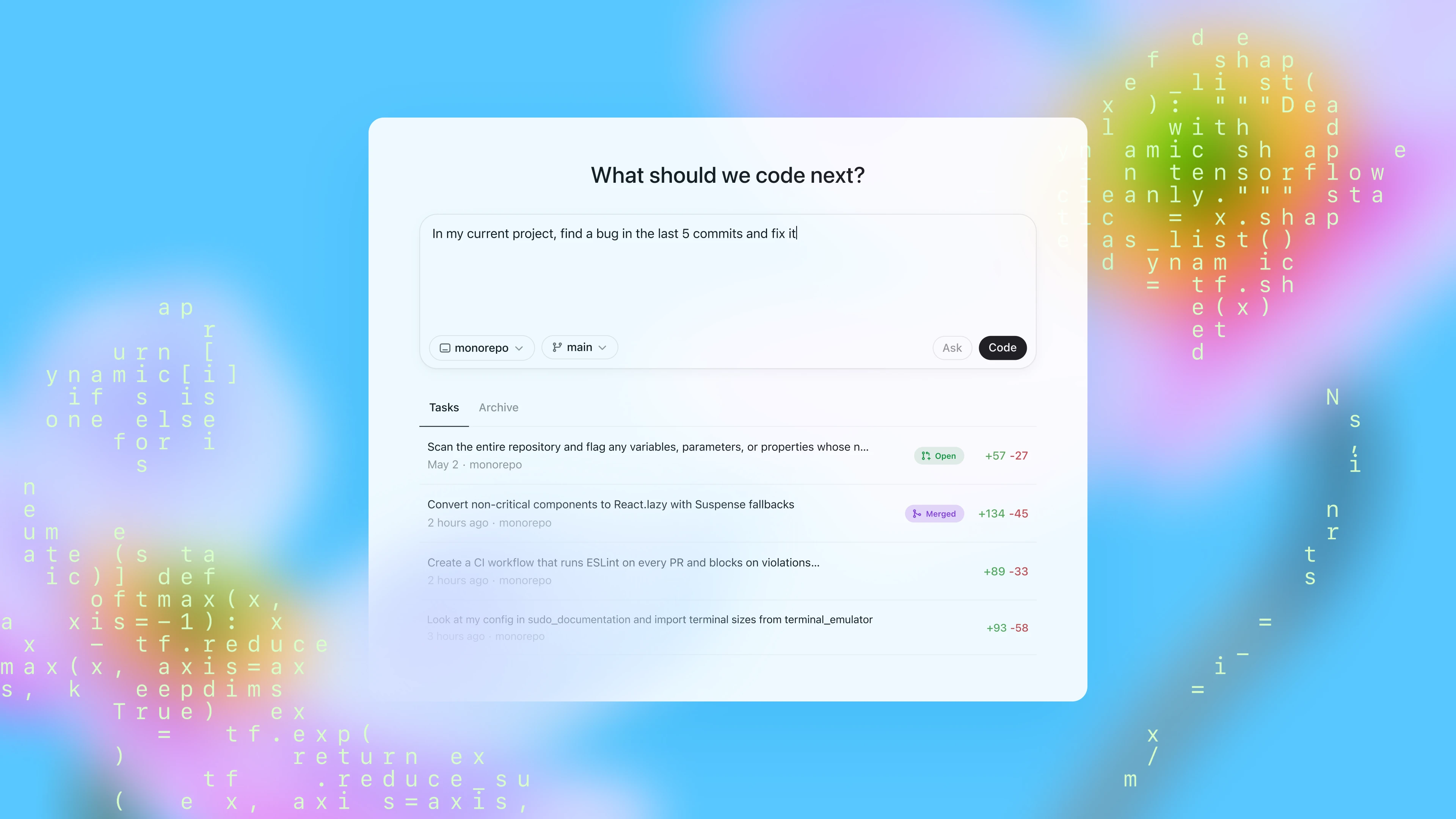
The official OpenAI Codex image below represents the cloud-agent side of vibe coding: a system where coding tasks can be delegated, tracked, reviewed, and completed across connected environments.
Watch this official GitHub video showing agent mode in action.
Watch this official OpenCode demo video showing an open-source AI coding agent workflow.
How Vibe Coding Works
Vibe coding usually follows a loop.
First, the human describes the intent. The prompt might be simple: "Build a personal finance dashboard with a monthly budget chart." It might also be specific: "Add a password reset flow to this app using the existing email service, and follow the current route structure."
Second, the AI gathers context. In a modern coding agent, this might include reading files, searching the repository, looking at open editor tabs, checking errors, inspecting package scripts, or reviewing a screenshot.
Third, the AI proposes or makes changes. Depending on the tool, it may show a plan, edit files, create a branch, run commands, or open a draft pull request.
Fourth, the human reviews the result. This is the most important step. The developer checks whether the code actually matches the desired behavior, fits the project style, and avoids obvious security or logic problems.
Fifth, the loop repeats. The human gives feedback such as "the layout is too crowded," "use the existing helper," "add tests," or "do not change the database schema."
Vibe coding feels magical when the loop is short. It feels frustrating when the prompt is vague, the project lacks tests, the model misunderstands architecture, or the human accepts changes too quickly.
Vibe Coding vs Traditional Coding
Traditional coding usually starts with the developer translating intent into code directly. The developer chooses structures, writes functions, imports libraries, handles errors, and runs tests. The computer executes what the developer wrote.
Vibe coding adds an AI mediator between intent and implementation. The human describes the goal, and the AI performs much of the translation into code.
That changes the developer's work:
- Traditional coding emphasizes syntax, APIs, and manual implementation.
- Vibe coding emphasizes prompting, context, evaluation, product taste, and verification.
- Traditional debugging often starts with reading stack traces and inspecting code.
- Vibe debugging often starts by pasting an error or letting an agent inspect terminal output.
- Traditional prototyping can be slow when boilerplate is high.
- Vibe prototyping can be fast, but quality depends heavily on review.
The best developers will likely use both. They will vibe code to explore and accelerate, then switch into traditional engineering discipline when correctness, security, and maintainability matter.
Vibe Coding vs No-Code
Vibe coding is sometimes compared with no-code, but they are not the same.
No-code tools usually provide a constrained visual environment. Users drag components, connect workflows, and configure prebuilt logic. The advantage is structure. The disadvantage is that users can hit platform limits.
Vibe coding uses AI to generate real code. The advantage is flexibility. The disadvantage is that generated code can be hard to understand, maintain, or secure if the user does not know what the AI produced.
No-code hides code behind a platform. Vibe coding creates code through conversation. That difference matters. Vibe coding can produce software that looks like a normal codebase, but if nobody understands it, the project can become fragile.
Tools That Enable Vibe Coding
Vibe coding is not tied to one product. It is a workflow enabled by several kinds of AI coding tools.
GitHub Copilot supports agentic workflows in Visual Studio Code and GitHub. GitHub's official posts describe agent mode, next-edit suggestions, code review agents, model choice, MCP support, and asynchronous coding agents.
OpenAI Codex is positioned as a coding agent that helps developers build and ship with AI. OpenAI describes Codex as able to complete tasks end to end, including features, refactors, migrations, and routine pull requests.
Claude Code is Anthropic's agentic coding tool. The official Claude Code docs describe a system that reads a codebase, edits files, runs commands, and integrates with development tools across terminal, IDE, desktop, and browser surfaces.
Gemini Code Assist includes agent mode for VS Code and IntelliJ. Google's official docs describe using IDE context, tools, MCP servers, files, and plans for multi-step coding tasks.
OpenCode is an open-source AI coding agent that works across terminal, IDE, and desktop workflows. It supports model flexibility and agent-style repository work.
Windsurf Cascade and Cursor-style editors represent AI-first development environments where chat, code edits, plans, terminal actions, and context awareness are deeply integrated into the editor.
The common pattern is not the brand. The pattern is an AI assistant that can understand intent, access code context, modify files, run or suggest commands, and iterate.
Vibe Coding for Beginners
For beginners, vibe coding can be empowering. It lowers the barrier to creating something real. A student can build a calculator, a portfolio site, a habit tracker, a game prototype, or a data dashboard without knowing every library in advance.
But beginners should not confuse "the app runs" with "the app is good." A generated app may have weak security, poor accessibility, messy structure, broken edge cases, or hidden bugs. Beginners should treat vibe coding as a learning accelerator, not a substitute for learning.
A good beginner workflow is:
- Ask the AI to explain the code it generated.
- Ask where the main files are.
- Ask how data flows through the app.
- Ask what could break.
- Ask how to test it.
- Change one small part manually to confirm understanding.
- Keep the project in version control.
The most valuable skill for beginners is not writing perfect prompts. It is learning to ask "why did this work?" and "what could go wrong?"
Vibe Coding for Professional Developers
Professional developers can use vibe coding very differently from beginners. For a professional, vibe coding is less about avoiding code and more about compressing routine work.
Useful professional tasks include:
- Generate first drafts of tests.
- Explain unfamiliar modules.
- Scaffold repetitive components.
- Create migration plans.
- Update documentation.
- Convert old patterns to newer ones.
- Investigate failing tests.
- Draft pull request descriptions.
- Explore implementation options.
Professionals should keep stronger boundaries. They should ask the AI to plan before editing, limit file scope, run tests, inspect diffs, and reject changes that do not fit the architecture.
For production work, vibe coding should become "AI-assisted engineering," not "AI did something and it looked fine."
Good Vibe Coding Prompts
Good prompts are specific, bounded, and reviewable.
A weak prompt is: "Build my app."
A better prompt is: "Create a React landing page for a personal budgeting app with a hero section, three feature blocks, and a call-to-action. Use the existing design tokens and do not add new dependencies."
A weak bug prompt is: "Fix the login."
A better bug prompt is: "The login form shows a generic error when the password field is empty. Inspect the form validation and submit handler. Explain the cause first. Do not edit files until you provide a plan."
A weak refactor prompt is: "Clean this up."
A better refactor prompt is: "Find duplicated date formatting logic in the invoice module. Propose a small refactor that changes no behavior, then add or update tests if there are existing tests nearby."
The best prompts define the goal, scope, constraints, expected output, and review step.
A Practical Vibe Coding Workflow
A reliable vibe coding workflow has six stages.
Stage one is discovery. Ask the AI to inspect the project and explain the relevant files. Do not edit yet.
Stage two is planning. Ask for a short plan, risk list, and test strategy.
Stage three is implementation. Approve a focused change and keep the scope small.
Stage four is verification. Run the app, tests, type checks, linting, or build commands.
Stage five is review. Inspect the diff like you would inspect a teammate's pull request.
Stage six is cleanup. Remove unused code, update documentation, and write a clear commit or PR description.
This workflow keeps the creative speed of vibe coding while preserving enough engineering discipline to avoid chaos.
Where Vibe Coding Works Best
Vibe coding works best when the task is visible, testable, and easy to evaluate.
Good use cases include prototypes, landing pages, internal tools, dashboards, small automations, UI mockups, simple scripts, documentation updates, test scaffolding, code explanations, and low-risk refactors.
It also works well for learning. A learner can ask the AI to build an example, then ask for explanations, variations, and exercises.
Vibe coding is especially useful in early product exploration. If the goal is to test an idea quickly, speed matters. A founder can build a clickable demo, a designer can explore interaction ideas, and a developer can test a technical approach before committing to a full implementation.
The best vibe coding tasks have quick feedback. If you can run the app and immediately see whether it works, the AI loop becomes easier to steer.
Where Vibe Coding Is Risky
Vibe coding becomes risky when the cost of being wrong is high.
Be careful with authentication, authorization, payments, financial calculations, medical workflows, legal workflows, encryption, database migrations, production infrastructure, user privacy, customer data, and security-sensitive code.
The risk is not only that the AI might write bad code. The risk is that it may write plausible code that looks correct to someone who does not know how to review it. That is worse than an obvious failure.
AI-generated code can contain insecure defaults, missing validation, weak error handling, race conditions, data leaks, dependency risks, or logic that passes simple tests but fails real cases.
If the system affects real users, vibe coding should be combined with expert review, automated tests, security checks, and staging environments.
Security Checklist for Vibe Coding
Use this checklist before trusting AI-generated code:
- Do not paste secrets, private keys, tokens, or customer data into prompts.
- Keep projects in version control before letting an agent edit files.
- Review every file changed by the AI.
- Run tests and add tests for important behavior.
- Check dependencies the AI adds.
- Watch for hardcoded credentials, unsafe eval, insecure CORS, weak authentication, and missing authorization checks.
- Use least privilege for API keys and tool permissions.
- Avoid giving network or shell access unless needed.
- Treat MCP servers and external tools as part of the trust boundary.
- Do not deploy code you cannot explain at a high level.
This does not make vibe coding slow. It makes it usable for serious work.
Vibe Coding and MCP
The Model Context Protocol matters because vibe coding depends on context. An AI assistant is more useful when it can access the right files, docs, tools, and systems. Anthropic introduced MCP as an open standard for connecting AI assistants to data sources and development environments.
In practical terms, MCP can let a coding agent use external capabilities: repository tools, issue trackers, databases, docs, browser automation, or internal APIs. GitHub, Google, Windsurf, OpenAI, and other tools have been moving toward MCP-style tool integrations.
This makes vibe coding more powerful, but also more sensitive. The more tools an agent can access, the more important permission design becomes. A vibe coding agent that can read files is useful. An agent that can write files, run commands, call APIs, and access company systems needs strict controls.

Vibe Coding and AI Agents
Vibe coding and AI agents are closely connected. A basic chatbot can generate code, but an agent can act. It can inspect files, edit code, run tests, read output, and continue.
That is why vibe coding in 2026 feels different from prompt-based coding in earlier years. The model is no longer only a text generator. It is part of a tool loop.
GitHub Copilot agent mode can work with files, terminal commands, runtime errors, and MCP tools. Codex can work across local and cloud environments. Claude Code can operate in terminal, IDE, desktop, and browser contexts. Gemini Code Assist agent mode can use IDE context, tools, and plans. OpenCode brings an open-source agent approach to terminal, IDE, and desktop workflows.
The trend is clear: vibe coding is becoming agentic coding.
Vibe Coding for Startups
Startups are drawn to vibe coding because it reduces time from idea to demo. A founder can create prototypes, landing pages, onboarding flows, pricing pages, analytics dashboards, and internal admin tools quickly.
This can be a real advantage. Speed helps teams test ideas. But startups should avoid building a fragile product on top of code nobody understands.
A good startup approach is:
- Use vibe coding for prototypes and experiments.
- Move successful prototypes into reviewed architecture.
- Add tests around core business logic.
- Bring in experienced engineering review before handling payments or private data.
- Keep AI-generated code small and understandable.
- Avoid shipping a pile of generated features without maintenance discipline.
Vibe coding can help a startup move fast, but it cannot replace technical ownership.
Vibe Coding for Students
Students can use vibe coding to learn faster, but only if they ask the AI to teach rather than only produce.
A student should ask:
- Explain this code line by line.
- What are the main concepts here?
- What would happen if this input were empty?
- How can I test this function?
- Rewrite this in a simpler way.
- Give me a small exercise based on this code.
If students only submit AI-generated code, they may pass a short assignment while learning very little. If they use vibe coding as a tutor, they can learn concepts more quickly and build confidence.
The key is active learning. Do not only ask for the answer. Ask for the reasoning.
Vibe Coding for Designers and Product Managers
Designers and product managers can use vibe coding to prototype interfaces and workflows without waiting for engineering capacity. A designer can turn a wireframe into a clickable prototype. A product manager can test an onboarding flow. A marketer can build a small calculator or interactive demo.
This can improve collaboration with engineers because vague ideas become visible. Instead of writing a long requirement document, a product person can bring a working prototype and say, "This is the behavior I mean."
However, prototypes should be labeled as prototypes. A vibe-coded prototype is not automatically production-ready. Engineers still need to review accessibility, performance, security, state management, analytics, and integration details.
Common Vibe Coding Mistakes
The first mistake is vague prompting. If the instruction is unclear, the output will be unpredictable.
The second mistake is accepting too much at once. Large AI diffs are hard to review.
The third mistake is ignoring tests. If there is no verification, the app may only appear to work.
The fourth mistake is letting the AI choose architecture without constraints. Models often reach for familiar patterns that may not match your project.
The fifth mistake is adding dependencies casually. Every new package has maintenance and security implications.
The sixth mistake is deploying without understanding. If you cannot explain how login, payments, permissions, or data storage works, you should not trust the code in production.
The seventh mistake is using vibe coding where regulations, privacy, or safety require expert review.
Best Practices for Vibe Coding
Use version control before starting. Commit a clean baseline so you can compare or revert.
Start with questions. Ask the AI to inspect and explain before editing.
Use small tasks. One clear change is better than ten vague goals.
Ask for a plan. Planning gives you a chance to correct assumptions before code changes.
Constrain files and dependencies. Tell the AI where it may work and what it should avoid.
Run the project often. Short feedback loops produce better results.
Read the diff. The diff is where vibe coding becomes engineering.
Ask the AI to write tests, then inspect those tests yourself.
Use human review for production code.
Document what changed and why.
Is Vibe Coding SEO-Friendly for Content Creators?
For content creators, "vibe coding" is a strong SEO topic because it sits at the intersection of AI, software development, no-code, startups, education, and productivity. Searchers want definitions, tools, examples, tutorials, risks, and best practices.
A strong vibe coding article should include:
- A clear definition.
- The term origin and date.
- Practical examples.
- Tool comparisons.
- Screenshots or official media.
- Video embeds.
- Security warnings.
- Beginner guidance.
- Professional workflow advice.
- FAQ content.
- Links to official sources.
Avoid empty hype. Readers do not need another article saying AI will change everything. They need to know when vibe coding is useful, when it is risky, and how to do it responsibly.
Future of Vibe Coding
Vibe coding will likely become less of a novelty and more of a normal development mode. The phrase may fade, but the workflow will remain.
Several changes are likely:
- AI coding agents will become better at reading large codebases.
- IDEs will merge chat, edit, terminal, and review workflows.
- Cloud agents will handle more asynchronous tasks.
- Model choice will become built into developer tools.
- MCP and tool protocols will make integrations more reusable.
- Security controls will become a major differentiator.
- Developers will spend more time reviewing, orchestrating, and testing AI work.
The long-term impact is not that everyone stops coding. It is that coding becomes more intent-driven. The developer's value shifts toward deciding what should exist, understanding why it works, and ensuring it is safe enough to ship.
FAQ: Vibe Coding
What does vibe coding mean?
Vibe coding means using AI coding tools to turn natural-language intent into software. The human describes what they want, and the AI writes or edits code while the human guides and reviews the result.
Who coined vibe coding?
Merriam-Webster notes that the term was apparently introduced by Andrej Karpathy in a February 2025 post on X.
Is vibe coding only for non-programmers?
No. Beginners use it to build things faster, but professional developers also use it for prototyping, tests, documentation, refactors, and debugging.
Is vibe coding safe?
It can be safe for low-risk prototypes and reviewed code. It is risky when users accept generated code without understanding, tests, or security review.
What tools are used for vibe coding?
Common tools include GitHub Copilot, OpenAI Codex, Claude Code, Gemini Code Assist, OpenCode, Windsurf, Cursor-style editors, and other AI coding agents.
Is vibe coding the same as no-code?
No. No-code uses visual platforms and predefined components. Vibe coding uses AI to generate or modify actual code through prompts and conversation.
Can vibe coding build production apps?
It can help build production apps, but the output needs engineering review, tests, security checks, and maintenance discipline.
Should students use vibe coding?
Students can use it effectively if they ask for explanations and learn from the code. They should not rely on it to avoid understanding programming concepts.
What is the biggest vibe coding risk?
The biggest risk is false confidence: generated code may look correct while hiding security, logic, or maintainability problems.
What is the best vibe coding workflow?
Use a loop: explain the goal, ask for a plan, approve a small implementation, run tests, inspect the diff, then iterate.
Final Takeaway
Vibe coding is not a joke term anymore. It is a useful name for a real shift in how people create software with AI. Natural language, screenshots, prompts, and iterative feedback are becoming part of the programming interface.
The best version of vibe coding is creative and fast, but not careless. It lets humans focus on intent, product feel, architecture, and review while AI handles more of the mechanical coding work. The worst version is blind trust in generated code.
Use vibe coding for speed, prototypes, learning, and routine development tasks. Use engineering discipline for anything that affects real users, private data, money, security, or long-term maintenance.
The future belongs to developers who can combine both: the flow of vibe coding and the rigor of software engineering.
Sources
- Merriam-Webster: Vibe coding definition and word history
- GitHub Blog: Vibe coding with GitHub Copilot, agent mode, and MCP support
- GitHub Newsroom: Copilot agent mode and next edit suggestions
- Visual Studio Code Blog: Introducing GitHub Copilot agent mode
- OpenAI Codex product page
- OpenAI: Codex is now generally available
- Claude Code official documentation
- Google Gemini Code Assist agent mode overview
- Anthropic: Introducing the Model Context Protocol
- OpenCode official homepage
Before you move on
Global AI workflow guidance. Use this short checklist to turn the article into action.
- Check whether the tool can access private files or account data.
- Verify factual claims against primary sources before publishing.
- Keep a human review step for work that affects money, school, or customers.
This guide is written for practical user safety. For account, platform, or legal decisions, confirm critical steps with the official help center or your service provider.