

The FBI is warning about Kali365, a phishing-as-a-service kit that can steal Microsoft 365 OAuth tokens and reach Outlook, Teams and OneDrive even after MFA.
Last checked: May 27, 2026. This article is based on the FBI Internet Crime Complaint Center alert I-052126-PSA, Microsoft Entra guidance, Microsoft Defender research on device-code phishing, and CISA phishing guidance. Administrators should confirm current Microsoft tenant controls before changing production policies.
Quick answer
The FBI has issued a public warning about Kali365, a phishing-as-a-service platform first seen in April 2026. The alert matters to Outlook, Teams and OneDrive users because the attack does not need to steal a password in the traditional way. It abuses the legitimate Microsoft 365 device-code sign-in flow so a victim enters a code on a real Microsoft page, while the attacker receives OAuth access and refresh tokens for the account.
Once those tokens are captured, the attacker may be able to access Microsoft 365 services such as Outlook, Teams and OneDrive without asking for the password again and without completing another MFA challenge. That is why this is more serious than an ordinary fake-login-page email.
For Microsoft 365 admins, the most important response is to audit and restrict device-code authentication, review suspicious sign-ins, revoke suspicious sessions, check mailbox rules and file-sharing activity, and report suspected Kali365 activity to IC3. For everyday users, the rule is simpler: never enter a Microsoft device code unless you personally started that sign-in on a device you control.
What the FBI actually warned
The FBI alert, dated May 21, 2026, names Kali365 as an emerging phishing-as-a-service platform. According to the FBI, Kali365 has mainly been distributed through Telegram and enables cybercriminals to obtain Microsoft 365 access tokens while bypassing multi-factor authentication protocols without intercepting the user's credentials.
The alert says the kit gives less-technical attackers access to AI-generated phishing lures, automated campaign templates, real-time target tracking dashboards and OAuth token capture capabilities. In plain English, Kali365 turns a technical identity attack into a packaged service that more criminals can rent or subscribe to.
That is the news hook behind the recent headlines about Outlook, Teams and OneDrive. The target is the Microsoft 365 account, and those apps are among the services a stolen session can expose.
| Detail | What it means |
|---|---|
| Alert | FBI IC3 alert I-052126-PSA |
| Date | May 21, 2026 |
| Threat name | Kali365 |
| Attack type | Phishing-as-a-service using device-code phishing |
| Main risk | OAuth access and refresh token theft |
| Services at risk | Microsoft 365 environments, including Outlook, Teams and OneDrive |
| Most urgent control | Restrict or block device-code flow where possible |
Why Outlook, Teams and OneDrive are affected
Outlook, Teams and OneDrive are not being singled out because of one ordinary bug in those apps. They are affected because they sit behind the same Microsoft 365 identity layer. If an attacker gets a valid token for the user's account, the problem moves from one inbox to the broader cloud workspace.
An attacker with access to Microsoft 365 may try to:
- Read or search Outlook email for invoices, reset links, internal conversations and attachments.
- Create hidden inbox rules or forwarding rules to monitor future messages.
- Send new phishing messages from a trusted internal account.
- Review Teams chats, shared files and meeting context.
- Browse OneDrive and SharePoint files for documents, spreadsheets, contracts, credentials or personal information.
- Use the compromised account to reset passwords or move deeper into the organization.
That is why this warning is relevant to businesses, schools, nonprofits and managed Microsoft 365 tenants. Personal Outlook.com users should still pay attention, but the strongest tenant-level controls discussed here are Microsoft Entra and Microsoft 365 administrator controls.
How the attack works
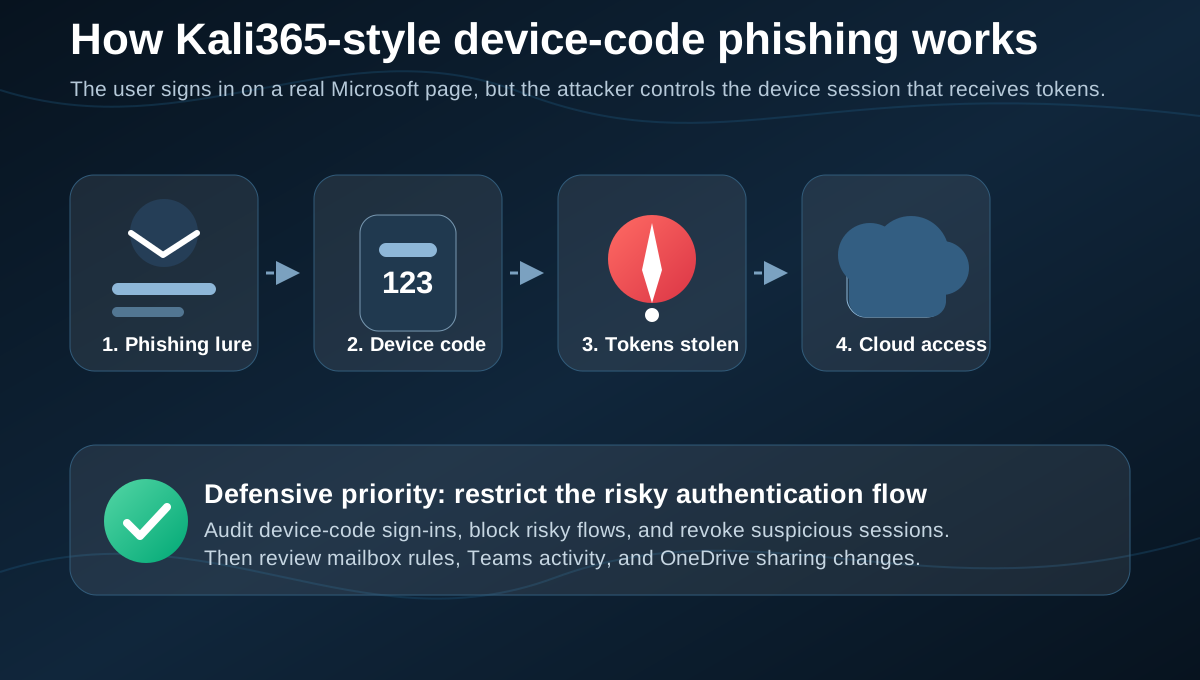
The FBI describes a four-step flow: lure, authorization, token theft and persistence.
First, the attacker sends a phishing email that impersonates a trusted cloud productivity or document-sharing service. The email includes a device code and instructions to visit a legitimate Microsoft verification page. That detail is what makes the attack harder for users to judge, because the sign-in page can be real.
Second, the victim enters the code on the real Microsoft page. The victim may believe they are approving access to a document, voicemail, shared file or workplace service. In reality, they are authorizing a device session initiated by the attacker.
Third, the attacker captures OAuth access and refresh tokens. A password was not necessarily typed into a fake form, but the result can still be account access.
Fourth, the attacker uses the token-backed session to access Microsoft 365 services. According to the FBI, this can include Outlook, Teams and OneDrive without requiring the password or another MFA challenge.
Why MFA may not be enough
Multi-factor authentication is still important. It stops many password-stuffing, credential reuse and basic phishing attempts. The lesson from Kali365 is not "turn MFA off" or "MFA is useless." The lesson is that some phishing attacks now target the authentication flow itself instead of only the password.
Microsoft's own Entra documentation describes device-code flow as a high-risk authentication method because it can be part of phishing attacks or can be used to access corporate resources from unmanaged devices. Microsoft recommends allowing device-code flow only where necessary and blocking it wherever possible.
Microsoft Defender researchers also reported in April 2026 that device-code phishing campaigns have become more automated. One important improvement for attackers is dynamic code generation: instead of sending an old code that expires quickly, the phishing site can generate a fresh code when the victim lands on the page. That makes the 15-minute device-code window less protective than it looks.
The practical takeaway is direct: MFA needs to be paired with Conditional Access, sign-in risk controls, token revocation processes, phishing-resistant authentication and user training that specifically warns about device-code prompts.
Warning signs users should notice
Device-code phishing can look cleaner than old phishing because part of the flow may happen on a real Microsoft page. Users should be suspicious when a message asks them to enter a code they did not request.
Red flags include:
- An email says a shared document, voicemail, HR file or invoice requires a device code.
- The message creates pressure to verify access quickly.
- The code appears before you started a sign-in on your own device.
- The sender looks familiar but the tone, timing or request is unusual.
- A link chain moves through several pages before reaching Microsoft sign-in.
- You are asked to approve access after opening a file you were not expecting.
- A login prompt appears after clicking a link in email, Teams or a shared file notification.
The safest habit is to close the message and open the official Microsoft 365 app or website directly. If a document is real, it should still be available from the official app, your company portal or a verified sender.
What Microsoft 365 admins should do now
Administrators should treat the FBI alert as an identity-control issue, not only an email-filtering issue. The attack starts with a message, but the impact happens in Microsoft Entra, Exchange Online, Teams, OneDrive and SharePoint.
Start with these controls:
- Audit device-code flow usage in Microsoft Entra sign-in logs.
- Identify legitimate business processes that still require device-code authentication.
- Create a Conditional Access policy in report-only mode to measure impact before enforcement.
- Block device-code flow for all users and resources where possible.
- Keep emergency access or break-glass accounts excluded from policies that could lock out administrators.
- Block authentication transfer where it does not fit your device policy.
- Review risky sign-ins, unfamiliar locations, anonymous IP use and unusual token activity.
- Turn on or tune Defender for Office 365 anti-phishing and Safe Links controls if available.
- Move high-risk users toward phishing-resistant authentication such as passkeys or FIDO2 security keys.
- Document the incident response path for token theft, not just password theft.
Microsoft's policy guidance recommends getting as close as possible to a unilateral block on device-code flow, then allowing it only for well-documented and secured use cases. That is a strong position, and it fits the FBI's recommendation to restrict or block device authentication codes.
What to check after a suspected compromise
If a user entered a device code from a suspicious message, assume the account session may be compromised even if the password was not typed into a fake page.
Administrators should check:
- Microsoft Entra sign-in logs for device-code flow activity.
- The original transfer method or authentication protocol fields where available.
- IP address, geolocation, device, user agent and timing anomalies.
- New or unfamiliar active sessions.
- Recently registered devices or MFA methods.
- Exchange inbox rules, forwarding settings and delegated mailbox access.
- Sent mail, deleted mail and drafts for outbound phishing.
- Teams messages sent from the account.
- OneDrive and SharePoint file downloads, sharing links and permission changes.
- OAuth app grants and connected applications.
Response should include revoking sessions, forcing re-authentication, resetting credentials where needed, reviewing MFA methods, removing malicious rules or app grants, and preserving evidence. Microsoft notes in its compromised email account guidance that account investigations should focus on the affected account and associated Microsoft 365 services such as mailbox, SharePoint and OneDrive access.
What information to report to IC3
The FBI asks victims or organizations impacted by Kali365 to file a complaint with the Internet Crime Complaint Center at ic3.gov.
Include as much evidence as possible:
- Phishing email headers and message body.
- The sender address and any reply-to address.
- URLs and redirect chains from the phishing message.
- Suspicious login times.
- IP addresses and locations from sign-in logs.
- Unauthorized devices or active sessions added to the account.
- Screenshots of the lure if they can be captured safely.
- Any financial loss, attempted fraud or data access discovered during the investigation.
Do not destroy the original email if your security team needs headers. Forwarding an email can strip details, so use your organization's reporting button or export the original message when possible.
What everyday users should do
If you use Microsoft 365 at work or school, report suspicious device-code prompts immediately. Fast reporting gives administrators a better chance to revoke sessions and stop follow-on phishing.
If you use a personal Microsoft account, focus on account hygiene:
- Do not enter device codes unless you started the sign-in yourself.
- Review recent sign-in activity from the official Microsoft account security page.
- Change your password if you entered credentials anywhere suspicious.
- Remove unknown devices and sessions.
- Check recovery email, recovery phone and security info.
- Use Microsoft Authenticator, passkeys or another strong sign-in method where available.
- Be careful with unexpected shared files, voicemail notices, electronic signature requests and invoice links.
The key behavior change is simple: a legitimate device code is usually part of a sign-in you started on a device in front of you. A code delivered inside an unexpected email or document workflow should be treated as dangerous.
Business impact
The business risk is bigger than one mailbox. A compromised Microsoft 365 account can become a launch point for business email compromise, invoice fraud, internal phishing, data theft, lateral movement and reputation damage.
The highest-risk accounts are executives, finance teams, IT administrators, HR staff, legal teams, sales operations, help desk workers and anyone with access to sensitive OneDrive or SharePoint libraries. These users should be prioritized for phishing-resistant MFA, stricter Conditional Access, tighter file-sharing policies and faster incident response.
Organizations should also review whether security awareness training still reflects current threats. Employees who were taught only to look for fake domains may miss this attack because the Microsoft verification page can be real. Training should explicitly say: never enter a device code from an email, chat or file prompt unless you initiated the sign-in yourself.
FAQ
Is this an Outlook vulnerability?
No. The FBI warning is about abuse of Microsoft 365 authentication flows and token theft. Outlook is one of the services that can be exposed after a Microsoft 365 account is compromised.
Does MFA still help?
Yes. MFA remains important, but device-code phishing can bypass some MFA protections by tricking the user into authorizing the attacker's session. Stronger controls include blocking device-code flow where possible and using phishing-resistant authentication.
Should every organization block device-code flow?
Microsoft recommends blocking device-code flow wherever possible and allowing it only where necessary. Admins should audit existing usage first so they do not break legitimate devices, legacy workflows or emergency access plans.
What should a user do if they entered a suspicious code?
Report it to IT or security immediately. Do not wait to see whether something bad happens. Admins may need to revoke sessions, check sign-in logs, remove malicious inbox rules and review OneDrive or SharePoint access.
Are personal Microsoft accounts affected?
The FBI alert focuses on Microsoft 365 environments, which usually means work, school and organization tenants. Personal Outlook.com users should still avoid unsolicited device-code prompts and review account activity if they interacted with one.
Sources
- FBI IC3 public service announcement I-052126-PSA: Kali365 Phishing-as-a-Service Kit Hijacks Microsoft 365 Access Tokens
- Microsoft Entra documentation: Conditional Access: Authentication flows
- Microsoft Entra documentation: Block authentication flows with Conditional Access policy
- Microsoft Security Blog: Inside an AI-enabled device code phishing campaign
- Microsoft Learn: Responding to a Compromised Email Account
- CISA: Phishing Guidance: Stopping the Attack Cycle at Phase One
Before you move on
Defensive security explainers. Use this short checklist to turn the article into action.
- Change reused passwords on important accounts.
- Enable multi-factor authentication or passkeys where available.
- Keep a separate backup for files you cannot afford to lose.
This guide is written for practical user safety. For account, platform, or legal decisions, confirm critical steps with the official help center or your service provider.