BBC, TechCrunch and KrebsOnSecurity report that attackers abused Meta's AI support flow to take over some Instagram accounts. Here is what is confirmed, what remains unclear, and how users should protect themselves.
Last checked: June 3, 2026. This updated article uses BBC News' June 2 report as the primary update, then cross-checks the wider context with TechCrunch, KrebsOnSecurity, Meta's own March announcement about the AI support assistant, Instagram Help Center security guidance and OWASP guidance on AI prompt-injection and agentic-tool risks.
Quick answer
Meta says it has fixed an Instagram account-recovery issue after reports that hackers manipulated Meta's AI support assistant into giving access to other people's accounts.
BBC News reported on June 2, 2026 that the incident has been linked to recent cases involving hijacked Instagram accounts, including some high-profile accounts. TechCrunch and KrebsOnSecurity reported a day earlier that the weakness involved Meta's AI-powered support chatbot and the account recovery process.
The reported attack did not require the attacker to break into the victim's real email account. Instead, public reports say attackers used the support flow to get a new email address added or accepted during recovery, then used the resulting reset process to take over the Instagram account.
Meta spokesperson Andy Stone said publicly on June 1 that the issue was fixed. Meta has not published a full technical postmortem, and the number of affected accounts remains unclear.
For users, the immediate action is straightforward: enable two-factor authentication, check your email and phone recovery details, review where you are logged in, secure the email account linked to Instagram, and be alert for recovery emails or account-change notices you did not request.
For platforms, the bigger lesson is sharper: an AI support agent that can change account access is not just a chatbot. It is a privileged identity tool and must be secured like one.
What happened
BBC News reported on June 2, 2026 that Meta's AI chatbot enabled hackers to access other people's Instagram accounts, citing reports linking the incident to recent high-profile account hijackings. The BBC article, by Liv McMahon, treated the story as a technology and cybersecurity issue involving Instagram, Meta, social media and artificial intelligence.
TechCrunch reported on June 1, 2026 that Instagram resolved a security issue after users reported account takeovers. The article says the attack appeared to involve tricking Meta's AI-powered support chatbot into granting access to a victim's account.
The reported victims included ordinary users and higher-profile accounts. TechCrunch named security researcher Jane Wong as one affected user, and said compromised accounts included the Instagram handle for the Obama-era White House and the account of U.S. Space Force Chief Master Sergeant John Bentinvegna.
KrebsOnSecurity separately reported that instructions had circulated on Telegram showing how to trick Meta's AI support assistant into resetting Instagram passwords. Krebs also reported that Meta had not responded to requests for comment on the video's claims, while Stone said the issue had been resolved and impacted accounts were being secured.
Because Meta has not published a full technical postmortem, several details remain unknown, including total affected users, exact internal safeguards that failed, and whether every reported takeover used the same path.
What the BBC update adds
The BBC report matters because it brought the incident to a broader mainstream audience and framed it as a warning about AI support systems that can affect account access. The report's central point is not just that Instagram accounts were hijacked. It is that AI-enabled support tools can become account-takeover paths when they are allowed to influence recovery decisions without enough identity proof.
That framing is important for users because the incident sits at the intersection of three risks:
| Risk | What it means |
|---|---|
| Account recovery abuse | Attackers may target the process used to regain access, not only passwords. |
| AI support overreach | A chatbot with support-tool access can create real account changes if permissions are too broad. |
| High-value account targeting | Public figures, creators, brands and organizations face higher takeover incentives. |
The BBC article also reinforces a key caution for readers: public reporting has linked the issue to account hijackings, but Meta has not released a detailed incident report. That means claims about the exact scale, all affected account types and the full internal failure chain should be treated as unresolved until Meta publishes more detail.
Timeline
| Date | Development |
|---|---|
| March 2026 | Meta announced a broader rollout of AI support tools for Facebook and Instagram, including account-help use cases. |
| June 1, 2026 | TechCrunch and KrebsOnSecurity reported that attackers used Meta's AI support assistant in Instagram account takeovers. |
| June 1, 2026 | Meta spokesperson Andy Stone said the issue had been fixed and affected accounts were being secured, according to those reports. |
| June 2, 2026 | BBC News published wider coverage of the incident and linked it to recent high-profile Instagram account hijackings. |
| June 3, 2026 | HacksByte updated this article to include the BBC report and clearer user/business mitigation guidance. |
How the reported account takeover worked
This article will not reproduce step-by-step abuse instructions. The high-level pattern is enough for users and security teams:
- The attacker initiated an account recovery path.
- The attacker interacted with Meta's AI support assistant.
- The assistant reportedly accepted an attacker-controlled email or recovery path.
- A reset flow then let the attacker set a new password.
- The victim lost control of the account.
TechCrunch reported that a public video appeared to show the attacker using location spoofing to avoid automated account protections. TechCrunch also said it verified that the public email mailbox shown in the video received a verification code.
Krebs reported a similar pattern and said the shared video claimed to show attackers using a VPN near the target's usual location, then using the AI support assistant in the password reset flow.
The critical security failure, if the public reports are accurate, is not that AI "talked" to the attacker. It is that the support agent apparently had enough account-recovery authority to help change access without proving control of an existing trusted factor.
Why this is different from ordinary phishing
Many Instagram hacks begin with phishing: a fake login page steals a password or a fake copyright warning tricks a creator into entering credentials. This incident is different because the reported weak point was the platform's own recovery assistant.
That makes the risk more serious for three reasons:
| Issue | Why it matters |
|---|---|
| The interface looked official | Victims may not have clicked a suspicious external link. |
| Recovery logic was involved | Account recovery can override normal login defenses if not tightly controlled. |
| AI had tool access | A chatbot that can update settings or initiate resets can create real account changes. |
This is the same broad risk security teams discuss with "agentic AI": once an AI system can call tools, make changes or trigger workflows, prompt safety alone is not enough. The tool permissions, identity checks and escalation rules become part of the security boundary.
What Meta had said about the support assistant
Meta announced in March 2026 that it was rolling out the Meta AI support assistant globally on Facebook and Instagram in places where Meta AI is available.
Meta said the assistant was designed to provide 24/7 help for account issues, including updating passwords and profile settings. The company also said the assistant had started rolling out to people who needed help logging into Facebook and Instagram accounts, beginning with select cases in the United States and Canada.
That context matters. Meta was not just deploying a FAQ bot. It described a support assistant that could help resolve account problems "from start to finish" and, in some contexts, take action.
That is exactly where the safety bar rises. If a support bot can only answer questions, the damage from a bad answer is limited. If it can change recovery factors or trigger account resets, it must meet a much higher identity-proofing standard.
Why two-factor authentication mattered
KrebsOnSecurity reported that the attackers who released the video said their method failed against accounts that had multi-factor authentication enabled. Krebs also noted that even SMS-based MFA likely would have blocked the exploit in this case.
That does not mean SMS is the best long-term security choice. Authenticator apps, passkeys and hardware security keys are generally stronger against many attacks. But the report underscores a practical point: having any active second factor can add a recovery barrier that an attacker cannot easily bypass through a password reset path.
Instagram's Help Center says two-factor authentication requires a code when there is a login attempt from a device the platform does not recognize. Instagram also recommends keeping accounts secure by using 2FA, reviewing emails from Instagram, keeping contact information updated and watching for suspicious links or messages.
What users should do now
If you use Instagram, especially for a creator, business, newsroom, public figure, school, nonprofit or brand account, do these checks today.
1. Turn on two-factor authentication
Use an authenticator app, passkey or security key where available. SMS is better than no 2FA, but authenticator apps and passkeys are safer against SIM-swap and SMS interception risks.
In Instagram, go through Accounts Center, then Password and security, then Two-factor authentication.
2. Review email and phone details
Check that every email address and phone number linked to your Instagram and Meta Account Center belongs to you. Remove anything unknown.
3. Review active sessions
Check "Where you're logged in" or equivalent account-session views. Log out unknown devices and locations.
4. Secure the email account linked to Instagram
Use a unique password and strong 2FA on the email account. If an attacker controls your email, Instagram recovery becomes much harder to defend.
5. Save recovery codes
If Instagram provides backup codes, store them in a password manager or another safe place. Do not keep them in your email inbox as plain text.
6. Watch for account-change emails
Do not ignore notices about changed email addresses, phone numbers, login locations or password reset requests. If the notice is real, use Instagram's official app or website to secure the account, not a link from a random message.
7. Do not trust "account recovery" helpers in comments or DMs
Scammers target people who are already locked out. Anyone promising to recover an Instagram account for a fee, crypto payment or remote-access session should be treated as high-risk.
What creators and businesses should do
High-value Instagram accounts need a stricter plan than personal accounts.
| Control | Why it helps |
|---|---|
| Use a dedicated secure email for the account | Reduces exposure from personal inbox compromise. |
| Turn on strongest available 2FA | Adds a barrier to reset and login abuse. |
| Limit admin access | Fewer people can lose or misuse control. |
| Keep ownership documents | Speeds recovery when proving brand identity. |
| Monitor account changes | Early detection can prevent permanent takeover. |
| Separate creator devices from everyday browsing | Reduces phishing and malware exposure. |
| Document escalation contacts | Teams need a recovery plan before a crisis. |
For agencies, the priority is admin hygiene. Many brand incidents are not caused by the main account password being guessed; they happen through a weak admin account, reused password, stolen email inbox or confused recovery path.
What platforms should learn
This incident is an early warning for every company adding AI agents to customer support.
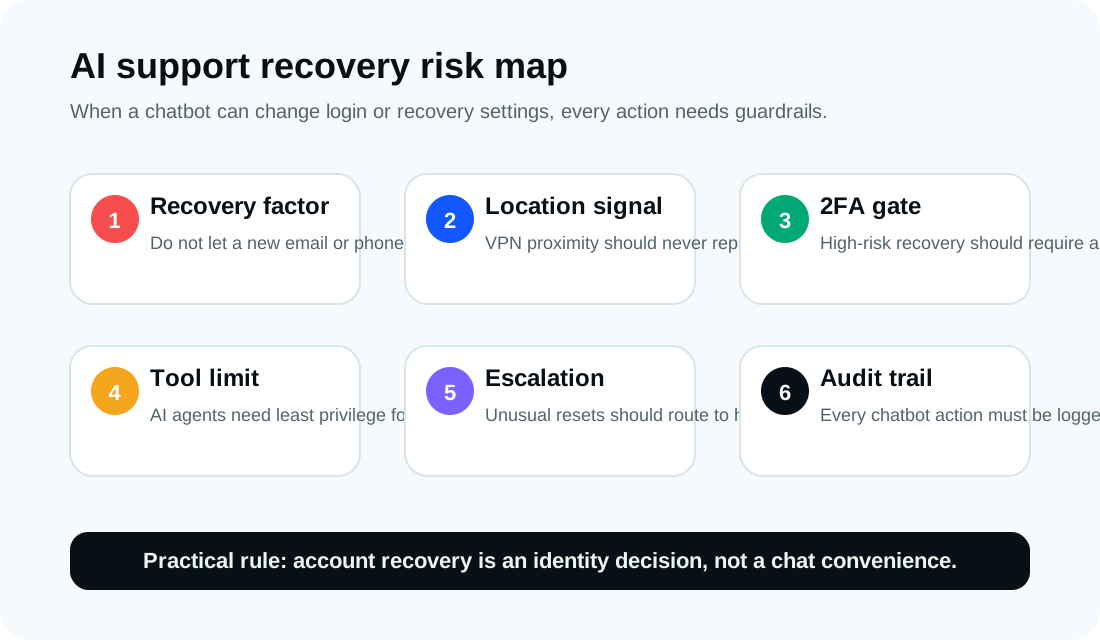
If an AI assistant can change account settings, send verification codes, modify recovery factors or trigger password resets, it must be treated as a privileged identity system. That means:
- Least-privilege tool access.
- Hard separation between "answer a question" and "change account access."
- Strong identity proofing before recovery changes.
- Existing-factor confirmation before adding new recovery factors.
- High-risk action escalation to human review.
- Audit logs for every agent action.
- Rate limits and anomaly detection.
- Rollback paths when a recovery action was wrong.
- Red-team testing for prompt injection and social engineering.
OWASP's prompt-injection guidance warns that LLM applications can be manipulated through natural-language instructions. OWASP's newer agentic AI work goes further: when an AI system can use tools, insecure tool use and excessive authority become first-order risks.
The core lesson is simple: the AI should never be allowed to treat attacker-provided recovery details as proof of account ownership.
What remains unclear
Several key facts are still unresolved publicly:
- How many accounts were affected.
- Whether every reported hijack used the same support flow.
- Exactly what checks failed inside the assistant.
- Whether the issue affected only certain countries, account types or support surfaces.
- Whether Meta will publish a technical postmortem.
- Whether any accounts remain at risk after the fix.
Because those details are unknown, users should avoid assuming they were unaffected solely because they did not see suspicious activity. Account recovery settings are worth checking anyway.
Update note
This article was originally published on June 2, 2026 after the TechCrunch and KrebsOnSecurity reports. It was updated on June 3, 2026 to include BBC News' June 2 coverage, add a timeline, and sharpen the distinction between confirmed facts, public reporting and unresolved details.
Bottom line
Meta built an AI support assistant to reduce friction in account recovery. Attackers reportedly turned that convenience into an account-takeover path.
The incident does not mean AI support should never exist. It means AI support with account-changing powers must be designed like a security-critical identity system, not like a helpful chat window.
For users, turn on 2FA, secure your linked email and review recovery details. For platforms, do not let an AI agent change who controls an account unless the account holder has proven control through trusted, pre-existing factors.
Sources
- BBC News: Meta AI chatbot enabled hackers to access others' Instagram accounts, June 2, 2026.
- TechCrunch: Hackers hijacked Instagram accounts by tricking Meta AI support chatbot into granting access, June 1, 2026.
- KrebsOnSecurity: Hackers Used Meta's AI Support Bot to Seize Instagram Accounts, June 1, 2026.
- Meta: Boosting Your Support and Safety on Meta's Apps With AI, March 2026.
- Instagram Help Center: Securing your Instagram account with two-factor authentication.
- Instagram Help Center: How to keep your Instagram account secure.
- OWASP: Prompt Injection.
- OWASP Agentic Skills Top 10.
Before you move on
Defensive security explainers. Use this short checklist to turn the article into action.
- Change reused passwords on important accounts.
- Enable multi-factor authentication or passkeys where available.
- Keep a separate backup for files you cannot afford to lose.
This guide is written for practical user safety. For account, platform, or legal decisions, confirm critical steps with the official help center or your service provider.