
Google Threat Intelligence Group says it found and disrupted what it believes was an AI-assisted zero-day exploit that could bypass 2FA in a popular open-source web administration tool. Here is what happened and how users should respond.
Last checked: May 31, 2026. This article is based primarily on Google Threat Intelligence Group's May 12, 2026 report. Google did not say the attack broke Google Account 2FA. It described an AI-assisted zero-day exploit for bypassing 2FA in an unnamed open-source, web-based system administration tool, and said it worked with the vendor to disclose the flaw and disrupt the threat activity.
Quick answer
Google Threat Intelligence Group, or GTIG, says it identified a criminal campaign involving a zero-day exploit that could bypass two-factor authentication on a popular open-source web administration tool. Google says it has high confidence the attacker used an AI model to help discover and weaponize the vulnerability, though it does not believe Gemini was used.
This is a major moment for AI cybersecurity, but it needs precise wording. The confirmed story is not "all 2FA is broken" and not "Google Accounts were hacked." The confirmed story is that attackers are now using generative AI in real vulnerability research and account-takeover workflows, while defenders are also using proactive intelligence to find and stop campaigns earlier.
For users, the lesson is direct: keep using 2FA, but prefer phishing-resistant methods such as passkeys or hardware security keys, update software quickly, and treat social engineering as a faster-moving threat than it used to be.

What Google found
GTIG's May 2026 AI Threat Tracker says Google observed prominent cybercrime actors planning a mass vulnerability exploitation operation. During analysis, Google found a zero-day vulnerability implemented in a Python script that enabled bypassing 2FA on a popular open-source web-based system administration tool.
Google says it worked with the impacted vendor to responsibly disclose the vulnerability and disrupt the threat activity. It also says the exploit showed signs of AI assistance, including highly structured Python, extensive educational-style comments and a hallucinated CVSS score.
The important details:
| Point | What Google reported |
|---|---|
| Target | An unnamed popular open-source, web-based system administration tool |
| Attack type | Zero-day exploit with a 2FA bypass component |
| Preconditions | Valid user credentials were still required |
| AI link | Google says it has high confidence an AI model helped discovery and weaponization |
| Gemini involvement | Google says it does not believe Gemini was used |
| Outcome | Google worked with the vendor and disrupted the planned activity |
That last line matters. This appears to be a defensive intelligence success before mass exploitation, not a public report of widespread compromised accounts.
Why people are calling it an AI-powered 2FA attack
The phrase "AI-powered 2FA attack" can be misleading if it sounds like AI magically defeated every second factor. The actual risk is more specific.
Attackers can use AI to speed up the steps around authentication abuse:
- Find or adapt vulnerabilities in login flows.
- Generate clean exploit scripts and helper tooling.
- Write convincing phishing or help-desk messages.
- Translate and personalize lures quickly.
- Analyze error messages and documentation.
- Automate account-takeover attempts across many targets.
In Google's case, the 2FA bypass still required valid credentials. That means a password had to be stolen, reused, phished, purchased from a leak or obtained another way. The bypass then threatened to weaken the second layer that should have stopped the attacker.
What this does not mean
This does not mean every 2FA method is unsafe. It also does not mean users should disable MFA. CISA still advises using multifactor authentication because it makes account compromise much harder when passwords are stolen.
It also does not mean every AI-generated script is advanced. Google noted that the exploit contained signs often associated with large language model output, including clean formatting and explanatory comments. AI can make attackers faster and more scalable even when the underlying idea is not magical.
The more accurate takeaway is this: old assumptions about attack speed are breaking. What used to take a small group days or weeks to research, rewrite and operationalize may now be accelerated by AI coding assistants and automated social engineering.
Why 2FA can still fail
Two-factor authentication is a category, not one single technology. Some forms are much stronger than others.
| MFA method | Main weakness |
|---|---|
| SMS codes | SIM swap, message interception, phishing, malware on device |
| Email codes | Email account compromise, phishing, recovery abuse |
| Push approvals | MFA fatigue, fake support calls, accidental approval |
| Authenticator app codes | Real-time phishing proxies, user trickery |
| Passkeys and hardware security keys | Stronger protection because they are phishing-resistant and bound to the real site or service |
Weak MFA can be phished, intercepted, socially engineered or bypassed through vulnerable software. Stronger MFA, especially passkeys and hardware security keys based on FIDO standards, is designed to resist phishing and remote replay.
Google's own Safety Center says passkeys use public-key cryptography and are resistant to phishing, credential stuffing and other remote attacks.
Why defenders still won this round
The headline is not only that attackers used AI. It is that Google detected the campaign, assessed the exploit, coordinated disclosure with the vendor and disrupted the planned activity.
That is what "automated defensive tech" should mean in practice:
- Threat intelligence catches early signals.
- Researchers analyze suspicious tooling before mass deployment.
- Vendors receive responsible disclosure.
- Detection teams block infrastructure and behavior.
- Users and administrators patch before attackers scale.
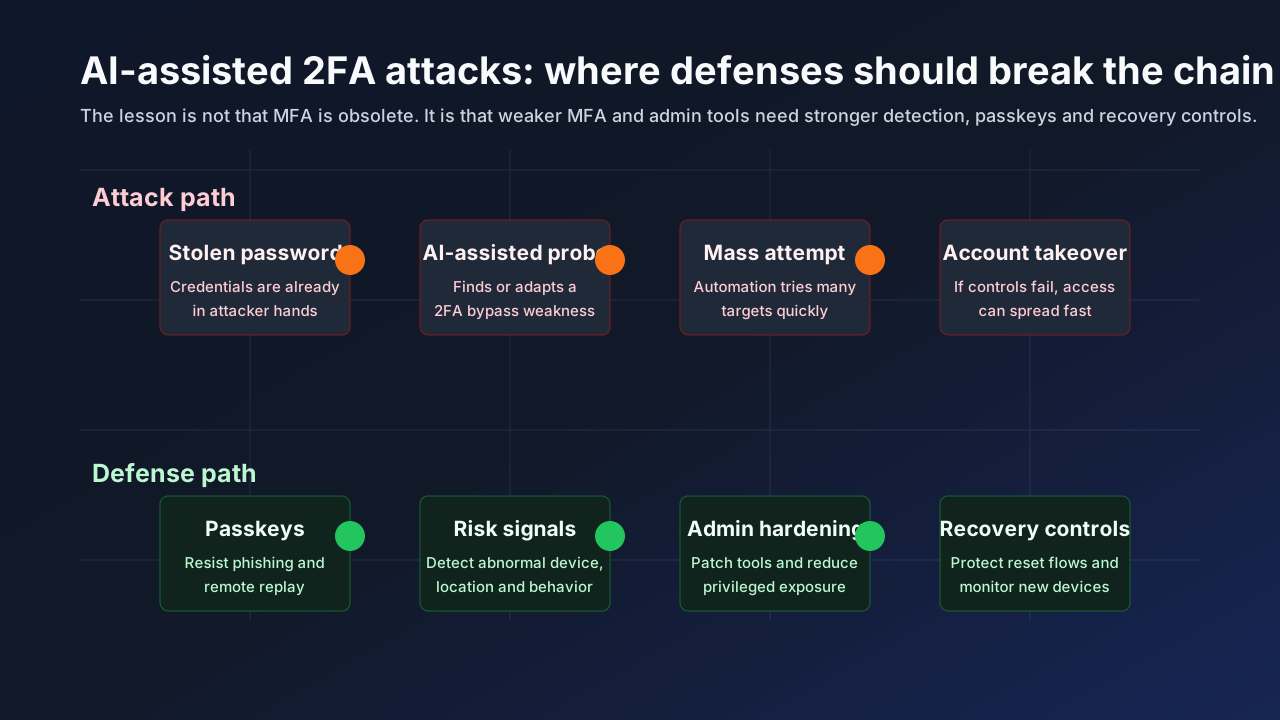
The future of account security is not humans manually reviewing every login. It is layered defense: phishing-resistant authentication, device signals, behavioral analytics, patch management, rate limits, recovery protections and fast incident response.
What users should do now
Keep 2FA turned on. The wrong reaction is to abandon MFA because some forms can be bypassed in specific situations.
The better response is to upgrade the quality of your authentication:
- Use passkeys where available.
- Use a hardware security key for your most important accounts if you are high risk.
- Prefer authenticator apps over SMS when passkeys are not available.
- Never approve a login prompt you did not initiate.
- Do not share one-time codes with anyone, including someone claiming to be support.
- Review account recovery email addresses and phone numbers.
- Remove old devices and sessions you no longer recognize.
What businesses should do
Businesses should treat this as a warning about admin surfaces, not only employee passwords. The Google case involved a web-based system administration tool, which is exactly the kind of software attackers target because it can sit close to privileged systems.
Security teams should prioritize:
- Patch internet-facing admin tools quickly.
- Require phishing-resistant MFA for administrators, developers, finance teams and support staff.
- Disable legacy authentication where possible.
- Monitor impossible travel, new device registration and sudden MFA resets.
- Alert on repeated failed second-factor checks.
- Rate-limit login attempts and suspicious recovery flows.
- Separate normal user accounts from privileged admin accounts.
- Test help-desk procedures against AI-generated social engineering.
If an attacker has a valid password and can exploit a 2FA weakness in an admin panel, the incident can move quickly. Organizations need controls that assume credentials will sometimes be stolen.
What developers and vendors should learn
The technical lesson is that authentication flows need adversarial testing. It is not enough to check whether a login page asks for a second factor in the expected path. Teams need to test edge cases, recovery flows, API endpoints, session handling, error states and role changes.
Recommended engineering checks:
- Enforce MFA server-side for every sensitive route, not only in the UI.
- Re-check authentication state after password reset, device enrollment and role changes.
- Treat recovery flows as high-risk authentication.
- Add regression tests for previously fixed MFA bypasses.
- Log second-factor failure, reset and bypass events.
- Avoid storing long-lived sessions that survive major account changes.
- Run threat modeling for account takeover, not only password login.
AI will make attackers better at reading code and documentation. That means authentication logic should be simpler, more centralized and easier to test.
How AI changes social engineering
Even when the technical exploit matters, social engineering remains a major part of account takeover. AI makes it easier to produce messages that look local, timely and specific to the victim.
Attackers can now generate:
- Polished help-desk scripts.
- Fake security alerts.
- Localized messages in many languages.
- Synthetic voice or video impersonation.
- Personalized messages using breached data.
- Real-time replies in chat or email.
That is why old advice like "look for bad spelling" is no longer enough. Users should verify requests through independent channels and should be especially careful when a message asks them to approve a login, reset MFA, install remote-access software or share a code.
FAQ
Did Google block the first known AI-powered 2FA attack?
Google reported what it described as the first time GTIG identified a threat actor using a zero-day exploit it believes was developed with AI. The exploit included a 2FA bypass against an unnamed open-source web administration tool. It is safer to call this an AI-assisted 2FA bypass campaign than a universal 2FA attack.
Were Google Accounts affected?
Google's report did not say Google Accounts were affected. It described a vulnerability in a popular open-source web-based system administration tool and said Google worked with the impacted vendor.
Should I stop using 2FA?
No. MFA still protects accounts when passwords are stolen. Users should keep MFA enabled and upgrade to passkeys or hardware security keys where possible.
What is the difference between MFA and 2FA?
2FA means two-factor authentication, a specific form of multifactor authentication. MFA can use two or more factors. In everyday use, people often use the terms interchangeably.
Why are passkeys safer?
Passkeys use public-key cryptography and are tied to the real website or service. That makes them much harder to phish or replay remotely than codes typed into a fake page.
Bottom line
Google's report is an early warning about the next phase of account attacks. AI can help criminals find vulnerabilities, polish scripts and scale social engineering. But defenders can also use intelligence, detection and coordinated disclosure to stop campaigns before they spread.
The practical answer is not to abandon 2FA. It is to move toward phishing-resistant authentication, patch admin tools faster and harden the recovery paths attackers use after they get a password.
Sources
- Google Threat Intelligence Group AI Threat Tracker, May 12, 2026: cloud.google.com
- Google Safety Center on authentication and passkeys: safety.google
- CISA, More than a Password: cisa.gov/MFA
- CISA Secure Our World videos: cisa.gov/secure-our-world/videos
Before you move on
Defensive security explainers. Use this short checklist to turn the article into action.
- Change reused passwords on important accounts.
- Enable multi-factor authentication or passkeys where available.
- Keep a separate backup for files you cannot afford to lose.
This guide is written for practical user safety. For account, platform, or legal decisions, confirm critical steps with the official help center or your service provider.